

Setting Up Putler Inbound API and Sending Data
Complete guide with code examples to configure Inbound API endpoints and send custom transaction payloads to Putler.
If your data source or custom platform is not directly integrated within Putler, you can use Putler’s Inbound API to push custom sales, customer records, and transaction data into Putler. Once connected, Putler automatically aggregates your custom store records into your unified analytics dashboards.
If you need any help or have questions, feel free to reach out to us.
API Authentication
API authentication is handled with HTTP Basic access authentication (email:token).
If you are not using HTTP Basic Auth headers, you can pass authentication credentials directly as input parameters in the request body.
| Parameter | Description |
|---|---|
email | The account email address you use to log in to Putler |
token | The Inbound API key generated in your Putler account |
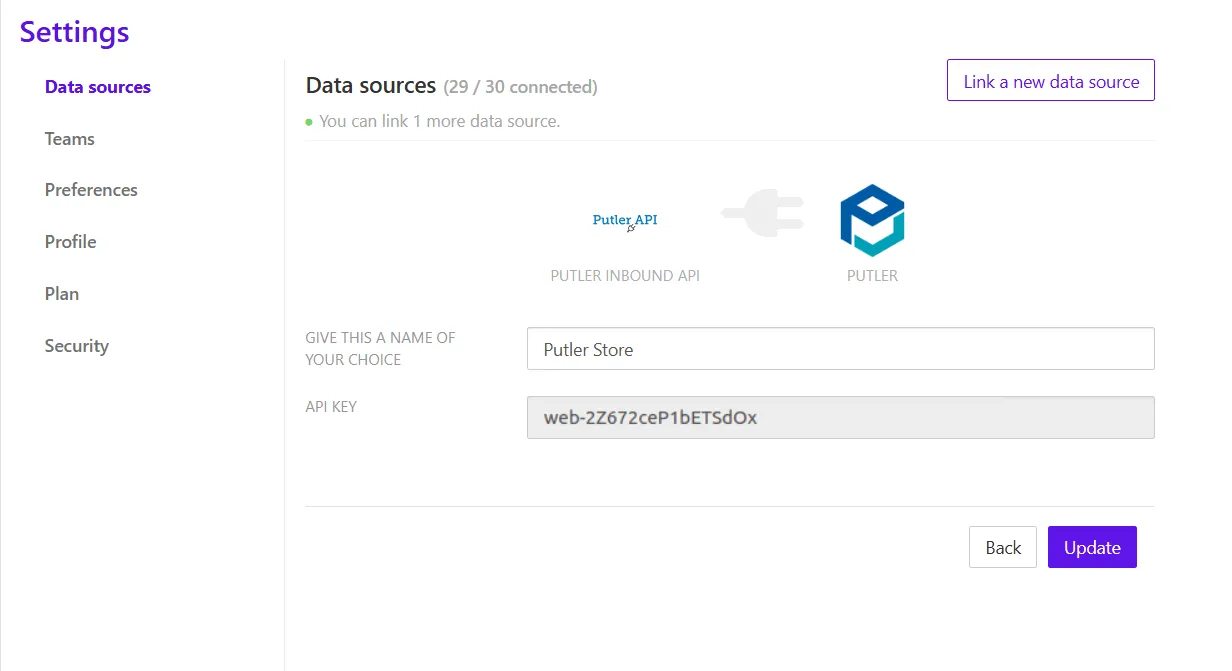
Obtaining your API Key
- Log in to your Putler account.
- Navigate to Settings > Data Sources.
- Click Link a new data source and select Putler Inbound API.
- Copy the generated API Key for use in your API requests.
API Resource
Validate
Verify that your API key and email credentials are valid before sending transactions.
- URL:
http://api.putler.com/inbound/ - HTTP Method:
HEAD(orPOSTwithaction: validate)
| Parameter | Value |
|---|---|
action | validate |
Response Codes:
| Status Code | Description |
|---|---|
200 | Valid User credentials confirmed |
401 | Unauthorized user (invalid email or token) |
Store (Push Data)
Push order, product, and customer transaction records into Putler.
- URL:
http://api.putler.com/inbound/ - HTTP Method:
POST
| Parameter | Value |
|---|---|
action | store |
Request Headers:
| Header | Value |
|---|---|
Content-Type | The MIME type of the request body: application/json (default), text/csv, or application/xml |
Transaction Data Model & Fields
Putler uses a flat transaction model (similar to PayPal exports):
- All data must be sent as an array of transactions, even when sending a single entry.
- Each line item in an order is sent as an individual record.
- The parent order header and its child line items share the same
Transaction_ID. - For an order with 3 distinct items, submit 4 total records in a single array / request: 1 main order record + 3 line item records.
Request Fields Specification
| Field | Required | Description |
|---|---|---|
Date | Yes | Date the order was created in MM/DD/YYYY format |
Time | Yes | Time the order was created in GMT (24-hour format HH:MM:SS) |
Type | Yes | Transaction type: Shopping Cart Payment Received (main order), Shopping Cart Item (line item), Web Accept Payment Received (Buy Now), Refund (refund), or Recurring Payment Received (subscription) |
Transaction_ID | Yes | Unique transaction ID for the order |
Item_Title | Yes | Main transaction: 'Shopping Cart'; Line item / Buy Now / Subscription: product title |
Quantity | Yes | Main transaction: total count of line items; Line item: quantity purchased for this product |
Source | No | Name of the shopping cart or payment gateway (e.g. Custom Cart, Stripe) |
Name | No | Customer full name |
Status | No | Order status: Pending, Completed, Cancelled, Partially Refunded, or Refunded |
Currency | No | 3-character ISO currency code (default is USD) |
Gross | No | Order total amount including tax (default is 0.00) |
Fee | No | Payment gateway transaction fees (default is 0.00) |
Net | No | Net revenue amount excluding fees (default is 0.00) |
From_Email_Address | No | Customer contact email address |
Item_ID | No | Product SKU or unique item ID |
Shipping_and_Handling_Amount | No | Shipping and handling cost (default is 0.00) |
Insurance_Amount | No | Shipping insurance amount (default is 0.00) |
Discount | No | Total discount or coupon amount (default is 0.00) |
Sales_Tax | No | Total sales tax collected (default is 0.00) |
Option_1_Name | No | Product option / variant attribute 1 name (e.g. Color) |
Option_1_Value | No | Product option / variant attribute 1 value (e.g. Blue) |
Option_2_Name | No | Product option / variant attribute 2 name (e.g. Size) |
Option_2_Value | No | Product option / variant attribute 2 value (e.g. Large) |
Reference_Txn_ID | No | Parent transaction ID for refund transactions |
Balance | No | Account balance if applicable (default is 0.00) |
Note | No | Additional order notes or customer instructions |
Address_Line_1 | No | Street address line 1 |
Address_Line_2 | No | Street address line 2 |
Town_City | No | City name |
State_Province | No | State or province code |
Zip_Postal_Code | No | Postal code / ZIP code |
Country | No | Country name or ISO code |
Contact_Phone_Number | No | Customer phone number |
Subscription_ID | No | Recurring subscription ID (required for subscription transactions) |
Specifics on Shopping cart payment
- For orders with multiple line items, send separate transaction records for each line item.
- For example, an order with 3 line items requires 4 records: 1 entry for the main order header and 3 entries for each line item, all sent together in a single request.
Transaction Types
| Type | Usage |
|---|---|
| Shopping Cart Payment Received | Main order summary header |
| Shopping Cart Item | Individual product line item record |
| Refund | Customer refund transaction |
| Web Accept Payment Received | Buy Now single product purchase |
| Recurring Payment Received | Subscription renewal or recurring payment |
Quantity Rules
- Main Transaction: Sum of all line item quantities
- Line Item: Quantity purchased for that specific product
Complete Example
[
  {
    "Date": "05/01/2026",
    "Time": "12:00:00",
    "Type": "Shopping Cart Payment Received",
    "Status": "Completed",
    "Transaction_ID": "ORD123",
    "Name": "John Doe",
    "From_Email_Address": "john@example.com",
    "Currency": "USD",
    "Gross": "100.00",
    "Quantity": "5",
    "Item_Title": "Shopping Cart"
  },
  {
    "Date": "05/01/2026",
    "Time": "12:00:00",
    "Type": "Shopping Cart Item",
    "Status": "Completed",
    "Transaction_ID": "ORD123",
    "Item_Title": "Product A",
    "Quantity": "2"
  },
  {
    "Date": "05/01/2026",
    "Time": "12:00:00",
    "Type": "Shopping Cart Item",
    "Status": "Completed",
    "Transaction_ID": "ORD123",
    "Item_Title": "Product B",
    "Quantity": "3"
  }
]
Limits & Performance
- Max Request Size: 30 MB
- Recommended Batch Size: 1,000–2,000 rows per batch (optimizes processing speed and avoids timeouts)
- Data Refresh Time: Ingested data appears in the Putler dashboard within 30–40 minutes
Specifics on Shopping Cart CSV Format
| Date | Time | Source | Name | Type | Status | Currency | Gross | Fee | Net | From_Email_Address | Transaction_ID | Item_Title | Item_ID | Shipping_and_Handling_Amount | Option_1_Name | Option_1_Value | Quantity | Note | Address_Line_1 | Address_Line_2 | Town_City | State_Province | Zip_Postal_Code | Country | Contact_Phone_Number |
|---|---|---|---|---|---|---|---|---|---|---|---|---|---|---|---|---|---|---|---|---|---|---|---|---|---|
| 10/24/13 | 16:02:00 | XYZ Gateway | Chirag B | Shopping Cart Payment Received | Completed | USD | 409 | 0 | 409 | john@putler.com | 46 | Shopping Cart | 10 | 3 | Order Note | Powai | Borivali | mumbai | MH | 444554 | IN | 95323135 | |||
| 10/24/13 | 16:02:00 | XYZ Gateway | Chirag B | Shopping Cart Item | Completed | USD | 149 | john@putler.com | 46 | Product-1 | P-45 | 0 | Color | Black | 1 | Powai | Borivali | mumbai | MH | 444554 | IN | 95323135 | |||
| 10/24/13 | 16:02:00 | XYZ Gateway | Chirag B | Shopping Cart Item | Completed | USD | 150 | john@putler.com | 46 | Product-2 | P-37 | 0 | Color | Red | 2 | Powai | Borivali | mumbai | MH | 444554 | IN | 95323135 | |||
| 10/24/13 | 16:02:00 | XYZ Gateway | Chirag B | Shopping Cart Item | Completed | USD | 100 | john@putler.com | 46 | Product-3 | P-19 | 0 | Color | Yellow | 1 | Powai | Borivali | mumbai | MH | 444554 | IN | 95323135 |
Specifics on Buy Now payment
Each transaction will have only 1 entry.
| Date | Time | Name | Type | Status | Currency | Gross | Fee | Net | From_Email_Address | Transaction_ID | Item_Title | Item_ID | Option_1_Name | Invoice_Number | Quantity | Balance | Address_Line_1 | Address_Line_2 | Town_City | State_Province | Zip_Postal_Code | Country | Contact_Phone_Number |
|---|---|---|---|---|---|---|---|---|---|---|---|---|---|---|---|---|---|---|---|---|---|---|---|
| 10/29/13 | 03:24:52 | Chirag B | Web Accept Payment Received | Completed | USD | 29 | -1.14 | 27.86 | john@putler.com | 5EA652410Y693721T | Product-1 | MUTD | Color:red, Size: XL, Style:Simple | RT-9871 | 1 | 819.57 | Street1 | Street2 | City | CA | 95101 | United States | 98512154552 |
Specifics on Refund Transaction
New entry for each refund.
Required field: Reference_Txn_ID
| Date | Time | Name | Type | Status | Currency | Gross | Fee | Net | From_Email_Address | Transaction_ID | Item_Title | Item_ID | Sales_Tax | Reference_Txn_ID | Quantity | Address_Line_1 | Address_Line_2 | Town_City | State_Province | Zip_Postal_Code | Country |
|---|---|---|---|---|---|---|---|---|---|---|---|---|---|---|---|---|---|---|---|---|---|
| 10/29/13 | 13:05:29 | Chirag B | Shopping Cart Payment Received | Partially Refunded | USD | 50.5 | -1.76 | 48.74 | john@putler.com | 5X16702303884432U | Shopping Cart | 0.5 | 1 | Street1 | Street2 | City | CA | 95101 | United States | ||
| 10/29/13 | 13:05:29 | Chirag B | Shopping Cart Item | Partially Refunded | USD | 50 | john@putler.com | 5X16702303884432U | Product-1 | RM-7 | 1 | Street1 | Street2 | City | CA | 95101 | United States | ||||
| 10/29/13 | 14:05:38 | Chirag B | Refund | Completed | USD | -20 | 0.58 | -19.42 | john@putler.com | 5L671541UP2927356 | 5X16702303884432U |
Specifics on Subscription Transaction
Each subscription transaction will have only 1 entry.
Required field: Subscription_ID
| Date | Time | Name | Type | Status | Currency | Gross | Fee | Net | From_Email_Address | Transaction_ID | Item_Title | Item_ID | Balance | Address_Line_1 | Town_City | State_Province | Zip_Postal_Code | Country | Contact_Phone_Number | Subscription_ID |
|---|---|---|---|---|---|---|---|---|---|---|---|---|---|---|---|---|---|---|---|---|
| 10/29/13 | 03:36:11 | Chirag B | Recurring Payment Received | Completed | USD | 2 | -0.36 | 1.64 | john@putler.com | 0G565730603123547 | Weather Updates | MET-2013 | 821.21 | 1Test address | San Jose | CA | 95131 | United States | 6543332132 | Sub-7562396 |
Refund Handling
Refunds must be sent as separate transactions.
Refund Example
[
  {
    "Date": "05/02/2026",
    "Time": "14:00:00",
    "Type": "Refund",
    "Status": "Completed",
    "Transaction_ID": "ORD123_R1",
    "Reference_Txn_ID": "ORD123",
    "Gross": "-30.00",
    "Item_Title": "Product A",
    "Quantity": "1",
    "Name": "John Doe",
    "From_Email_Address": "john@example.com"
  }
]
Refund Rules
Transaction_IDmust be unique.Reference_Txn_IDlinks to the original order’sTransaction_ID.Grossmust be negative.- A refund is a single entry (no child line items required).
Refund Strategies
- Option 1 (Recommended): Send the refund separately as its own transaction with
Reference_Txn_ID. This preserves complete transactional history and ensures accurate revenue and refund accounting. - Option 2: Update the existing order’s amount and status directly. This is simpler but less granular for historical tracking.
Duplicate Handling
Transaction_IDis the unique primary key for every record.- Re-sending a transaction with an identical
Transaction_IDupdates the existing record without creating duplicates.
Status Values
| Status | Meaning |
|---|---|
Pending | Order awaiting payment (not included in revenue) |
Completed | Successful paid order (counted in net sales) |
Cancelled | Cancelled order |
Refunded | Fully refunded transaction |
Partially Refunded | Partially refunded order |
Error Codes
| Status Code | Description |
|---|---|
400 | Bad Request / Validation Failed (payload not wrapped in array or missing required fields) |
401 | Unauthorized User (invalid email or API token) |
404 | Unknown Action endpoint |
500 | Could not store transactions (internal processing error) |
Common Issues & Fixes
-
400 Validation Failed
- Data not wrapped in an array: Wrap your payload in an array
[ { ... } ]even if sending a single transaction. - Missing required fields (e.g.
Date,Time,Type,Transaction_ID,Quantity,Item_Title). - Line items missing for shopping cart transactions.
- Incorrect
TypeorStatusvalue. - Invalid refund structure (e.g. missing
Reference_Txn_IDor non-negativeGross).
- Data not wrapped in an array: Wrap your payload in an array
-
Data Not Appearing in Dashboard
- Inbound data requires approximately 30–40 minutes to process and reflect across Putler dashboards.
- Verify all required fields are present and correctly spelled.
- Check that date and time formats conform to
MM/DD/YYYYandHH:MM:SS(GMT).
-
Invalid or Unrecognized Fields
- Putler silently ignores unrecognized fields.
- Examples of invalid field names:
Order_ID(useTransaction_ID),Payment_Method(useSource),From_Name(useName).
-
Refund Not Linked to Order
- Ensure
Reference_Txn_IDexactly matches theTransaction_IDof the parent order.
- Ensure
Best Practices
- Always send the main order transaction and its child line items together in a single request payload.
- Use unique and immutable
Transaction_IDvalues. - For bulk imports, batch transactions in chunks of 1,000–2,000 rows (max 30 MB per payload).
- Send refunds as separate transactions for accurate reporting.
- Ensure the JSON data payload is passed in the request body (not as URL query parameters).
Need Help?
If you are still facing issues or need assistance configuring your Inbound API integration:
- Double-check your payload structure and required field mappings against the specification tables above.
- Reach out to our team at Putler Support.