


Polar Analytics alternatives serve different reporting needs. A founder checking sales across several stores needs a different dashboard from a media buyer allocating ad spend or an analyst combining retail and ecommerce data.
Start with Triple Whale for broad daily ecommerce reporting and marketing measurement, Putler for consolidated sales and customer reporting, Lifetimely for profit and customer value, ThoughtMetric for attribution and custom reports, Northbeam for deeper marketing measurement, or Daasity for omnichannel data and reporting.
These are use-case recommendations based on public product documentation, pricing and interface examples, with pricing rechecked on 13 October 2026. They are not a hands-on accuracy ranking. The screenshots below are genuine vendor examples or a capture of a public demo; their displayed numbers are sample data.
Polar Analytics alternatives at a glance
Use this table to build a shortlist. The prices are published entry points with different limits, so they do not describe equivalent subscriptions.
Prices are in USD. Monthly prices may still require an annual commitment, and the applicable tier depends on your usage.
| Alternative | Main reason to shortlist it | Published price reference | What determines the comparison |
|---|---|---|---|
| Triple Whale | Daily business dashboard plus attribution | Free plan; Foundation listed at $219/month | Annual GMV, package and contract term |
| Putler | Sales, customers and products across stores/payment accounts | $20/month through $10,000 tracked monthly revenue | Tracked revenue and required data-source allowance |
| Lifetimely by Amp | P&L, customer behavior and predictive LTV | Free through 50 orders/month; $49/month through 500 | Monthly Shopify order volume and add-ons |
| ThoughtMetric | Attribution, creative analysis and custom reporting | $99/month through 50,000 pageviews/month | Monthly pageviews |
| Northbeam | Marketing attribution and campaign performance analysis | Starter starts at $1,500/month | Data volume, plan and agreement |
| Daasity | Reporting across DTC, Amazon and retail | Starter Essentials $1,499/month | Required tier, connectors and customization |
Price sources: Triple Whale’s app listing, Putler pricing, Lifetimely pricing, ThoughtMetric’s app listing, Northbeam pricing and Daasity’s 2026 pricing. Confirm the offer for your business before committing.
Why consider switching from Polar Analytics?
Polar covers a broad set of jobs: acquisition, profit reporting, customer lifetime value, cohorts, product performance and custom reporting. Its current Shopify listing shows $750/month, with pricing based on online GMV. That breadth matters when deciding what a replacement must preserve.
Three situations make an alternatives search useful:
- You use only a small part of the platform. If the weekly decision is which customers to retain, a focused customer-value tool may be enough.
- Your reporting scope has changed. More stores, payment accounts or retail channels can alter the data you need to combine.
- Your current reports do not answer the decision clearly. This could be a cost-definition issue, missing source data or an attribution-model mismatch. Changing software helps only if it addresses that cause.
The maintenance burden is a real reader concern. In a public Shopify discussion, a merchant described different cost, shipping and advertising setups making multi-store profit reporting increasingly difficult. That is an anecdote about the problem, not proof that a particular tool solves it.
Before choosing an alternative, write down the three reports you rely on most. Those reports should drive the shortlist.
1. Triple Whale: broad daily reporting and marketing measurement
Shortlist it when: you are comparing Shopify analytics tools for daily business reporting and marketing measurement.
Triple Whale’s Summary dashboard lets teams organize KPI cards, including a pinned section for frequently used metrics. Its dashboard tools extend into custom layouts; the paid Foundation package includes custom dashboards, custom metrics and SQL alongside multi-touch attribution. This makes it a candidate when you use several parts of Polar, rather than one isolated report.
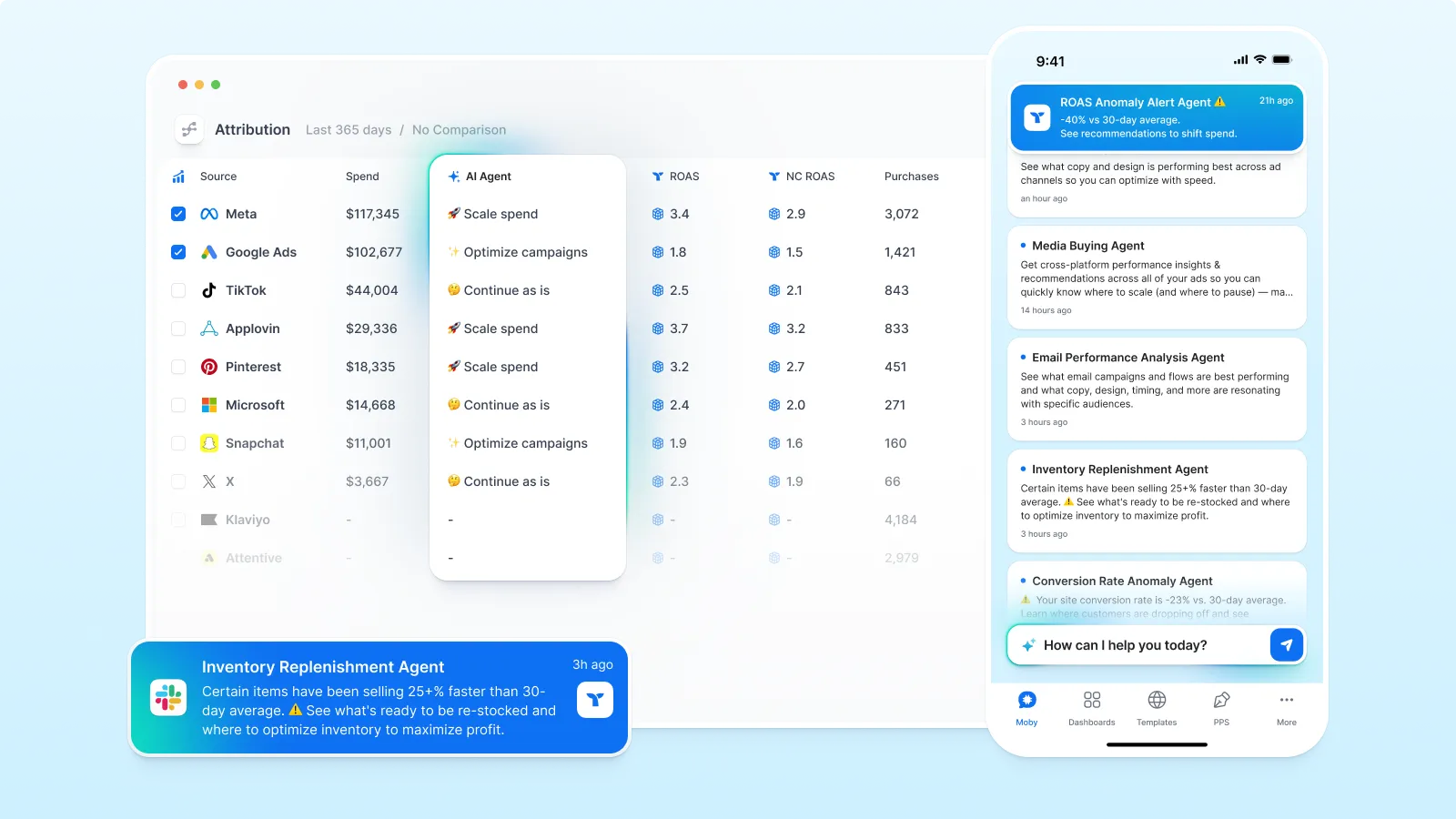
The attribution example puts spend, return on ad spend and purchases beside each channel. Compare channels under the same attribution model before using the result to adjust ad spend. The agent suggestions are a separate feature, and their presence in an image does not establish what your plan includes.
Pay attention to filters during a demo. Triple Whale documents global controls for exclusions, geography, campaigns and products. A saved dashboard can therefore represent a narrower business slice than its headline number suggests.
Pricing and boundary: the free plan is useful for an initial look, but its reporting and attribution coverage differs from paid packages. The app listing shows Foundation at $219/month; the website bases offers on annual GMV and package. It also states that Foundation, Automate and Enterprise are 12-month subscriptions, even when billed monthly. Compare the package that reproduces your reports and the full commitment.
2. Putler: consolidated sales and customer reporting
Shortlist it when: you need multi-store analytics for sales, customers, products and subscriptions across stores or payment accounts.
Putler’s features center on combining transaction sources, cleaning duplicate data and handling currencies, then turning that data into sales, customer and product views. Customer analysis includes RFM segmentation: recency, frequency and monetary value. This is useful when the operational question is which customers to retain or which products contribute revenue across the business.
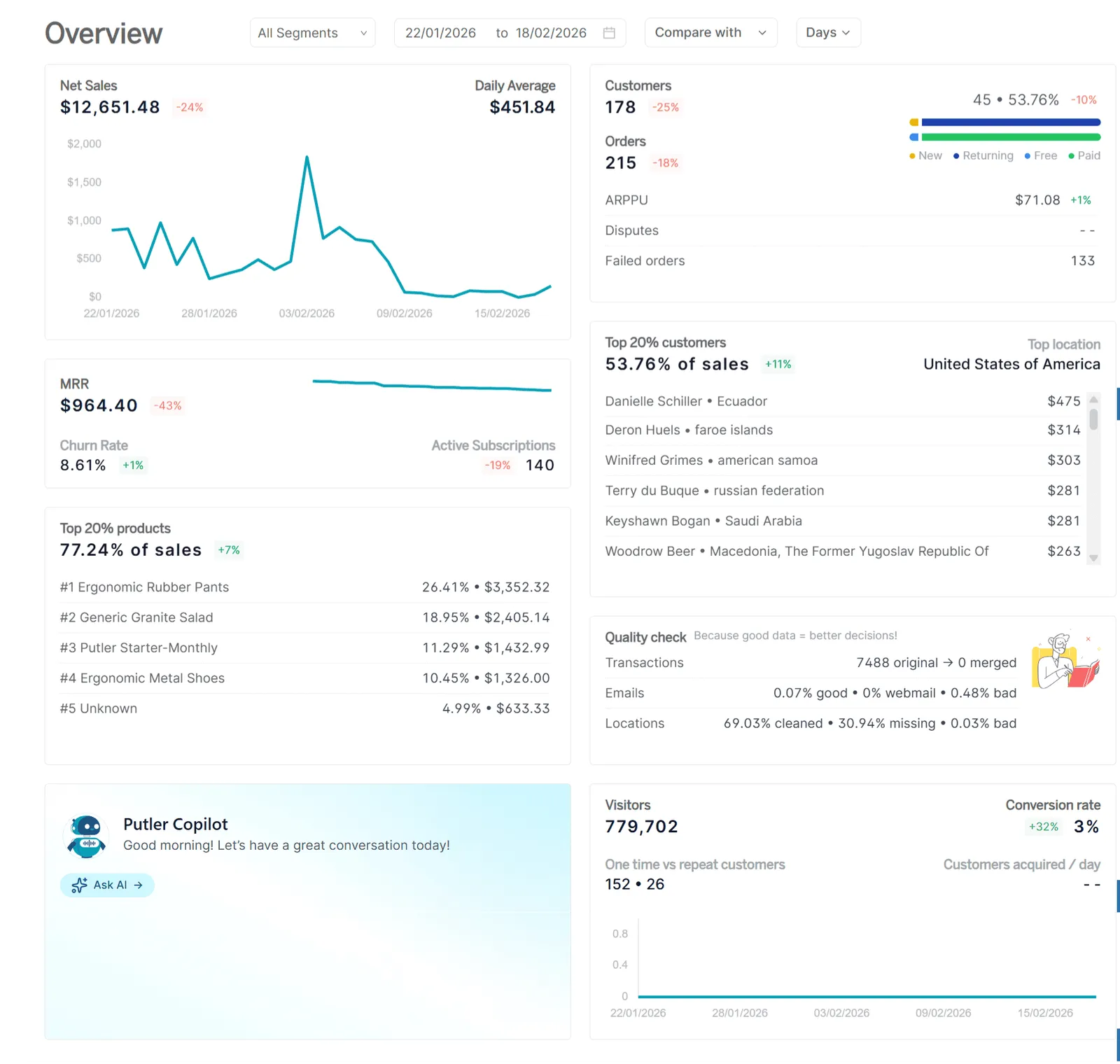
The Overview dashboard brings net sales, orders, customers, subscriptions and top products into one view. Date, segment and comparison controls help you explore changes, while the quality-check panel shows how transaction and customer data has been processed.
That layout suits a founder or operator who wants an initial business check before investigating a customer segment or product. In a demo, try the actual segment you use (returning customers, a particular store or a subscription business) and establish how shared customers and transactions are handled.
Pricing and boundary: Putler’s published table starts at $20/month through $10,000 tracked monthly revenue. It lists $50 for $10,000 to $30,000 and $150 for $50,000 to $100,000. The model follows tracked revenue, so a growing business should price its expected volume and confirm its data-source allowance.
Treat Putler as a candidate for the sales-and-customer part of your stack. If your Polar use depends on ad-level attribution, specific cost calculations or custom data joins, verify those requirements separately before calling it a complete replacement.
3. Lifetimely by Amp: profit and customer lifetime value
Shortlist it when: the recurring decision is how profitable customers are, how quickly acquisition costs are recovered or which products lead to repeat orders.
Lifetimely combines daily profit-and-loss reporting with customer behavior, customer lifetime value analytics, custom dashboards and product performance. Its predictive LTV model estimates future customer value, while its published paid-plan capabilities also include customer journeys, acquisition costs and payback analysis. These make it a strong candidate for a team whose Polar usage is concentrated on customer economics.
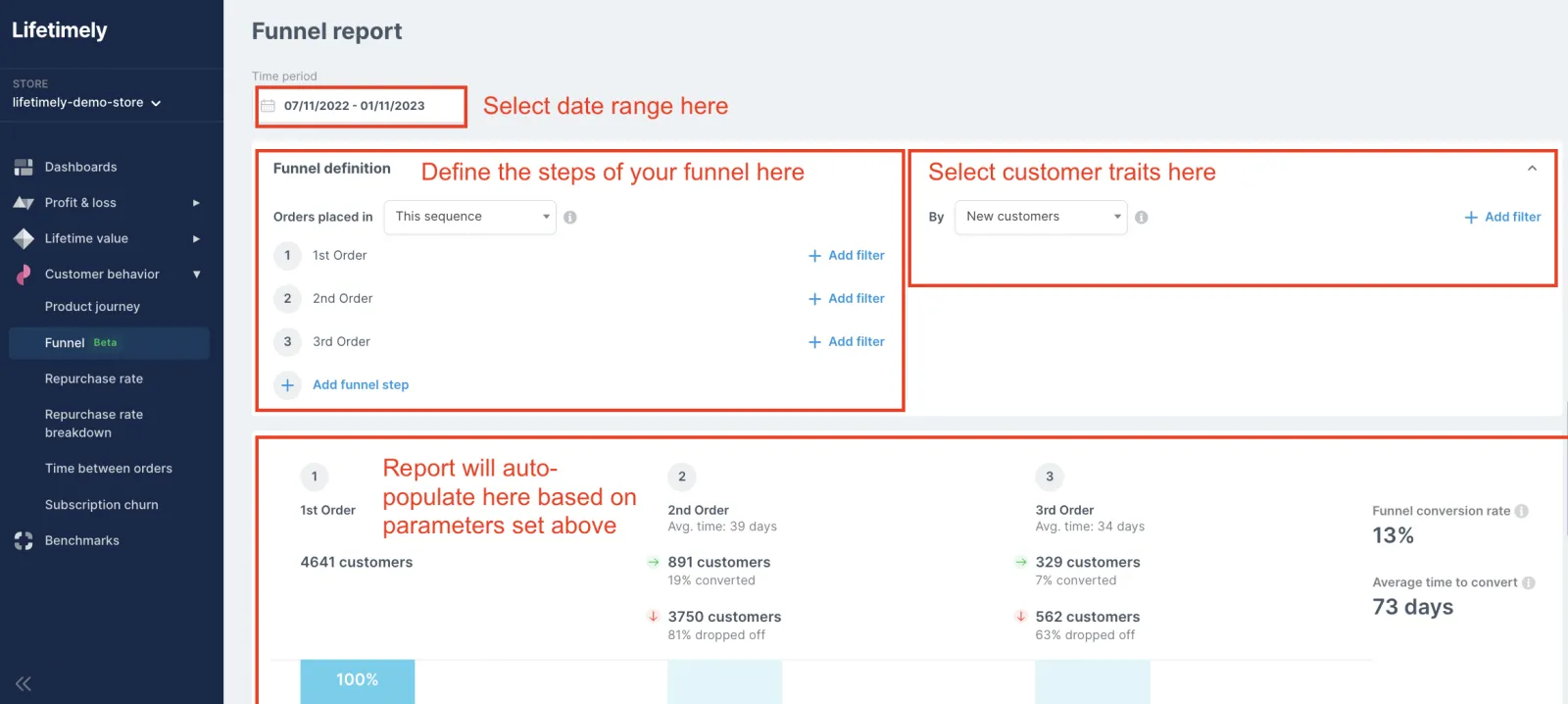
The Funnel example shows how the reporting question becomes specific: which customers move from a first order to a second and third, within a chosen period? Sequence and customer filters matter as much as the chart.
The guide also says refunded orders are excluded from this Funnel report. Include refund treatment in your migration checks: customer journeys can look different when systems include different orders. This exclusion applies to the Funnel report, rather than every Lifetimely report.
Pricing and boundary: the current schedule is based on monthly Shopify orders: free through 50, $49 through 500 and $149 through 3,000. Higher volumes move into higher tiers. The Amazon add-on is $75/month on a paid plan, and Profit Agent requires a paid plan.
Choose it for the profit-and-retention questions you can demonstrate. Confirm store coverage, cost inputs and any broader attribution or omnichannel requirements separately; an LTV dashboard alone does not reproduce all of Polar’s reporting jobs.
4. ThoughtMetric: attribution with custom reports
Shortlist it when: you want marketing attribution, creative analysis and report customization with a pageview-based pricing model.
ThoughtMetric describes a measurement approach combining tracking data with customer surveys. Its offering also includes customer analytics and LTV, so it should not be dismissed as an attribution-only tool. The useful distinction is whether its reports answer your marketing and customer questions with the data you have.
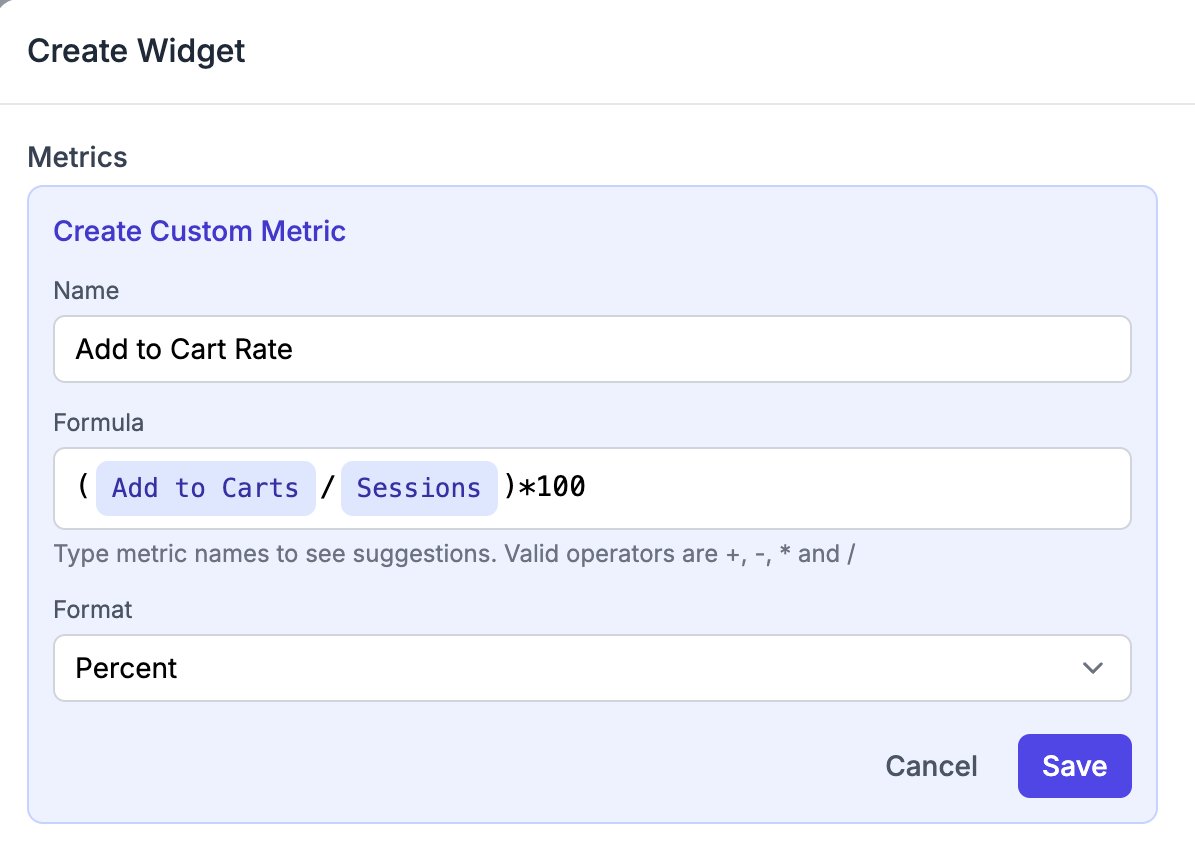
The editor shows a named metric, a formula and an output format. Its custom-report page also documents table, chart, KPI and funnel widgets. This is useful if a default dashboard is close to what you need but the business uses a different calculation or layout.
A formula builder still depends on available inputs. For a profitability report, confirm which cost fields are present and how they are maintained. For attribution, inspect the models, windows and customer-survey handling that affect your decision.
Pricing and boundary: the app listing shows $99/month through 50,000 pageviews, $199 through 100,000 and $299 through 200,000. ThoughtMetric’s pricing FAQ says every plan includes all features. Traffic volume therefore matters even when revenue stays flat.
Establish whether its connectors and historical coverage can also reproduce your other Polar reports before consolidating the stack.
5. Northbeam: marketing measurement and campaign decisions
Shortlist it when: paid-media measurement is the central requirement and you have a team that will use attribution detail regularly.
Northbeam’s Sales Attribution dashboard organizes channels, campaigns, ad sets and ads. Its multi-touch attribution product offers choices around models, lookback windows and accounting modes. These controls matter when the task is deciding where to allocate marketing spend.
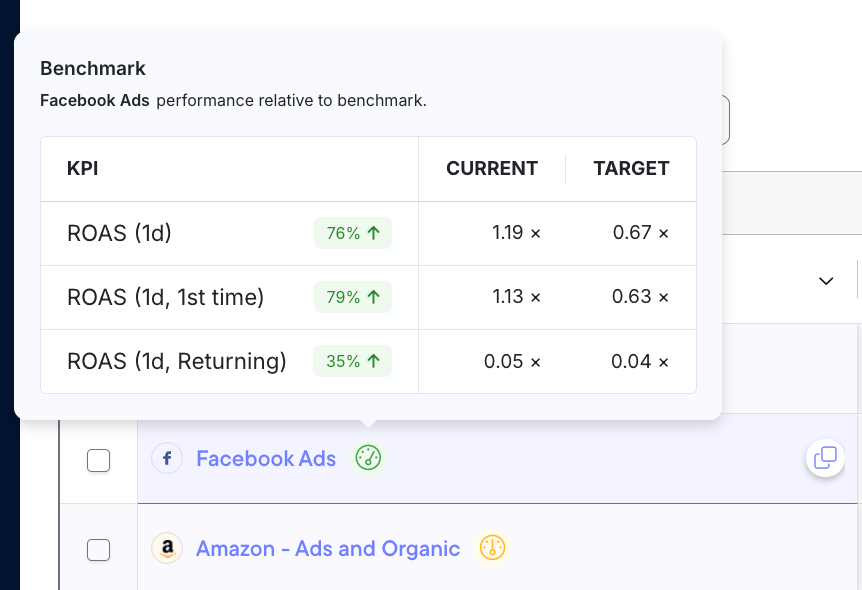
Profit Benchmarks adds context to the numbers by relating performance to targets set for the business. Its guide says the feature becomes available after 30 days of data and recommends at least 90 days before establishing benchmarks. That is a practical onboarding dependency to include in a migration schedule.
Do not interpret a different attributed ROAS as proof that a platform is more accurate. First establish what each model counts, which window it uses and whether conversions are reported against the sale date or another accounting view.
Pricing and boundary: Northbeam lists Starter from $1,500 and Professional from $3,500. Its FAQ explains that actual monthly pricing is informed by data volume measured in pageviews. Starter is month-to-month for Shopify; Professional and Enterprise use annual terms. Multi-store setups require a tailored discussion.
This is primarily a marketing-measurement shortlist choice. Get explicit scope and pricing for MMM or incrementality needs, and map any finance, retention or merchandising reports that would still need another system.
6. Daasity: omnichannel data and reporting
Shortlist it when: the business needs to combine DTC, Amazon, retail and other operating data, and expects reporting requirements to evolve.
Daasity positions its platform around connecting data across channels and turning it into dashboards and operational reporting. Its published scope includes customer, product, subscription and inventory analysis, alongside data and implementation services. This is a candidate when the problem extends beyond a single store’s dashboard.
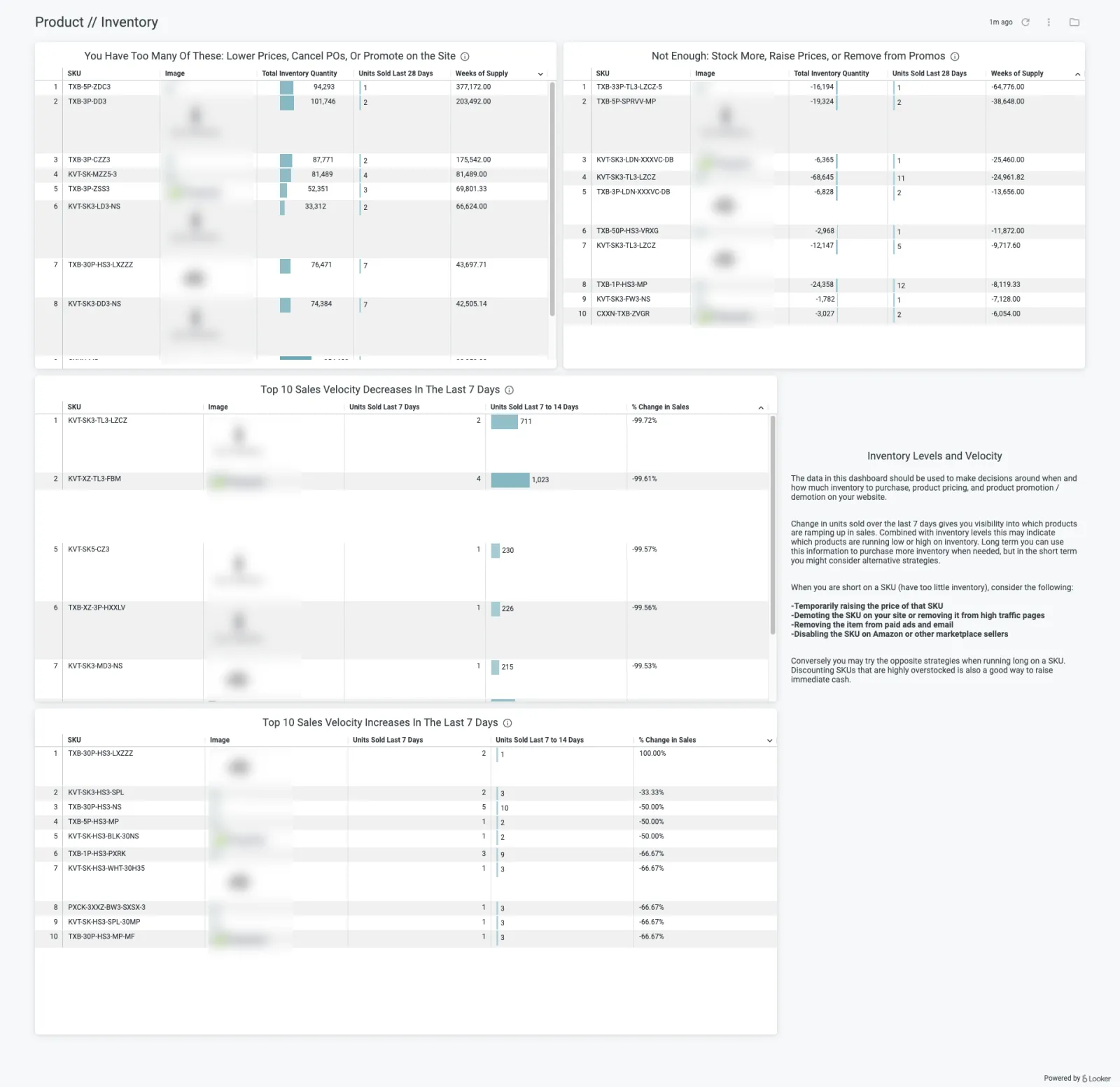
The inventory example focuses on stock levels and sales velocity, not advertising return. Its guide describes reporting on products running long or low on stock using the Inventory Levels data exploration. This is useful evidence of the type of operational question to bring to a demonstration.
Pricing and boundary: Daasity’s current 2026 page lists Starter Essentials at $1,499/month, Essentials at $1,999/month and custom Enterprise pricing. Starter includes native connections, dashboards and reports; Enterprise is positioned for customization and consulting.
Establish which connectors, custom transformations, implementation support and ongoing maintenance the quoted tier includes. Also confirm where the data lives and what access or export you retain. A broad platform description does not settle those details for your agreement.
Compare the cost at your operating scale
Compare ecommerce analytics tools using the billing unit as well as the starting price. Revenue, orders and pageviews can move independently as your business grows.
Consider a hypothetical store with 2,000 monthly orders, 80,000 pageviews and $75,000 in tracked monthly revenue. Applying the published thresholds gives these reference points:
| Candidate | Relevant published tier in this example | Listed monthly amount |
|---|---|---|
| Putler | $50,000 to $100,000 tracked revenue | $150 |
| Lifetimely | Up to 3,000 Shopify orders | $149 |
| ThoughtMetric | Up to 100,000 pageviews | $199 |
This is arithmetic applied to Putler’s table, Lifetimely’s schedule and ThoughtMetric’s listing, not a quote or a claim of equivalent coverage. It excludes additional requirements, add-ons and taxes. Triple Whale, Northbeam and Daasity should also be priced against the same business scope and required package.
For each shortlisted tool, collect four amounts or commitments:
- The subscription for all required stores, sources and users at current volume.
- The expected subscription if volume doubles, including add-ons or usage credits you need.
- Setup, historical-data import, connectors and ongoing maintenance costs.
- The contract term, renewal terms and any overlap while Polar remains active.
Then identify which existing subscriptions can actually be retired. A cheaper app that needs two additional tools may still be worthwhile, but that is a different cost comparison.
How to switch without losing the reports you use
The most useful evaluation is a real recurring decision. Take a recent week and ask a candidate to answer the same question you answered in Polar: which campaign to scale, which customer segment to target or which product to replenish.
Start with a report specification
Write the question, the source accounts, the metric definition and the required breakdown. For example: “Weekly net sales by store, with refunds included under our agreed timing rule, in our reporting currency.” That is more precise than asking whether the tool has a sales dashboard.
Specify the attribution model and conversion window for a marketing report. For customer value, define the starting cohort, observation period and treatment of refunded orders. Profitability reports need COGS, shipping, payment fees and advertising costs rather than assuming the word “profit” includes them all.
Reconcile the data before interpreting the difference
Match date range, time zone, currency, source coverage and exclusions. Check a small set of orders (including a refund, a repeat customer and a discounted purchase) against the underlying records. Identify whether a discrepancy comes from missing data, a definition or the model.
Then repeat the weekly decision. Can the intended reader answer it without a new manual spreadsheet? Can they inspect the inputs and explain the result? Record missing reports and who would maintain any workaround.
Decide what the new tool replaces
For each recurring report, mark whether it is supported in the chosen plan, needs configuration or needs another system. Keep Polar available during the evaluation and preserve the exports and metric definitions you need before ending access. Confirm historical coverage, saved-report migration and cancellation timing with the relevant vendor.
If you also use Polar’s Klaviyo Audiences or Advertising Signals, check how those functions will be handled before cancelling; replacing the reporting dashboard alone may leave them uncovered.
That exercise gives you a defensible replacement decision even when two dashboards never show identical attributed revenue.
Frequently asked questions
Which Polar Analytics alternative should a small store start with?
Start with the reporting problem. Putler’s low-revenue tier suits a sales-and-customer shortlist; Lifetimely’s free tier suits eligible stores exploring profit and customer value; Triple Whale’s free plan provides an initial look at its reporting environment. Their free or entry plans are not interchangeable. Use the comparison table to check limits and the product section to identify coverage.
What is the closest alternative to Polar’s broad dashboard?
Triple Whale is a reasonable first candidate if you want both daily ecommerce reporting and marketing measurement. Daasity deserves a look when channel breadth and custom data requirements dominate. “Closest” still depends on the exact Polar reports and integrations you use; this guide does not establish feature parity.
Which marketing attribution tools should I compare with Polar?
Shortlist ThoughtMetric, Northbeam and Triple Whale, then compare the actual model, window, tracking setup and plan. Ask each to explain a conversion path from your own business. A dashboard screenshot cannot establish comparative tracking accuracy or incremental sales.
Can one tool cover several stores?
Multi-store reporting is part of the evaluation, not an assumption about one subscription. Putler explicitly focuses on consolidating sources, while the other vendors offer differing arrangements and plan conditions. Confirm store count, data-source allowances, currency conversion, shared-customer handling and the total bill for your setup.
Should I replace Polar with a more focused tool?
Yes, if the focused tool covers the work you actually use and you have a clear home for the remaining reports. If it leaves a weekly finance, retention or merchandising decision unsupported, keep it on the shortlist as a partial substitute until that gap is resolved.
Choose the reporting job first
Pick two candidates from the use-case shortlist and make them reproduce one real weekly decision. Compare their all-in cost and the reports they let you retire. The best Polar Analytics alternative for your business is the one whose data, dashboard and plan support that work consistently.