
You probably know your repeat customers are valuable. The numbers back it up. Repeat buyers make up 48% of all eCommerce transactions and spend 67% more per order than first-time buyers.
But here’s where most store owners get stuck: knowing repeat customers matter is not the same as knowing how to identify them.
You open Shopify and see “returning customers.” You check Klaviyo and see purchase tags. You pull a CSV and start sorting. None of it lines up. Each tool shows a slice. None of them show the full picture.
This guide covers how to identify repeat customers in your eCommerce store using 7 practical methods, from manual filters to fully automated segmentation. Pick the one that fits your stack and your time.
Why identifying repeat customers matters before anything else
Customer retention is one of the highest-leverage levers in eCommerce. It costs 5x more to acquire a new customer than to retain an existing one.
The probability of selling to someone who’s already bought from you sits at 60-70%, compared to just 5-20% for a new prospect.
But none of those numbers help your business until you can actually answer the question: who are my repeat customers?
Without that, you’re sending the same email to everyone. Same offer. Same urgency. Same generic discount. Your most loyal buyers get treated like first-time visitors, and your at-risk customers slip away unnoticed.
Identifying repeat customers is the prerequisite for everything that comes after, whether that is loyalty programs, win-back campaigns, personalized recommendations, or premium-tier offers. You cannot retain what you cannot see.
What counts as a repeat customer
A repeat customer is anyone who has purchased from your store more than once. The definition itself is simple. The math is too:
Repeat purchase rate = (customers with 2+ orders ÷ total customers) × 100
If 1,000 people bought from you last year and 280 of them came back for a second purchase, your repeat purchase rate is 28%.
The average eCommerce repeat purchase rate sits at 28.2%, but benchmarks vary significantly by category. Grocery and consumables regularly exceed 40%. Luxury and furniture hover under 15%. Subscription-based businesses can hit 45% or more.
What matters more than the absolute number is the trend. A 5% increase in customer retention can boost profits by 25% to 95%.
7 methods to identify repeat customers in eCommerce
Each method below works. They differ in how much time they take, how complete the picture is, and how easily you can act on the data once you find it.
1. Check your eCommerce platform’s customer reports
The fastest place to start is your existing platform.
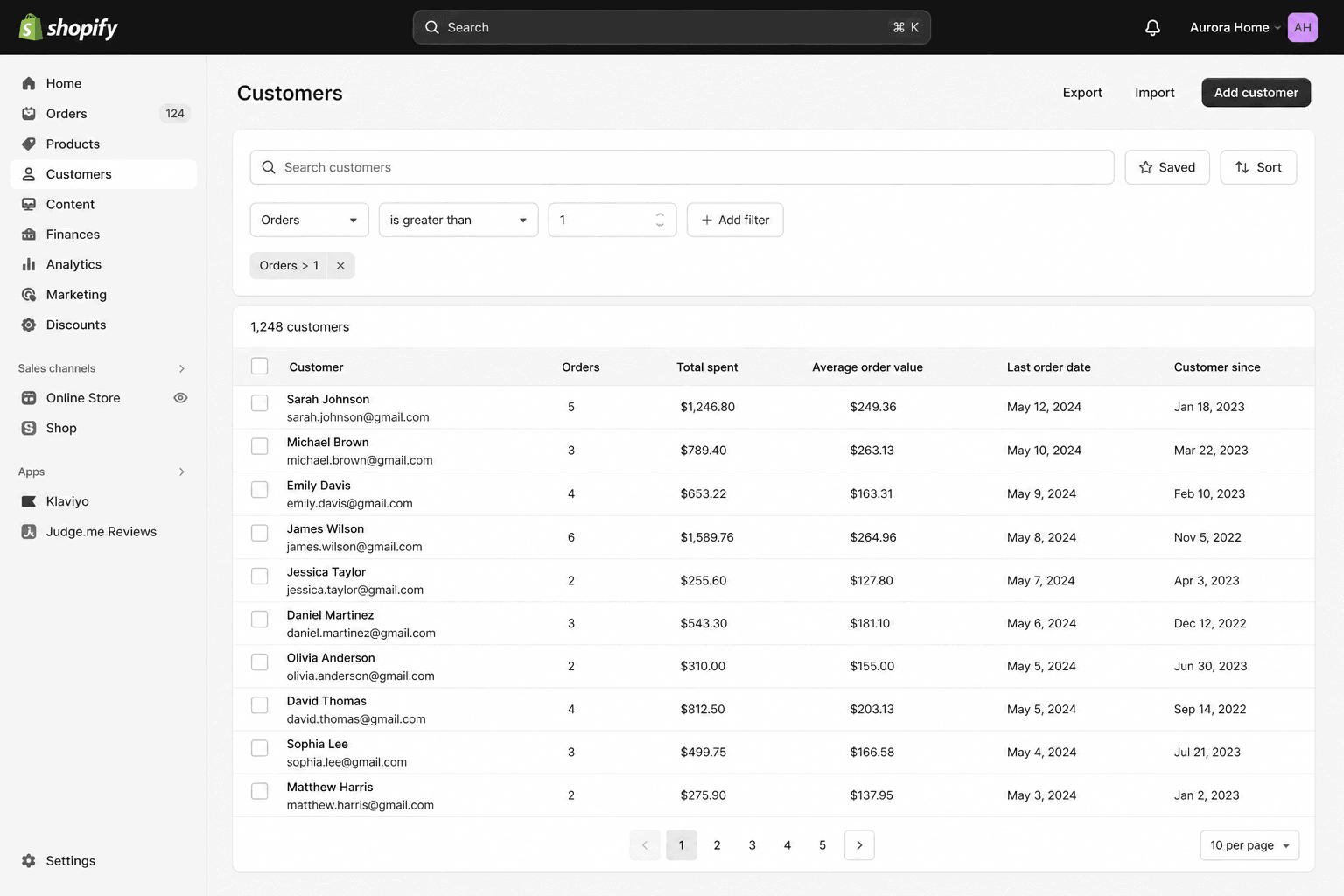
In Shopify, go to Customers → Filters and filter by “Number of orders is greater than 1.” This instantly shows you everyone who has ordered more than once. You can sort by total spent, last order date, or order count.
In WooCommerce, the Customers report (under Analytics → Customers) shows lifetime spend, last order date, and average order value per customer. Sort by orders to surface your repeat buyers.
This method is free, fast, and built in. The limitation is that it only shows orders processed through that specific platform. If you sell on Shopify and Etsy and Amazon, each platform sees its own slice.
2. Filter your orders dashboard by customer email
If your platform’s customer report is too high-level, drop down to the orders view and group by customer email.
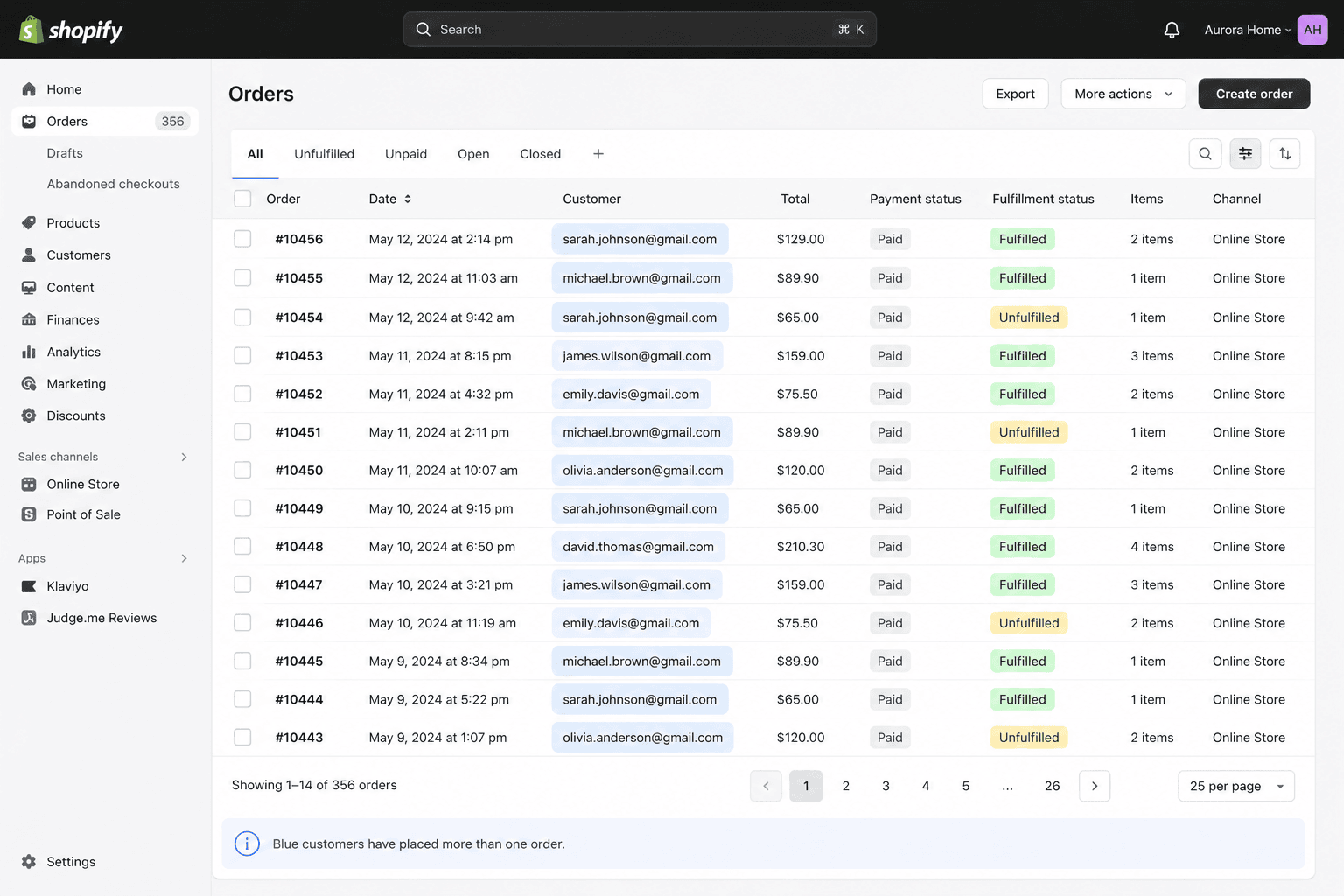
Most eCommerce platforms let you sort or filter the orders list by email address. Buyers who appear more than once are repeat customers. This method is useful when you want to see which products someone repurchased, not just that they came back.
It works well for stores under a few thousand orders. Past that, scrolling through becomes impractical and you’ll want method 3.
3. Export your customer CSV and analyse it manually
Every eCommerce platform lets you export your customer or orders list as a CSV. Once you have the file open in Excel or Google Sheets, you can:
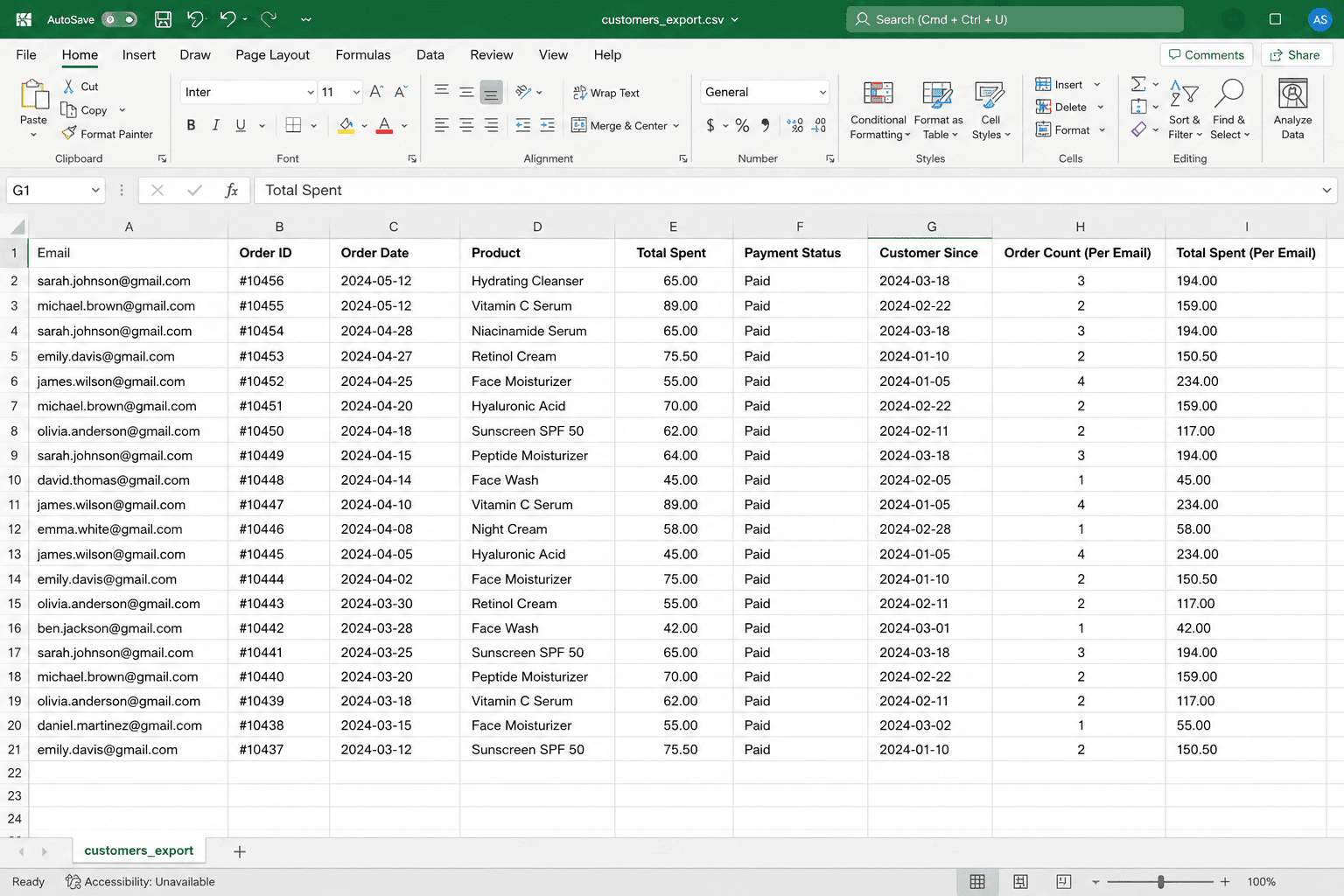
- Sort by email address to spot duplicates
- Use COUNTIF to count how many times each email appears
- Filter for emails with 2 or more orders
- Build a pivot table by customer to see total spend, order count, and last purchase date
This method is free and gives you complete control. The downside is obvious: it takes hours, and the data is stale the moment you finish. Useful for a one-time audit, painful as a recurring workflow.
4. Use your email platform’s purchase history
If you use Klaviyo, Mailchimp, or Omnisend, your email platform already tracks purchase history per subscriber. This is one of the easiest ways to identify repeat customers without leaving your marketing tools.
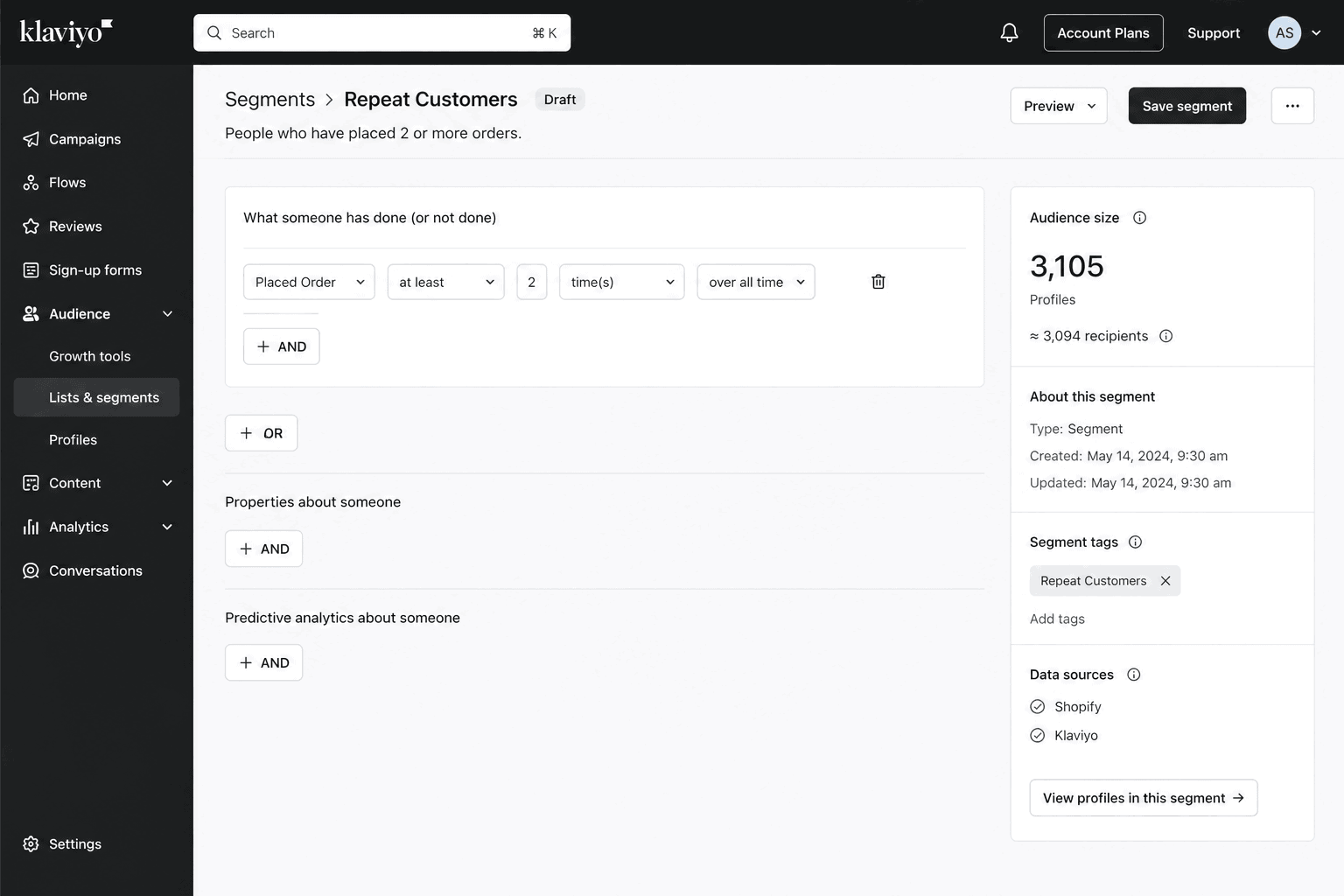
In Klaviyo, you can build a segment with conditions like “Placed Order at least 2 times over all time.” That segment updates automatically and stays current as new orders come in. You can then send targeted campaigns directly to that group.
The catch is that your email platform only sees the data your eCommerce platform sends it. If a customer bought once through your Shopify store and once through Etsy, only the Shopify purchase shows up. The Etsy order is invisible.
5. Track returning customers in Google Analytics 4
GA4 has a built-in “New vs Returning Users” report that shows how many of your visitors have come back to your site. For eCommerce, you can pair this with the purchase event to see which returning users actually converted again.
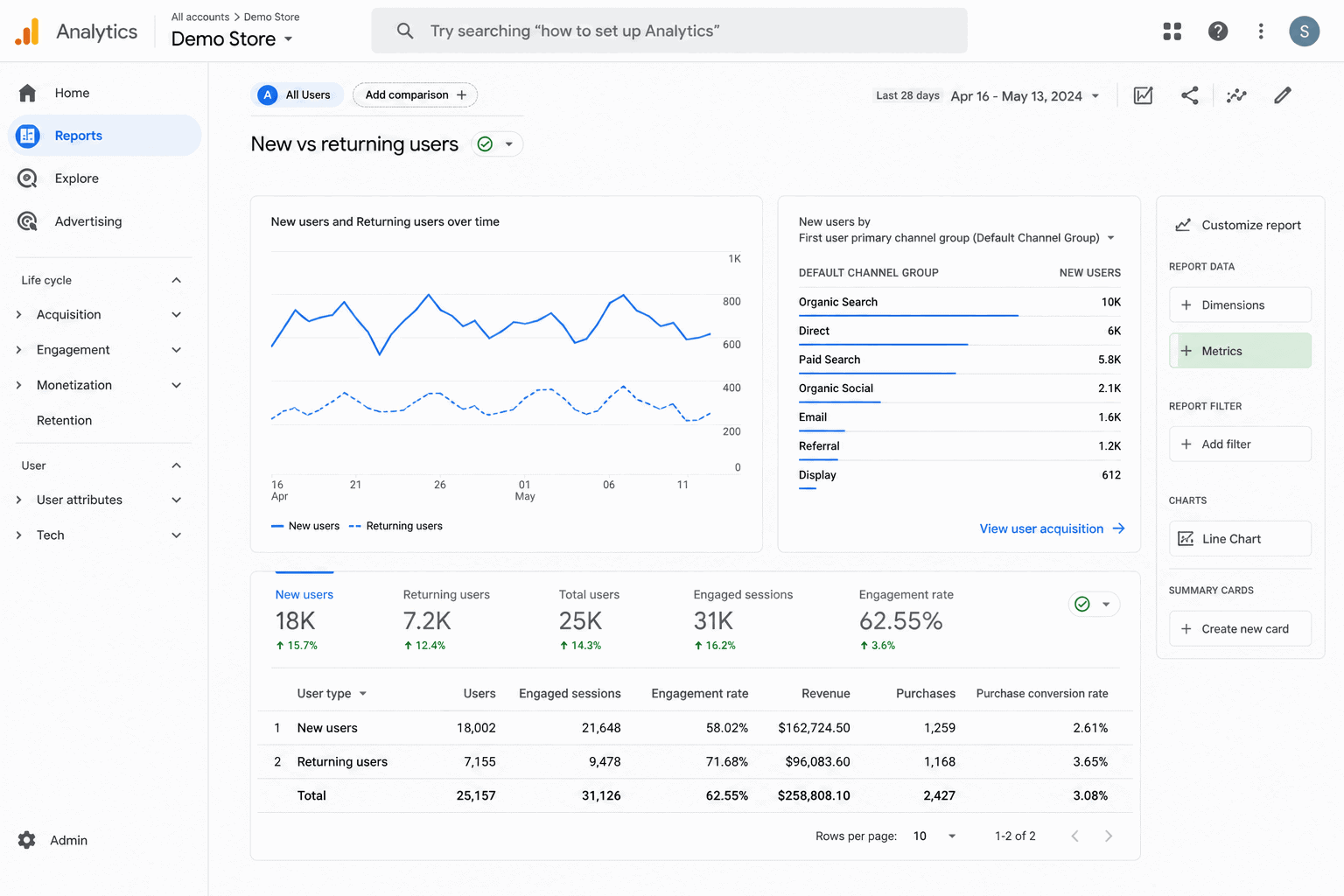
Build an Exploration with the User Type dimension and the Purchase event metric. You’ll get a clean view of how many returning users buy versus first-time visitors.
GA4’s strength is web-side behaviour. Its weakness is that it tracks devices and browsers, not necessarily people. A customer who buys on mobile and again on desktop can show up as two users. Treat GA4 as a directional indicator, not a customer database.
6. Use RFM segmentation
RFM is the most powerful method on this list. It groups customers based on three behavioural signals:
- Recency: How recently did they buy?
- Frequency: How often do they buy?
- Monetary: How much do they spend?
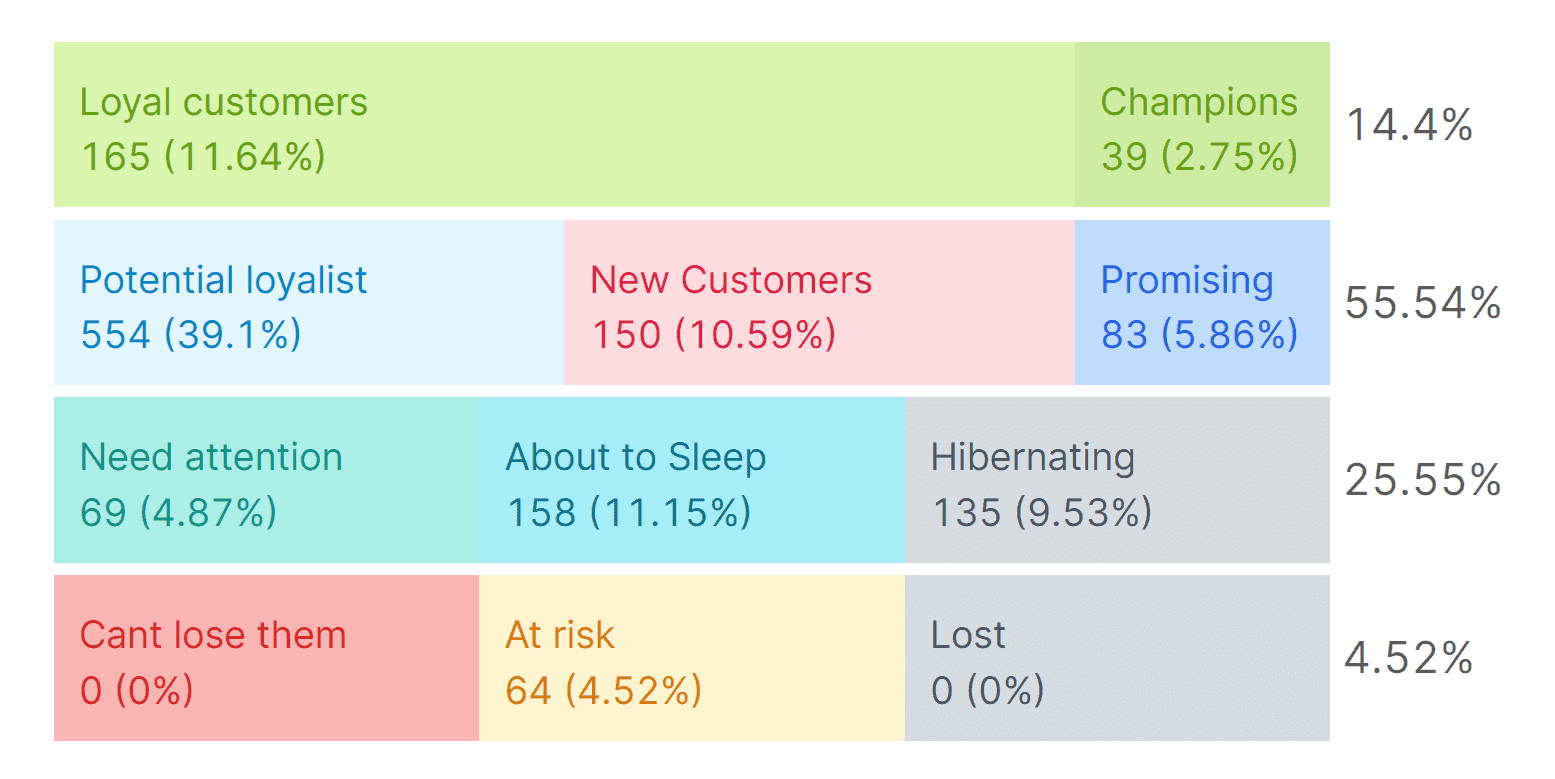
Each customer gets a score on all three dimensions, and the combined score sorts them into segments like Champions, Loyal Customers, At Risk, About to Sleep, and Lost.
RFM is built on the Pareto Principle, roughly 20% of your customers drive 80% of your revenue. RFM finds that 20% automatically and tells you who they are.
The catch is that running RFM manually requires SQL skills, a clean customer database, and recurring effort. For most store owners, this is the moment a dedicated tool starts to make sense.
7. Use a dedicated analytics tool with built-in RFM
If you want RFM segmentation without building it yourself, this is where tools like Putler come in.
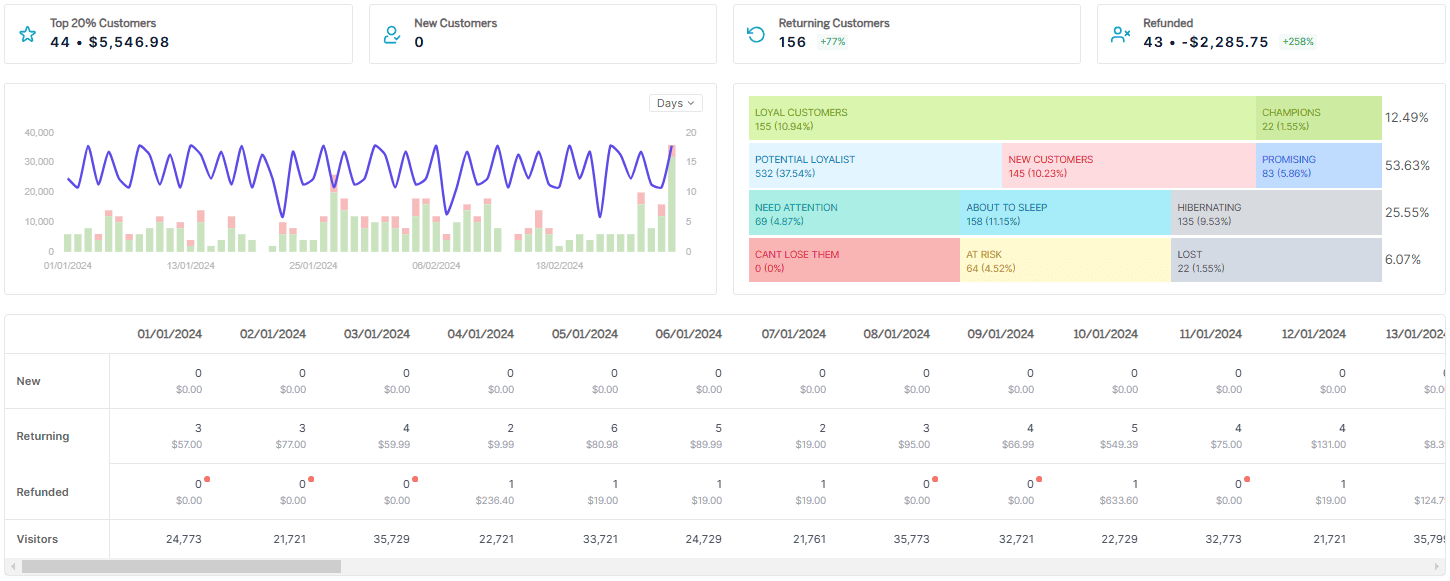
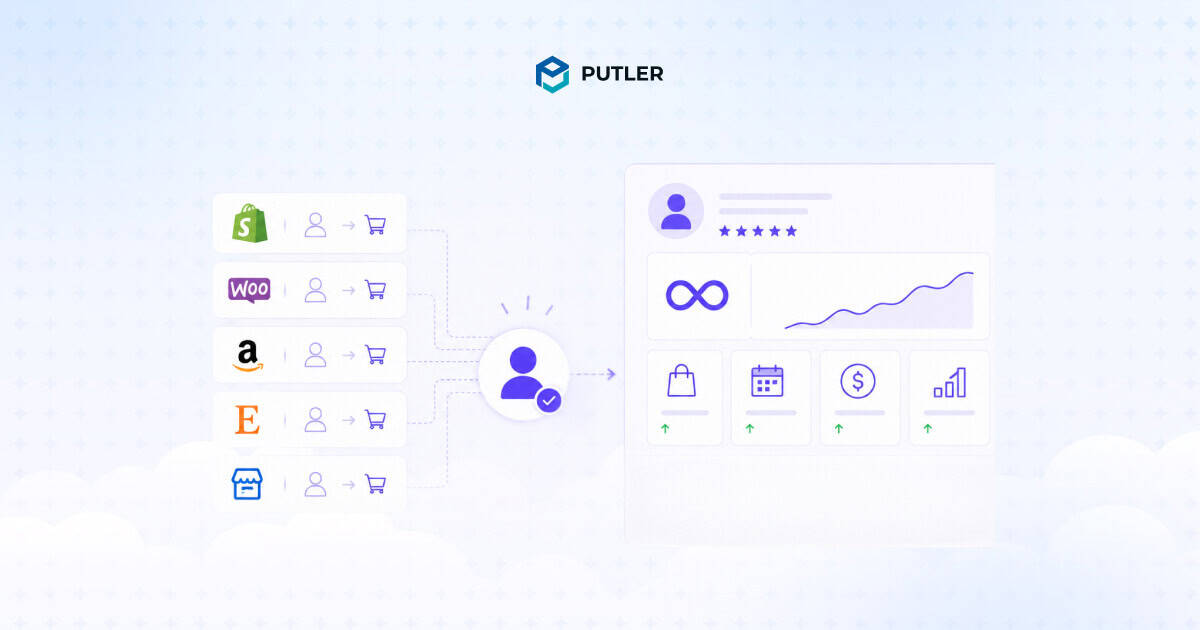
Putler connects natively to Shopify, WooCommerce, Etsy, Amazon, eBay, PayPal, Stripe, Braintree, Razorpay, and 17+ other sources. Every transaction across every connected source runs through an automatic deduplication engine.
The same customer who bought on Shopify via Stripe and again on Etsy via PayPal becomes one record. One profile. One purchase history.
Once your data is connected, Putler automatically scores every customer on Recency, Frequency, and Monetary value and sorts them into 11 pre-built segments:
- Champions: Bought recently, buy often, spend the most. These are your VIPs.
- Loyal Customers: Buy regularly. Highly responsive to promotions.
- Potential Loyalists: Recent buyers with average frequency. Worth nurturing.
- New Customers: Bought recently but only once.
- At Risk: Spent big and bought often, but it’s been a while. Win-back priority.
- Can’t Lose Them: Big spenders who haven’t returned in a long time.
- About to Sleep: Below average recency and frequency. Will churn without attention.
- Hibernating: Low spend, low frequency, last purchase was a long time ago.
- Lost: Lowest scores across the board.
Click any segment to see the full customer list. Export to CSV or push directly to Mailchimp for targeted campaigns. Pricing starts at $20 per month with a 14-day free trial.
The advantage over methods 1 through 6 is simple: you stop building reports and start using them.
What to do once you’ve identified your repeat customers
Identification is step one. The real value comes from acting on what you find.
Reward your Champions: Early access to new products, exclusive discounts, hand-written thank-you notes, or VIP-only sales. These are the buyers driving most of your revenue. Treat them accordingly.
Re-engage your At Risk and Can’t Lose Them segments: These customers used to buy often but have gone quiet. A targeted win-back email with a personalized offer often brings them back. Reference what they bought before. Make it relevant.
Nurture your Potential Loyalists: They’re showing repeat behaviour but haven’t fully committed yet. A loyalty program, a second-purchase discount, or a personalized product recommendation can convert them into Loyal Customers.
Let your Hibernating and Lost segments rest: Sending heavy discounts to deeply inactive customers usually trains them to wait for sales. Focus your energy on segments where retention is still possible.
Frequently asked questions
What is a repeat customer?
A repeat customer is anyone who has purchased from your store more than once. There is no fixed time limit, though most eCommerce businesses define a relevant window based on their product’s typical repurchase cycle.
What is a good repeat customer rate for eCommerce?
The industry average sits at 25-30%. Above 40% is strong, often seen in subscription and consumable categories. Below 20% suggests room for improvement in retention strategy.
How do I calculate repeat purchase rate?
Divide the number of customers with two or more orders by the total number of customers, then multiply by 100. Example: 280 repeat customers ÷ 1,000 total customers × 100 = 28%.
Can Google Analytics tell me who my repeat customers are?
GA4 can show you returning users and their purchase behaviour at an aggregate level, but it tracks devices, not people. For individual customer-level identification, you need your eCommerce platform’s customer database or a dedicated analytics tool.
What is the easiest way to find repeat customers across multiple sales channels?
A tool with native integrations and automatic deduplication. Manually combining data from Shopify, Etsy, and Amazon is possible but error-prone. Tools like Putler connect all your sources and merge duplicate customer records automatically.
Start identifying your repeat customers today
Every method in this guide works. Some take minutes, some take hours, some run automatically in the background. Pick the one that matches your scale and your stack.
If you sell on a single platform and have a few hundred customers, your built-in reports might be enough. If you sell across multiple channels and want segmentation that updates itself, a dedicated tool is the cleaner answer.
The point is not which method you pick. The point is to stop guessing about your repeat customers and start making decisions based on what your data is already telling you.

