


If you’re running an online business, you’ll know the importance of having a reliable payment gateway.
Authorize.net is a trusted name in the eCommerce industry that has been facilitating online payments for more than 20 years. It’s a safe and secure platform that allows you to accept payments from all major credit cards like Visa, MasterCard, American Express, Diner’s Club, JCB, and Discover, making it a popular choice for online store owners.
Now, if you’re using WooCommerce to power your online store, integrating Authorize.net with your website is a no-brainer.
But with so many Authorize.net WordPress plugins available, choosing the right one can be overwhelming. A robust plugin that seamlessly integrates with your WooCommerce store can make a world of difference in the success of your online business.
That’s why we’ve rounded up the five best WooCommerce Authorize.net plugins of 2025. Whether you’re just starting out or looking to upgrade your existing plugin, our list has got you covered.
But, before diving deeper into the plugins, let’s explore more about the benefits that these plugins bring to the table.
What Are the Benefits of Using WooCommerce Authorize.Net Plugins?
When it comes to running an eCommerce store, integrating Authorize.net with your WooCommerce website can offer a plethora of benefits. And by installing a robust WooCommerce Authorize.net plugin, you can maximize those benefits and take your online business to new heights.
Let’s take a closer look at some of the advantages of using WooCommerce Authorize.net plugins:
- Enhanced Security: With its advanced fraud detection tools and secure data transmission, Authorize.net is already one of the most secure payment gateways. And by using a WooCommerce Authorize.net plugin, you can further enhance the security of your online store, protecting both you and your customers from potential fraud.
- Increased Sales: By offering multiple payment options and allowing customers to pay with their preferred method, you can significantly increase your sales. With Authorize.net’s support for all major credit cards, a WooCommerce Authorize.net plugin can help you expand your customer base and increase your revenue.
- Seamless Integration: A good WooCommerce Authorize.net plugin will integrate seamlessly with your WooCommerce store, providing a hassle-free payment experience for your customers. This means that customers won’t have to leave your website to complete the payment process, which can lead to higher conversion rates and lower cart abandonment rates.
- Automated Recurring Payments: Many online businesses rely on recurring payments for subscription-based services or memberships. With a WooCommerce Authorize.net plugin, you can automate these payments, making it easier for customers to pay and ensuring that you receive payments on time.
- Detailed Reporting: A WooCommerce Authorize.net plugin can provide you with detailed reporting and analytics, giving you insights into your online business’s performance. You can track your sales, monitor your inventory, and identify areas for improvement.
Overall, a WooCommerce Authorize.net plugin can offer numerous benefits to your online store. By providing a secure payment gateway, multiple payment options, automated recurring payments, and detailed reporting, you can enhance the customer experience, increase sales, and grow your online business.
So, without further ado, let’s dive in and find the best authorize.net plugins for WordPress to take your online store to the next level!
The Best WooCommerce-Authorize.net Plugins in 2025
As we already know, integrating Authorize.net requires the use of a plugin. So, let’s check out some of the best plugins that can solve the purpose, and which is the best Authorize.Net plugin for WooCommerce.
Authorize.net Payment Gateway for WooCommerce.
Authorize.net Payment Gateway for WooCommerce is the most commonly used authorize.net Woocommerce plugin. All payments are processed on the secured platform of Authorize.net and also has the “Authorize Only” mode available nowadays.
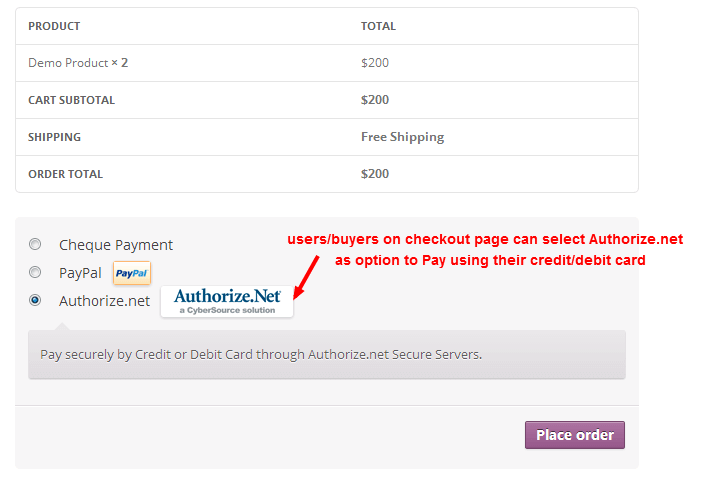
Some of the important features are listed below:
- Easy to install and configure
- No SSL/PCI required
- Option to configure success & failure message
- Now with option to use Authorize only mode.
- Safe way to process credit cards and debit cards on WooCommerce using authorize.net SIM
- Uses the hosted solution provided by Authorize.net and payment is processed on secured servers of Authorize.net
Price: Free
ELEX Authorize.net Payment Gateway for WooCommerce.
ELEX is another Authorize.net WooCommerce plugin that is currently available in the market and has a vast user base.
Once you install this plugin, you will be able to accept credit cards and eCheck payments from your customers, seamlessly.
One of the important features of this payment mode is that the customers will stay on your site throughout the entire checkout process.
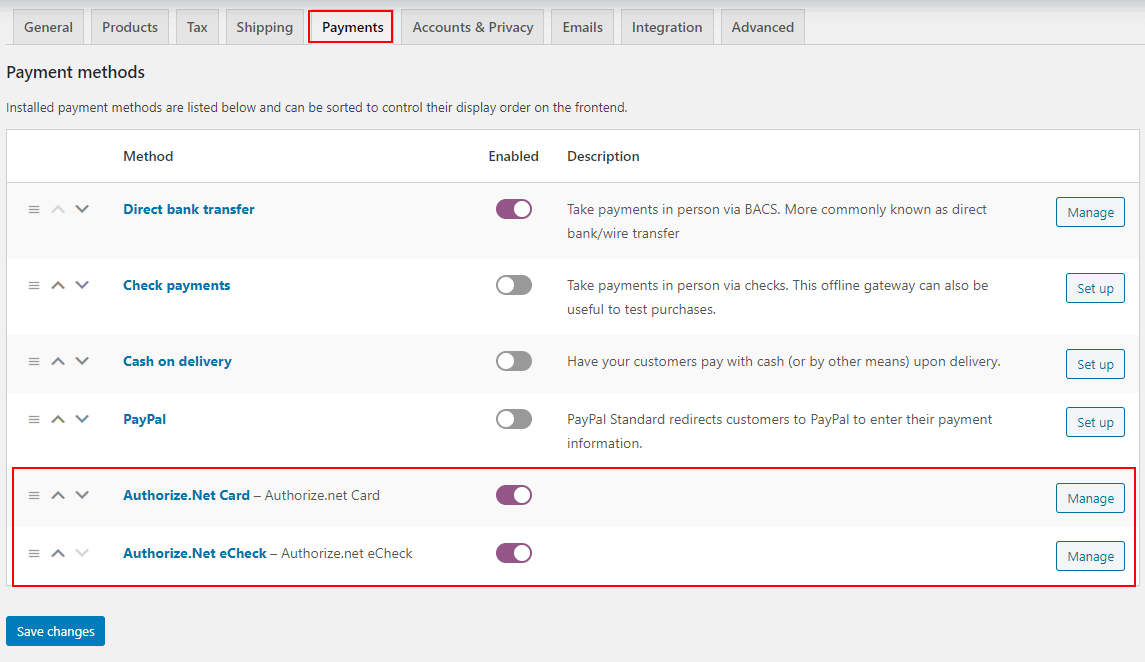
Some of the important features are listed below:
- Supports WooCommerce Subscriptions.
- Allows redirecting customers to a specific page after successful checkout.
- Helps you accept payments on your site through major credit cards such as Visa, MasterCard, American Express, Discover, JCB, Diners Club, etc.
- Overview page that allows capturing payments and processing refunds in a single click.
- Allows selective display of the logos of credit cards on the checkout page.
- Allows accepting eCheck payments from customers.
- Allows easy handling of full and partial refunds from WooCommerce admin or overview page.
- Customization options to create a seamless checkout experience for customers.
Price: $79/Single site
YITH WooCommerce Authorize.net Payment Gateway.
YITH WooCommerce Authorize.net Payment Gateway is an Authorize.net WooCommerce plugin that is used to extend the WooCommerce default payment modes. This plugin also facilitates adding the possibility to pay with credit cards using the services offered by the Authorize.net network.
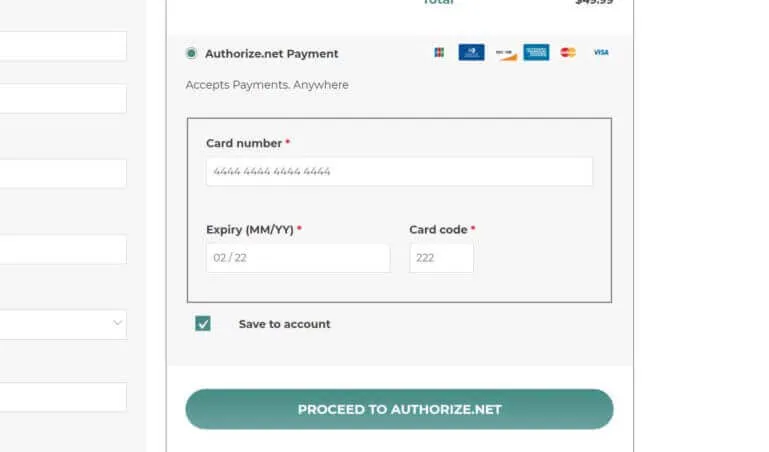
Some of the important features are listed below:
- Redirects customers to Authorize.net’s pages for the conclusion of the payment
- Uses Authorize.net as a payment gateway on your WooCommerce Shop
- Completely automatic Instant Payment Notification service managed by Authorize.net
- Allows users to customize the frontend view using labels, description, and credit card logos.
Price: $79.99/Single site
Authorize.Net SIM
The Authorize.Net SIM is advanced authorized.net WooCommerce plugin that allows you to securely accept credit card payments in your WooCommerce Shop. This plugin provides support for checkout using Authorize.Net eChecks.
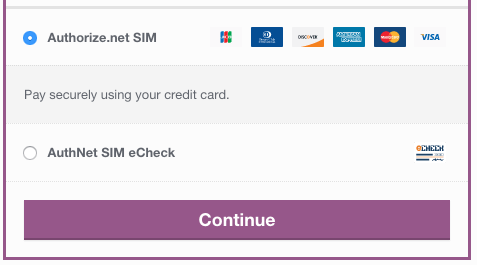
Some of the important features are listed below:
- Customers are automatically redirected back to your site or can be kept on-site with a secure payment page, post successful purchase.
- Facilitates capturing prior authorized transactions right from the WooCommerce edit order screen
- Authorize/Immediately charge transactions
- Accepts eChecks with optional Authorize.Net eCheck account
Price: $25.00/month
SkyVerge WooCommerce Authorize.Net
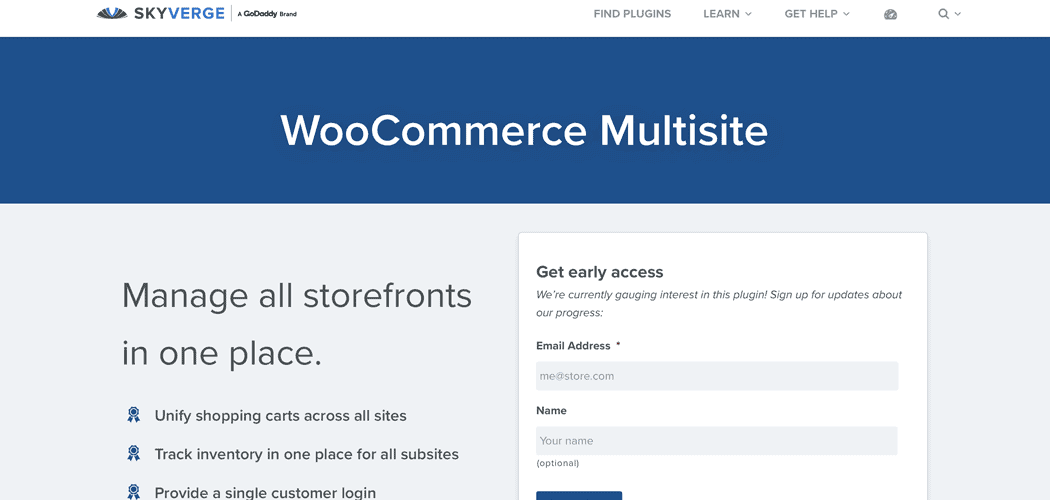
SkyVerge is one of the most popular Authorize.Net WooCommerce plugins in the recent times. It allows your customers to save their credit cards and bank accounts to their WooCommerce account for fast and easy checkout.
This plugin offers full support for WooCommerce Subscriptions. Moreover, it also allows its users to accept WooCommerce Pre-Orders, and all major credit cards such as, Visa, MC, Amex, Discover, JCB, and Diner’s Club).
Some of the important features are listed below:
- Accepts eChecks if enabled in your Authorize.Net account
- Lets customers add and manage saved payment methods from their accounts or checkout.
- Vastly improved in version 2.0 for better Authorize.Net error handling
- Allows performing refunds, voids, or capturing charges directly from WooCommerce
- Shows detailed decline messages at checkout
Price: $79.00
How to set up Authorize.Net on your WooCommerce store
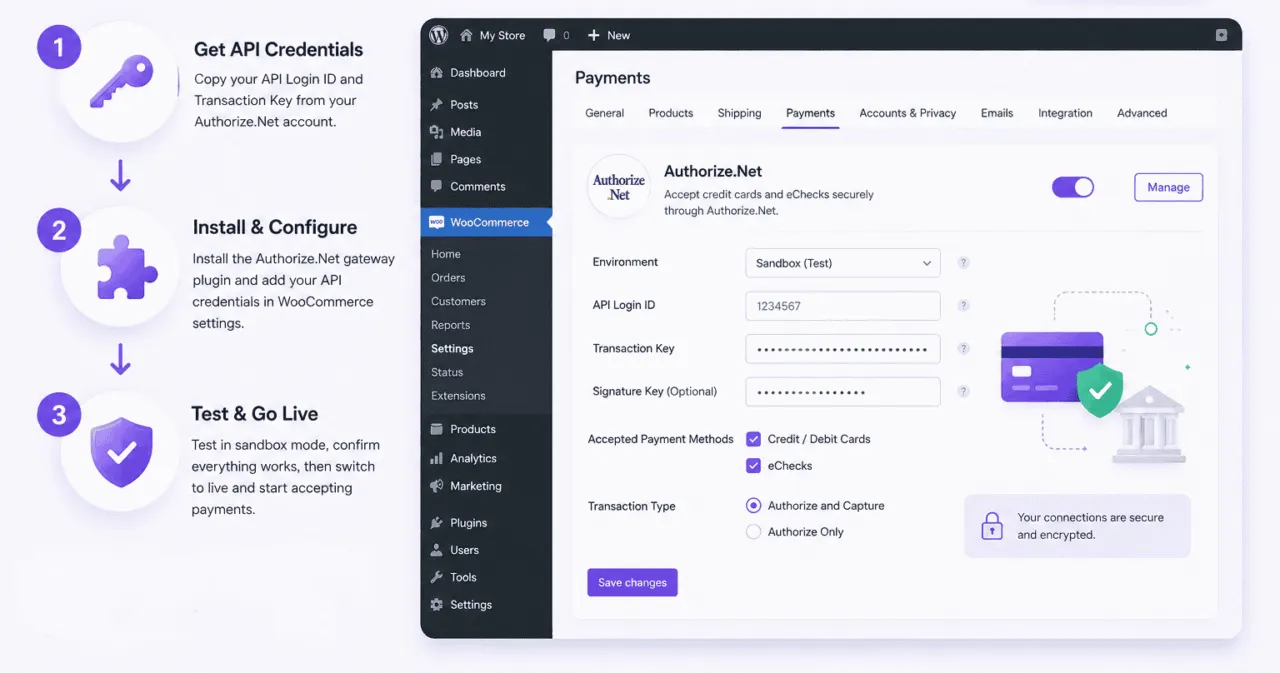
Setting up Authorize.Net on WooCommerce takes three steps: gather your API credentials, install and configure the gateway, and test in sandbox mode before going live.
What you need before you start
Authorize.Net authenticates your store using API credentials, not your login password.
You will need two values, both generated inside the Authorize.Net Merchant Interface under Account, then API Credentials & Keys:
- API Login ID: a public identifier for your Authorize.Net account.
- Transaction Key: a secret key that authorizes API requests. Generate a new one if you do not have it saved, because it is shown only once.
Here’s how to get your Authorize.Net API Login ID and Transaction Key.
There is also a third value, the Signature Key, but it is optional. You only need it if you want to enable webhooks so WooCommerce receives account updates from Authorize.Net.
For a standard setup, the Login ID and Transaction Key are enough.
Keep these values somewhere safe. The Transaction Key and Signature Key both function like passwords, so they should never be shared in plain text or pasted into a public document.
Installing and configuring the WooCommerce Authorize.Net gateway
Once you have the credentials, the setup inside WordPress is short:
- Buy and download the WooCommerce Authorize.Net gateway extension from WooCommerce.com.
- In your WordPress admin, go to Plugins, then Add New, then Upload Plugin, and upload the extension ZIP file.
- Activate the plugin, then go to WooCommerce, then Settings, then Payments.
- Enable Authorize.Net and click Manage.
- Paste in your API Login ID and Transaction Key. Add the Signature Key only if you plan to use webhooks.
- Choose which payment methods to accept, credit cards, eChecks, or both, and set whether to capture payment immediately or authorize only.
- Save changes.
Authorize.Net is now available as a payment option on your store.
Testing in sandbox mode before going live
Never push a payment gateway straight to production. Authorize.Net offers a sandbox environment for exactly this reason.
In the gateway settings, switch the Environment to Test or enable sandbox mode, then run a few test orders using Authorize.Net’s published test card numbers.
Confirm that successful payments, declined payments, and refunds all behave the way you expect. Once everything checks out, switch the environment back to Production.
Why reporting is a separate problem from payments
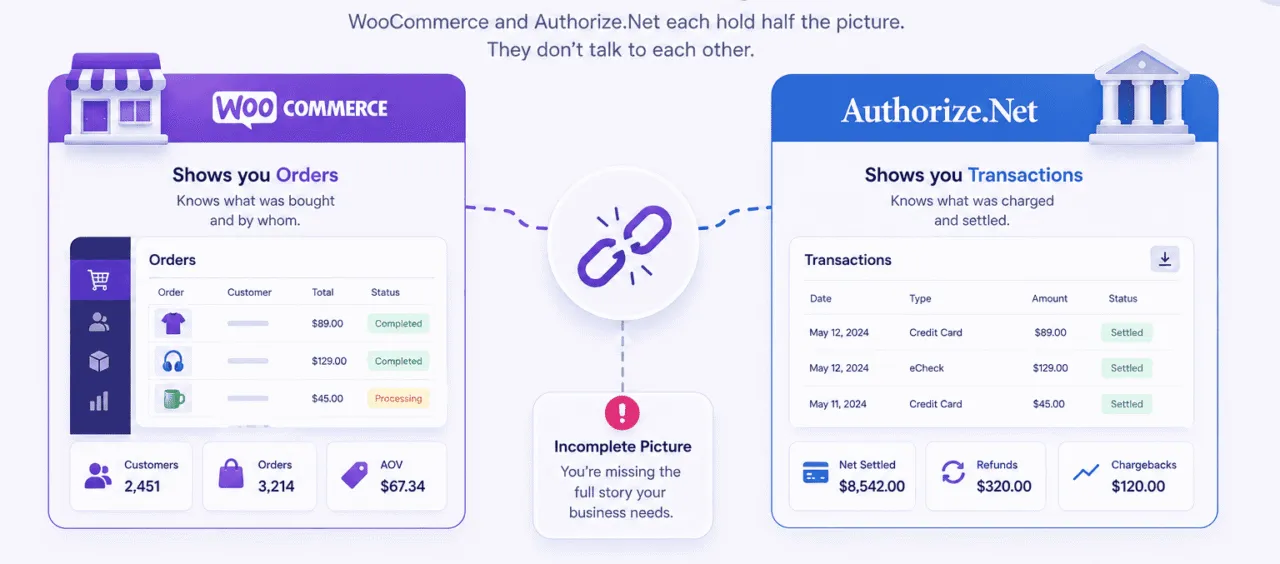
Once Authorize.Net is processing payments, a frustrating gap appears. Payments work, but the store owner still cannot see anything useful.
Here is the split:
- WooCommerce shows you orders. It knows what was bought and by whom, but it does not know how Authorize.Net settled those payments.
- Authorize.Net shows you transactions. It knows what was charged and settled, but it does not know which product was sold or whether that customer ever came back.
The two systems hold half the picture each, and they do not talk to each other.
WooCommerce reporting and Authorize.Net reporting are genuinely separate problems, and solving one does not solve the other. That is why a dedicated reporting tool exists at all.
The WooCommerce Authorize.Net Reporting extension explained
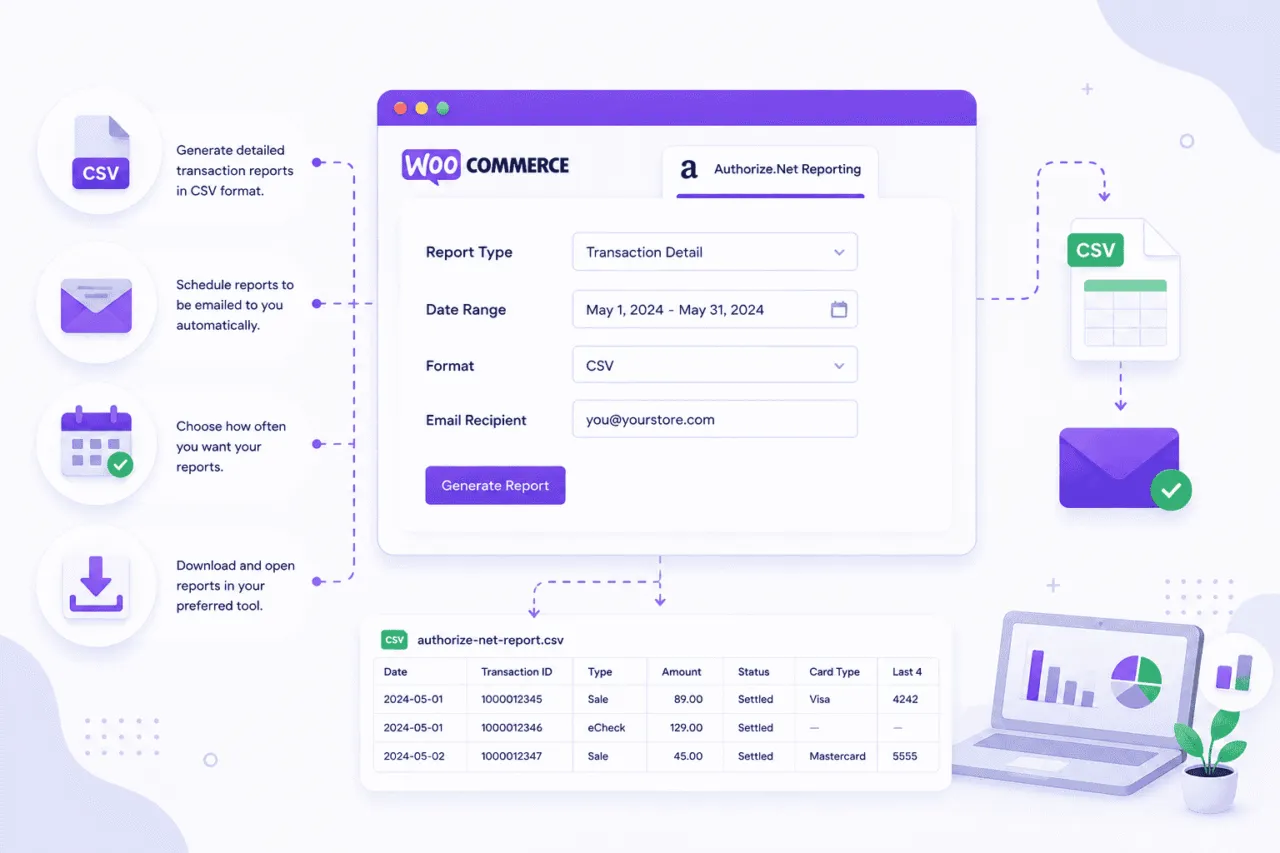
WooCommerce’s official solution for this gap is a second extension: WooCommerce Authorize.Net Reporting, built by SkyVerge and sold separately on the WooCommerce.com marketplace.
It costs $49 per year for a single site, and the current version is 1.14.4.
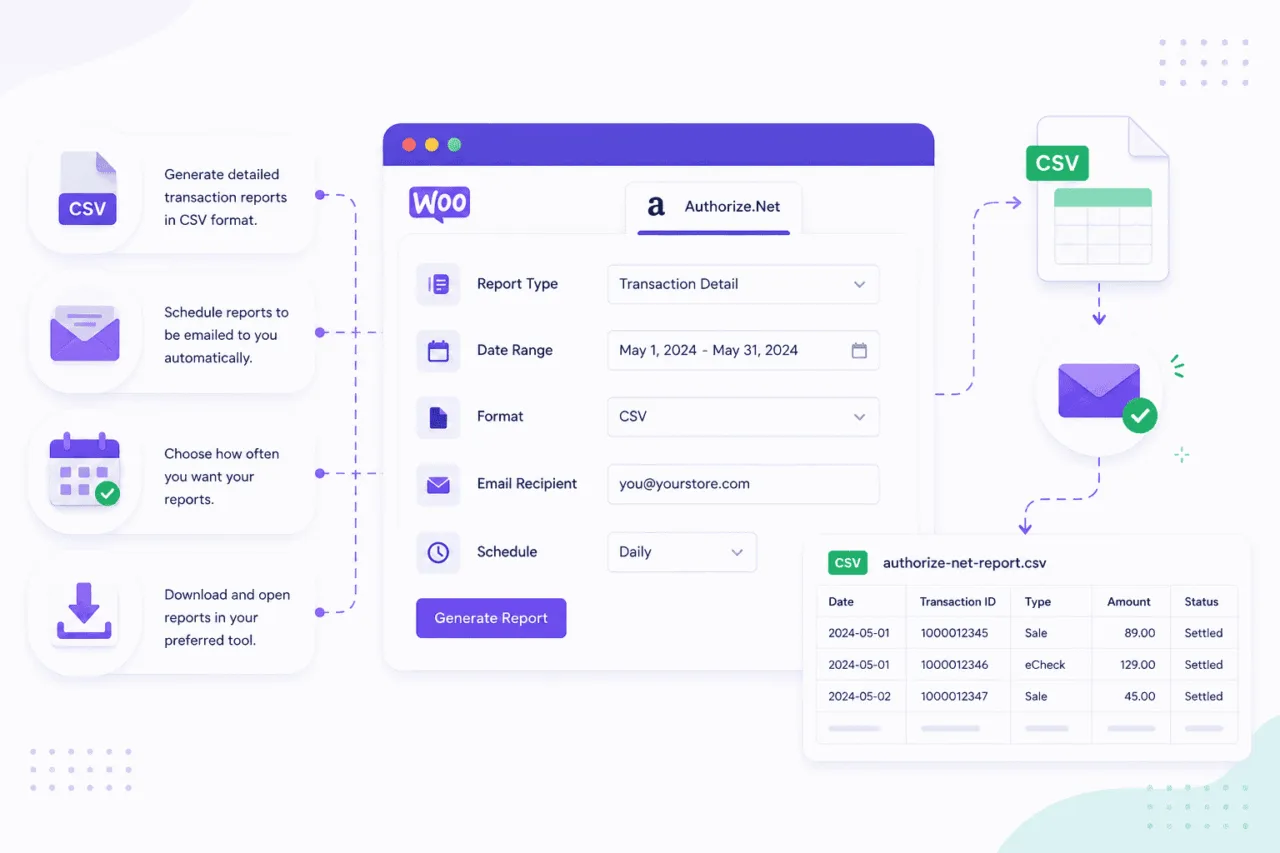
In one sentence: it emails you a CSV of yesterday’s settled Authorize.Net transactions every morning, and lets you download a CSV for any date range on demand.
How to set it up
Setup became simpler in early 2026. According to WooCommerce’s own documentation, there is no longer a requirement to create any additional settings inside your Authorize.Net account to use this plugin.
The steps:
- Install and activate the WooCommerce Authorize.Net Reporting extension.
- Go to WooCommerce, then Reports, then Authorize.Net, then Settings.
- If you already have the Authorize.Net payment gateway installed, your API Login ID and Transaction Key will be pre-filled. Confirm they are correct.
- Enter the email address or addresses that should receive the daily report. Separate multiple emails with commas.
- Set the API Environment to Production, or Test if you are still in sandbox.
- Save.
Mode 1: the daily CSV email
The first reporting mode is automatic.
An email goes out to every address in your settings every day at 12:05 AM UTC, with the previous day’s settled Authorize.Net transactions attached as a CSV file.
Two details worth knowing. First, if there were no settled transactions the previous day, no email is sent. Second, the timing is fixed to UTC. A store owner in New York receives yesterday’s report in the evening, not first thing in the morning.
Mode 2: the on-demand CSV export
The second reporting mode is manual.
Inside WooCommerce, then Reports, then Authorize.Net, you pick a start and end date and click Download. The transactions for that range export as a CSV straight to your computer.
Leaving both date fields blank exports the last 24 hours. The date range is inclusive, and it uses your merchant account’s timezone.
The limits of CSV-based reporting
The reporting extension does its job, but it is honest to say where that job ends. There are four limits worth knowing before relying on it.
It is settled transactions only: the daily report covers transactions that have settled. Payments that are authorized but not yet captured, voids, and unsettled refunds do not appear in it. The CSV is a record of completed money movement, not live activity.
It is CSV only, with no charts: every output is a flat spreadsheet. There is no graph, no trend line, no dashboard inside WordPress. Answering a question like “are sales growing?” means opening the CSV and building the chart yourself.
Long date ranges are slow: WooCommerce’s documentation warns that because of limits in the Authorize.Net Reporting API, downloading a date range of a week or more can take up to 20 minutes. Most web hosts will stop the script before it finishes, which produces an Error 500 or a blank white screen. The fix is to shorten the range, which makes quarterly or annual reporting genuinely painful.
It is a transaction list, not a business report: the CSV tells you what was charged. It does not tell you which product earned the most, which customers are about to churn, what your refund rate is trending toward, or what next month’s revenue is likely to be. It is built for a bookkeeper, not for someone trying to grow the store.
None of this makes the extension bad. It simply makes it specialized.
If all you need is a daily transaction list for reconciliation, it is enough. If you need to understand the business, it is only the starting point.
How to get reporting natively, without an extra plugin
Before buying anything, it is worth knowing what reporting you already have. Both Authorize.Net and WooCommerce ship with built-in reports.
Inside the Authorize.Net Merchant Interface
Authorize.Net’s Merchant Interface includes a set of pre-built reports under the Reports tab: Transaction Detail, Transaction Statistics, Settled Batch List, Unsettled Transactions, and monthly statements.
Transaction Search also lets you download results to a file in tab-delimited, comma-separated, or Excel formats.
One thing to plan around: Authorize.Net retains the current year and the previous two years of data, and archives anything older. Searches that use a full credit card number only return the last 180 days.
If you need long historical records, export them before they are archived.
What the Merchant Interface does not give you is product-level revenue, customer lifetime value, segmentation, or forecasting. It is built around transactions and settlement batches, not around business growth.
Inside WooCommerce Reports and Analytics
WooCommerce ships with its own Analytics section covering Revenue, Orders, Products, Categories, Coupons, Taxes, and Customers, with actual charts.
It has two limits that matter here. WooCommerce’s documentation states that multi-currency is not supported, so stores selling in several currencies can see inaccurate analytics.
And as of WooCommerce 10.5, released in February 2026, new stores process analytics data in scheduled batches every 12 hours rather than in real time.
The bigger gap is that WooCommerce Analytics has no concept of payment gateways. It cannot separate Authorize.Net revenue from Stripe or PayPal revenue, because it only sees orders, not settlements.
What real WooCommerce Authorize.Net reporting should show you
A daily CSV answers one question: what was charged yesterday.
A store owner trying to grow has a much longer list of questions. Useful reporting should cover:
- Sales trends over time: revenue by day, week, and month, with the direction of travel visible at a glance.
- Product performance: top sellers, refund rate by product, and which products get bought together.
- Customer insight: lifetime value, repeat purchase rate, and RFM segmentation that groups customers into champions, at-risk, and lost.
- Refunds and chargebacks: tracked over time, not buried as one-off lines in a spreadsheet.
- Subscription tracking: active recurring revenue, churn, and failed renewals, which matters for any store using WooCommerce Subscriptions on Authorize.Net.
- Multi-gateway and multi-store consolidation: one revenue number when the store also takes Stripe or PayPal, or runs more than one storefront.
- Forecasting and goal tracking: a projection of where revenue is heading and progress against a target.
Almost none of this is available from a CSV or from the native reports. That is the gap a proper analytics tool fills.
Bottomline
So, there you have it, folks!
We’ve explored the top 5 WooCommerce Authorize.net plugins for 2025. With various options available, you can choose the plugin that suits your budget and requirements. If you know of any other plugins we missed, feel free to share them in the comments.
However, installing an Authorize.net plugin on your WooCommerce website will help you in accepting payments and aiding conversions only.
To stay ahead in the game, you need something that can summarize the analytics and feed you only what you need to make data-driven decisions for your business growth.
Yes, we are talking about Putler.
Let’s find out how it can help you go beyond the WooCommerce Authorize.net plugin game and shoot your sales to the skies.
One step further – combined analytics for Authorize.net and WooCommerce
As a WooCommerce store owner, you know that tracking payments and monitoring them can be a bit of a hassle.
While native WooCommerce and Authorize.net reports are available, they offer limited insights, and using both means double the work and less flexibility.
To simplify your life and provide more accurate and reliable insights, Putler offers a simple solution.
You simply add your WooCommerce store and your Authorize.net account to Putler, and let Putler handle all the reporting.
- Track your payments in one place without any hassle.
- Putler removes duplicate data and cleans it up for you to ensure accurate and reliable insights about your business performance.
- Get in-depth reports and insights, along with advanced features like Customer Segmentation, Forecasting, Goal Tracking, and much more.
- Gain valuable insights about your customers, sales, products, and orders, all in one place.
In short, Putler lets you focus on growing your business instead of spending time and energy on data management.
How Putler connects to WooCommerce and Authorize.Net
Connecting both sources takes minutes, with no developer involved:
- Authorize.Net connects through the API: sign in to Putler, click the Authorize.Net icon, and securely enter your API credentials. Putler starts pulling historical transaction data immediately.
- WooCommerce connects through the free Putler Connector plugin: install it on your store and the link is live. No CSV exports, no manual uploads.
- Both feed one dashboard: Putler then runs every transaction through its eCommerce data consolidation engine, which fixes over 100 data problems automatically in the background.
The most important part is deduplication. A payment recorded in both WooCommerce and Authorize.Net is counted once, not twice, so your revenue number is finally accurate instead of inflated.
What Putler shows that a CSV cannot
On top of the raw transaction list, Putler turns settled payments into the business reporting a daily CSV was never built to give you:
- Real-time dashboards: sales, products, customers, and subscriptions, updated live instead of waiting for tomorrow’s email.
- RFM customer segmentation: Putler sorts your customers into 11 groups such as champions, loyal, at risk, and lost, so you know who to keep and who to win back. See how RFM segmentation works.
- Unified customer profiles: the same buyer paying through different gateways becomes one customer profile with full history, not two fragmented records.
- Forecasting and goal tracking: a projection of where revenue is heading and live progress against a target.
- Instant transaction lookup: find any payment, customer, or order across both sources in seconds, plus full transaction management in one place.
- Weekly email digests: the key numbers delivered to your inbox without logging in.
Built for more than one gateway
Most stores do not stop at Authorize.Net, and neither does Putler:
- Multi-currency and multi-timezone handling: transactions are converted using the exchange rate from the actual day of the sale and aligned to a single timeline, so a late-night sale lands on the right day.
- Other gateways in the same view: Stripe, PayPal, and Braintree consolidate into the same dashboard, giving you one revenue number across 17+ data sources.
- Officially certified: Authorize.Net lists Putler as a Certified Solution, so the integration is recognized on both sides.
Which reporting setup is right for you
There is no single best answer. The right setup depends on the complexity of your store.
Here is a quick way to match the situation to the tool:
- Just a daily transaction list for your bookkeeper: the official WooCommerce Authorize.Net Reporting extension does the job.
- One store, one gateway, no need for customer or product analytics: native WooCommerce Analytics plus the Authorize.Net Merchant Interface is enough.
- A WooCommerce-only store that wants deep customer and marketing analytics: a WooCommerce analytics plugin such as Metorik works well.
- Authorize.Net plus Stripe or PayPal, or multiple stores, and you want one revenue number with full analytics: a multi-channel platform such as Putler is the right fit.
- Mainly clean bookkeeping into accounting software: an accounting-sync tool, or the Authorize.Net QuickBooks download.
Match the tool to the question you are actually trying to answer, and the choice gets simple.
FAQs
Is Authorize.net safe for customers?
Yes, Authorize.net is safe for customers. They use industry-standard security measures, are Payment Card Industry Data Security Standard (PCI DSS) compliant, and offer fraud detection and prevention tools to protect customers. However, customers should also take necessary precautions such as using strong passwords and monitoring account activity.
Which is best payment gateway for WooCommerce?
Choosing the best payment gateway for WooCommerce depends on several factors, such as your business needs, customer preferences, and budget. Some popular payment gateways for WooCommerce include
- Authorize.net
- Stripe
- PayPal
- Square
Ultimately, the best payment gateway for your WooCommerce store will depend on your specific needs and preferences. It’s important to consider factors such as pricing, features, and ease of integration when making a decision.
How do I set up authorize net with WooCommerce?
To set up Authorize.net with WooCommerce, follow these simple steps:
- Log in to your WordPress dashboard and go to the WooCommerce settings.
- Click on the “Payments” tab and select “Authorize.net” from the list of payment options.
- Enter your Authorize.net API Login ID and Transaction Key, which you can find in your Authorize.net account settings.
- Choose the payment capture method (Authorize Only or Authorize and Capture) and select any additional settings you want to enable.
- Save your changes and start accepting payments through Authorize.net!
That’s it - you’ve successfully set up Authorize.net with WooCommerce. If you run into any issues, refer to the Authorize.net documentation or contact their support team for assistance.
Which is the Best Authorize.Net plugin for WooCommerce?
There are several plugins available to integrate Authorize.Net with WooCommerce, and the best one for you will depend on your specific needs and preferences. Here are a few popular options to consider:
- Authorize.net Payment Gateway for WooCommerce
- ELEX Authorize.net Payment Gateway for WooCommerce
- YITH WooCommerce Authorize.net Payment Gateway
- Authorize.Net SIM
- SkyVerge WooCommerce Authorize.Net
Ultimately, the best Authorize.Net plugin for WooCommerce will depend on your specific needs and preferences. Consider factors like pricing, features, and ease of use when making a decision.
How much does the WooCommerce Authorize.Net Reporting extension cost?
The reporting extension is $49 per year for a single site, sold separately from the payment gateway on the WooCommerce.com marketplace.
What is in the daily CSV report?
The daily CSV contains the previous day’s settled Authorize.Net transactions, including transaction details such as amounts, dates, and transaction IDs.
It does not include unsettled transactions or voids.
Why is my CSV export erroring or showing a white screen?
This usually happens with date ranges of a week or more. The Authorize.Net Reporting API is slow for long ranges, and most hosts stop the script before it finishes.
Shorten the date range, or export in smaller monthly chunks.
Does the reporting extension work with WooCommerce Subscriptions?
The extension reports on settled Authorize.Net transactions, which includes successful subscription renewal payments.
It does not give subscription-specific analytics such as churn or active recurring revenue. A dedicated analytics tool is needed for that.
Can I see Authorize.Net charts inside the WordPress dashboard?
Not with the official reporting extension. It produces CSV files only, with no charts or visual dashboards inside WordPress.
Visual reporting requires native WooCommerce Analytics or a third-party analytics platform.
How do I get reports from Authorize.Net directly?
Log in to the Authorize.Net Merchant Interface and open the Reports tab.
You can view Transaction Detail, Settled Batch List, and Statistics reports, and download transaction search results as a file.