

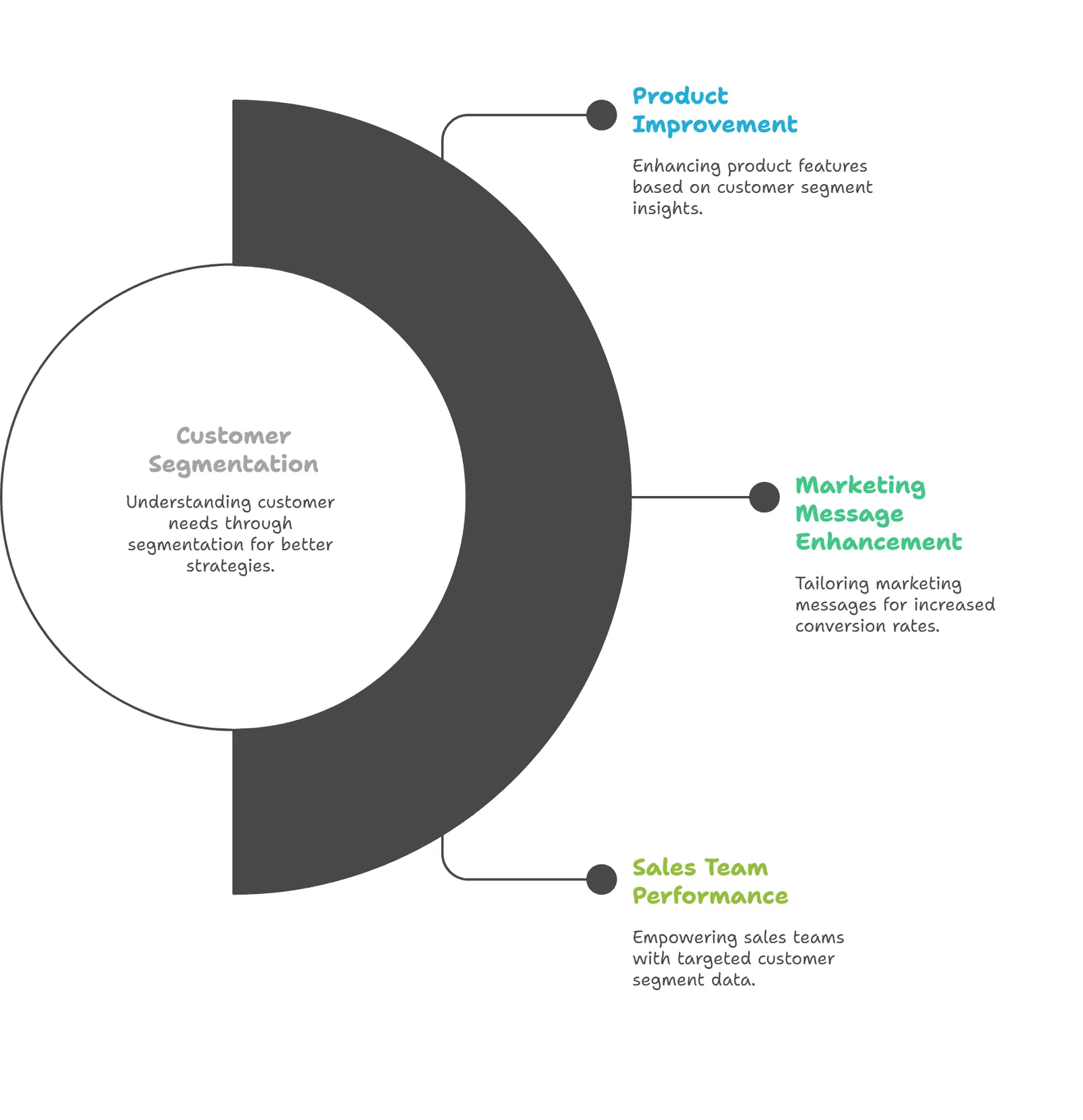
Customer segmentation is the process of dividing customers into groups based on shared characteristics, needs, or behavior. Use those groups to choose a relevant action, such as welcoming a first-time buyer or checking on someone whose usual purchases have stopped.
A useful segment needs more than a name. Someone can look inactive in one store while buying regularly in another; a discount aimed at that person may solve a problem that doesn’t exist.
The three things to get right are:
- Start with a decision, then choose the data and grouping rule.
- Check who belongs in the group, including people who should be excluded.
- Measure the action against a defined outcome instead of assuming personalized messages work.
What are the main types of customer segmentation?
Demographic, geographic, behavioral, and psychographic segmentation are four common ways to group customers. Value, needs, and lifecycle stage offer other useful perspectives. The right choice depends on the business decision and the information available; no single list describes every possible approach to segmenting customers.
| Basis | Information to use | Decision it can support |
|---|---|---|
| Demographic | Relevant attributes such as age or household stage, where supplied appropriately | Choose suitable product guidance |
| Geographic | Delivery region, country, or climate | Match delivery information or seasonal offers |
| Behavioral | Purchases, product use, or engagement | Choose a next step based on an observed action |
| Psychographic | Interests, priorities, or attitudes learned through research | Explain benefits in language that fits customer priorities |
| Value | Defined spending, margin, or expected contribution measures | Decide where a service or retention investment makes sense |
| Needs | Stated problems, intended use, or support requests | Recommend an option that addresses the problem |
| Lifecycle | First purchase, ongoing use, or a defined period of inactivity | Choose onboarding or follow-up appropriate to the relationship |
Treat these as lenses, not mutually exclusive boxes. A repeat buyer in a particular region can also need a smaller pack size and have an unresolved support request.
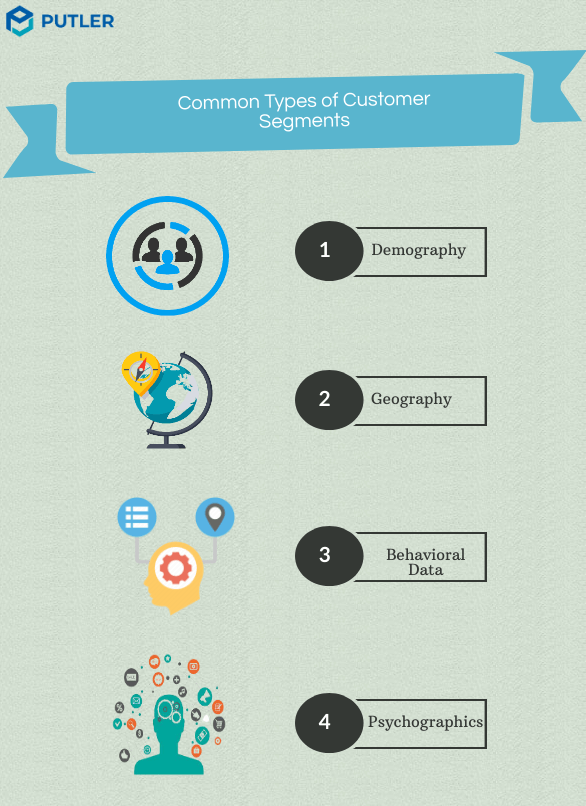
Four common bases: demographic, geographic, behavioral, and psychographic. Other approaches can be useful too.
Separate the grouping basis from the method
A basis describes what customers share. A method describes how you form the groups: you might write rules in advance, use a scoring model, or use statistical clustering to find patterns.
For example, “bought coffee twice this quarter” is a rule based on behavior. RFM is a scoring approach built around purchasing behavior and spending; it isn’t a fifth demographic attribute.
In B2B work, company size and industry are firmographic attributes. They aren’t the definition of a priori segmentation, which means choosing the grouping criteria before analyzing the data.
Use value, needs, and lifecycle with care
Customer value describes a defined contribution to your business, not a person’s income or economic standing. Revenue can help identify high spenders, but costs and refunds matter before calling a customer profitable.
Needs require evidence. A purchase may suggest an intended use, while feedback can explain why the customer chose it; neither gives permission to invent a detailed personality profile.
Lifecycle groups also need rules. New customers may need setup guidance, active buyers may need relevant replenishment options, and customers whose buying slows may need a service check. For a non-subscription store, silence alone doesn’t prove someone has permanently churned.
Use the customer segments guide for group interpretation and behavioral segmentation for a deeper look at action-based grouping.
When does customer segmentation help?
Customer segmentation helps when different groups need different messages, service, or offers and the business can act on those differences. Useful applications include onboarding, feedback requests, replenishment, and retention. Benefits depend on the quality of the rule and the action, rather than on creating more groups.
A first-time buyer may be unsure how to use a product. A welcome message that answers that concern can be more useful than an immediate upsell.
For another group, the issue may be a delayed delivery. A promotion won’t fix it; support follow-up is the more suitable response.
You can also use segments to choose whom to ask for feedback. Recent buyers can explain checkout friction, while long-standing customers can describe what keeps them returning. Those answers can inform customer insights without treating a few responses as representative of everyone.
Check the limits before making an offer
Missing history can make a repeat buyer appear new. Separate store records can hide a recent purchase, and overlapping groups can send competing offers to the same person.
Small groups create another constraint: an apparently large change may come from one order. Changes in stock, season, pricing, or advertising can also affect results even when your segment rule stays the same.
Keep only the data needed for the decision, use appropriate access controls, and confirm communication eligibility before sending. If nobody owns the next action, another segment is just another list.

How do you segment customers in practice?
Build a segment by choosing a business decision, defining the data and time period, writing inclusion and exclusion rules, checking records, assigning an action, and reviewing results. Keep those choices together so another person can reproduce the audience and understand why each customer belongs in it.
The six steps below use a fictional two-store coffee business. These thresholds illustrate a rule, not recommended settings for every shop.
Choose the decision and outcome
Suppose the business wants to offer a replenishment reminder to established coffee buyers who may be due to reorder. The decision is whom to contact, not simply how many customers can be labeled “at risk.”
Choose an outcome before building the audience, such as an eligible customer’s paid coffee purchase within the follow-up window. Also decide whether a reminder without a discount is enough; an incentive costs money even when the customer would have reordered anyway.
Identify the data and period
The sample uses orders from 1 July through 30 September 2026, evaluated on 1 October. That calendar quarter contains 92 days, so it mustn’t be described as a rolling 90-day window.
Bring together order IDs, dates, payment and refund status, products, and a reliable customer identifier. Marketing eligibility and open service cases may live in separate systems and need their own checks.
For two stores, verify identity matching before adding order counts. Two records with similar names aren’t enough to establish that they belong to one person; in this example, the merchant has verified the fictional person IDs.
Define inclusion and exclusion rules
Write the rule in terms someone else can test. For this coffee example, a person must have at least two paid, non-fully-refunded coffee orders during the quarter, with the latest qualifying coffee purchase 30-60 days before 1 October.
The date condition includes purchases from 2 August through 1 September. Exclude anyone ineligible for marketing email or with an open service case, even if their purchase history qualifies.
Count orders, not units or line items. Two coffee bags in one order don’t satisfy a two-order rule, and a grinder purchase doesn’t satisfy a coffee-purchase condition.
Check records and overlapping groups
Inspect a few included and excluded records before exporting the audience. Check a boundary date, a refund, a duplicate record, and a customer who bought through the other store.
Look for overlapping campaigns too. A welcome email, replenishment message, and service apology shouldn’t compete just because three independent filters selected the same person.
If you add browsing signals, document where they come from and their limits. Purchase records and user behavior analytics answer different questions; a missing tracked visit doesn’t prove a customer lost interest.
Choose the action and handoff
Specify the message, owner, send date, and suppression checks. A small amount of planning prevents the audience from reaching an email platform with no clear purpose.
Put the rule and intended action in the marketing plan so the next person knows what to do. Keep service cases with support and confirm any new purchase or opt-out before sending a reminder.
Review membership and measure
Recheck time-sensitive groups before use. A person can qualify on Monday and purchase on Tuesday; yesterday’s “due to reorder” list may already be stale.
Save the audience definition and evaluation date for reporting. If you change the threshold midway through a campaign, document the change instead of treating the old and new groups as comparable.
What does an actionable customer segment look like?
An actionable customer segment has a clear rule, identifiable members, exclusions, and a suitable next step. The fictional example below applies the same rule across two stores. It shows why purchase counts alone are insufficient: recent activity, refunds, product choice, communication eligibility, and service status change the decision.
Fictional sample, evaluated on 1 October 2026: 15 order records belong to eight merchant-verified people across Stores A and B. The table uses the quarter and coffee rule above; it isn’t customer evidence or a screenshot of Putler output.
| Person | Qualifying coffee orders | Days since latest | Decision |
|---|---|---|---|
| C1 | 2 | 6 | Exclude recent purchase in Store B |
| C2 | 2 | 47 | Include using both stores' history |
| C3 | 1 | 42 | Exclude fewer than two orders |
| C4 | 2 | 37 | Exclude not eligible for marketing email |
| C5 | 1 | 88 | Exclude fully refunded second order and older remaining purchase |
| C6 | 0 | Not applicable | Exclude grinder purchases only |
| C7 | 2 | 32 | Include |
| C8 | 2 | 52 | Exclude open service case |
Only C2 and C7 qualify. C1 would look inactive for 52 days if the merchant looked only at Store A, but a Store B purchase six days ago changes the decision.
C2 illustrates the opposite problem: the person reaches two qualifying orders only after both stores’ records are combined. C8 meets the purchase rule but needs service follow-up before a marketing reminder.
Define partial-refund and profit rules separately if they affect eligibility or value. This exercise doesn’t establish that every condition is available in one analytics filter.
For more applications after this rule is clear, see the ecommerce segment examples or Moosend’s ecommerce segmentation examples.
When should you use RFM segmentation?
RFM segmentation groups customers using recency, frequency, and monetary value: how recently they purchased, how often they purchased, and how much they spent. It is useful for examining purchase patterns when enough history is available, but it doesn’t explain every customer’s needs or predict every next purchase.
A frequent coffee buyer and someone who bought a durable espresso machine have different purchase cycles. The same inactivity threshold could be useful for the first person and misleading for the second.
Use RFM as a starting point for investigation, then add product context and service information where needed. High spending also isn’t the same as high profit, and a low-frequency buyer isn’t automatically dissatisfied.
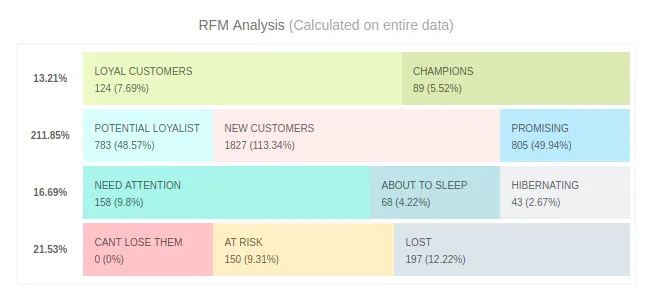
Existing Putler RFM example. The displayed customer counts illustrate the report, not a result from the fictional coffee business.
Check the history behind the score
Putler’s RFM documentation distinguishes the RFM chart from its filtered customer list. Scores and chart counts use the entire imported customer history; changing the dashboard date range filters the customer list and export rather than rescoring RFM for that custom period.
That distinction matters when someone asks for “RFM for Q3.” A quarter-filtered export isn’t proof that the scores were calculated only from Q3 orders.
Check how much history was imported before comparing groups. Use the dedicated RFM analysis guide for the method rather than assuming one score describes the full customer relationship.
What should you do for each customer group?
Choose an action that addresses the reason for grouping customers, then check whether another need should take priority. Segmentation can support relevant messages, feedback, payment follow-up, seasonal offers, upsells, and onboarding. Each use needs exclusions so a plausible marketing opportunity doesn’t override service or communication preferences.
| Signal | Possible action | Check or exclusion |
|---|---|---|
| Observed product behavior | Send relevant use or replenishment guidance | Recent purchase or conflicting campaign |
| Recent purchase or support interaction | Ask focused feedback | Unresolved issue needing a direct response |
| Failed payment on an actual order or subscription | Send appropriate payment recovery guidance | Already recovered or otherwise resolved payment |
| Relevant location and season | Offer suitable seasonal products | Delivery limits and regional availability |
| Purchase with a compatible next product | Explain a useful add-on | Product compatibility and unresolved returns |
| First purchase | Send welcome and setup guidance | Prior history hidden in another store |
A failed payment is a payment-status problem, not evidence that an unknown lead is ready to buy. Check the order or subscription status before sending recovery instructions, and stop the follow-up once the issue is resolved.
For a public example of behavior-based communication, Grammarly explains that its weekly Insights reports use writing activity linked to an account. The useful idea is matching content to observed activity; the documentation doesn’t establish that those reports caused a particular retention or upgrade result.
How can you build and use segments in Putler?
Use Putler’s customer reports and saved conditions to explore groups from connected sales data, then validate the records before acting. RFM provides a purchase-history view, while custom segmentation supports explicit conditions. Contact permissions, service exclusions, and campaign delivery may require checks or handoffs outside the reporting workflow.
Start with the right customer definition
Connect the supported sources and allow their data to process before interpreting the report. Confirm the imported history covers the relationship you want to examine.
Read the Customers report definitions before interpreting a group. In Putler, a new customer makes their first purchase in the selected period; a returning customer purchased before that period and buys again within it.
A repeat customer has two or more orders within the selected period. Someone can therefore be both new and repeat: their first purchase and second order can happen in the same month.
Set the period you actually intend to analyze. A one-month view doesn’t represent three months of buying, and missing imported history can affect the interpretation of a first purchase.
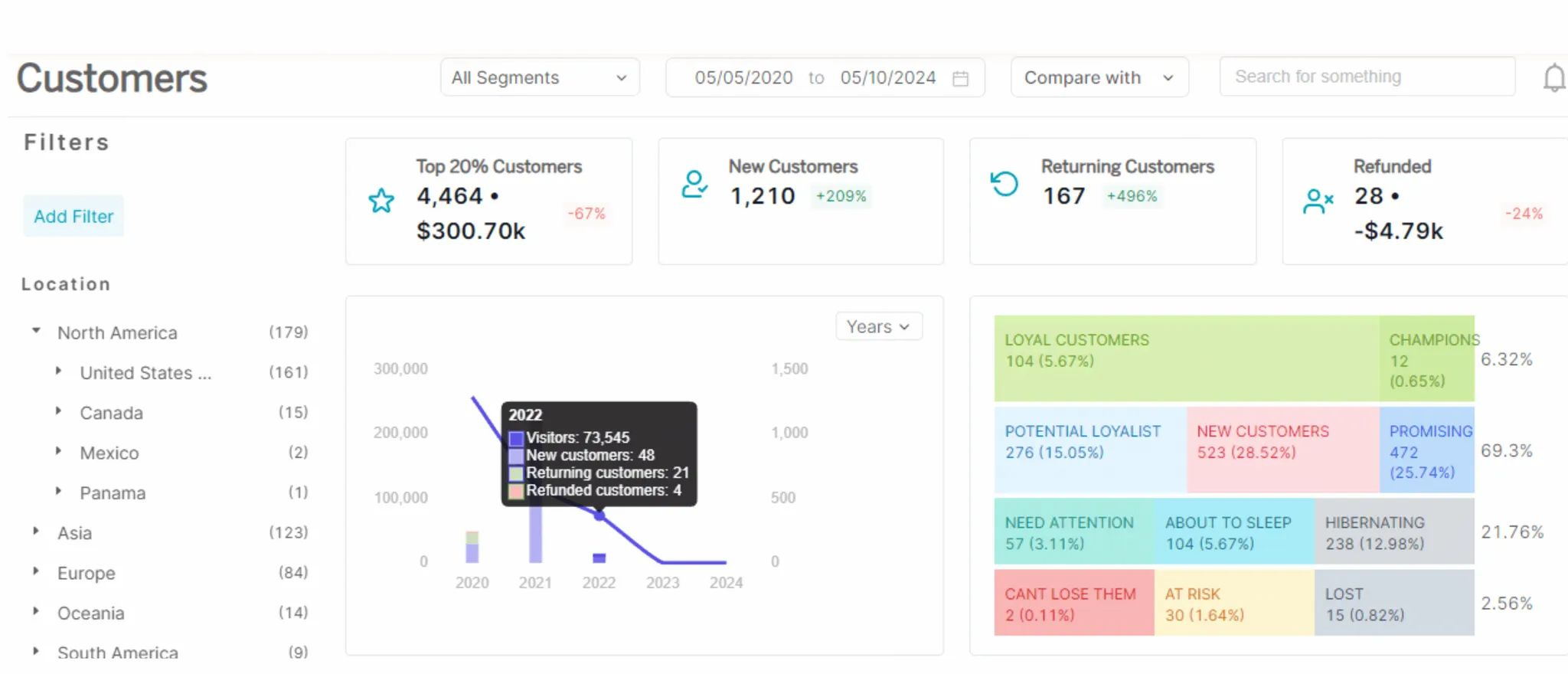
Official documentation example of the Customers report. Displayed dates and figures belong to the source example. Source: Putler documentation.
Apply and save a rule, then inspect it
Follow the custom segmentation instructions to add conditions, select All or Any, apply the filter, and save a useful segment. All requires every condition to match; Any allows a match on at least one.
Start with a simple rule and open a few matching records. If you use an amount condition, confirm which amount and period it represents; spending doesn’t establish income, profit, or willingness to pay a higher product price.
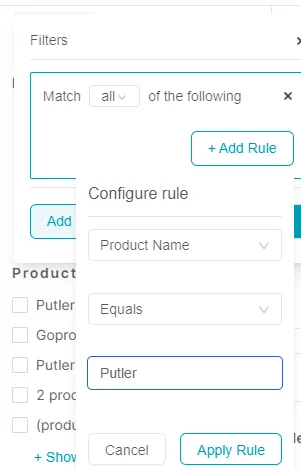
Official documentation example of a product-name condition. This does not represent every condition in the fictional coffee example. Source: Putler documentation.
The coffee example also needs marketing eligibility and service-case checks. Keep those in the appropriate source systems or a validated working list unless the exact combined rule has been verified in your setup.
Hand off the audience to the sending tool
Export the checked customer list as CSV, or use the documented Mailchimp connection to pass contacts to an audience. Confirm the recipient group’s permission and suppression status in the email platform before sending.
Compose and deliver the campaign in the sending tool. Mailchimp’s send-to-segment instructions describe that separate step; exporting a list isn’t the same as delivering a campaign.
How do you know whether segmentation helped?
Measure a specific action against an outcome defined before it starts. Record the eligible audience, denominator, assignment date, observation window, and treatment of costs and refunds. With adequate volume, a randomly assigned holdout can help distinguish a message’s effect from purchases that would have happened anyway.
For the coffee reminder, define a paid qualifying reorder within a chosen follow-up window, then report the share of assigned eligible people who meet that definition. Decide in advance whether cancellations and later refunds remove an order from the result.
Track the cost of any discount and the contribution from the purchase where reliable cost data exists. A rise in revenue can still be a poor outcome if the offer gives away too much margin.
Separate attribution from additional sales
An email platform may attribute an order to a message even when the customer was already planning to buy. A before-and-after comparison can also change because of a holiday, a stock issue, or another promotion.
A campaign holdout leaves a randomly assigned eligible group without the tested message, allowing a more useful comparison. Keep assignment consistent and account for other campaign exposure; this is a measurement principle, not a claimed Putler experimentation feature.
C2 and C7 are only two fictional eligible people. They demonstrate that a rule can be checked, not that a campaign has enough recipients to establish an effect; there are no invented conversion or revenue results here.
Review the rule as well as the result
Check whether the audience still reflects how people buy. A new pack size or a different replenishment cycle can make an old threshold unsuitable even if the filter still works.
Apply the same discipline to AI-assisted groups: inspect the inputs, understand the grouping, and test a useful action. A model label or an accuracy claim doesn’t show that the resulting campaign helps your customers.
Start with one decision you can act on
Choose a question you need to answer this week. Write a rule, verify a few included and excluded records, and assign an action before expanding to more customer groups.
If the question depends on purchase history across supported sales sources, explore Putler’s RFM segmentation and customer filtering. Keep the service, permission, and measurement checks alongside the report.
FAQ
What are the four types of customer segmentation?
Demographic, geographic, behavioral, and psychographic segmentation are four common bases. Other useful approaches include value, needs, and lifecycle stage, so lists of four or five types aren’t exhaustive. A basis describes what customers share; rules, RFM scoring, and clustering describe ways to form groups from available information.
How is customer segmentation different from market or audience segmentation?
Customer segmentation groups people or accounts that already buy from a business. Market segmentation considers a broader market, including potential buyers, while audience segmentation can include visitors, subscribers, or advertising audiences. The groups can overlap, but purchase-based conclusions require purchase history rather than an assumption that every visitor is a customer.
Is RFM the best customer segmentation method?
RFM is useful when purchase recency, frequency, and spending help answer the business question and sufficient history is available. It isn’t a universal best method. Product cycles, customer needs, service issues, and profitability may require other information. Choose the method after defining the decision, and check the report’s scoring period.
How often should you update customer segments?
Refresh a segment often enough for its intended action. Recheck recent purchases, permission changes, and open service issues before a time-sensitive campaign. Review slower-changing rules when buying patterns, products, or business goals change. Keep a dated audience snapshot for measurement so a changing live group doesn’t erase who originally received the action.
Which customer segmentation tools should you use, and how do you measure success?
Choose tools that support your actual data, grouping rule, and action. An analytics report, a service system, and an email platform may each handle a different part. Compare options in the customer segmentation tools guide, then judge success against a defined customer outcome, costs, and an appropriate comparison rather than the number of saved groups.