
![[Full Guide] Amazon Multiple Accounts](https://www.putler.com/wp-content/uploads/2022/08/Full-Guide-Amazon-Multiple-Accounts.png)
Running multiple Amazon businesses or brands? Then you’ve probably wondered — can you have multiple Amazon seller accounts without getting suspended?
The short answer is yes — Amazon allows multiple seller accounts in 2026, but only under strict conditions.
In this article, I will cover everything you need to know about multiple Amazon accounts. So whether you’re scaling brands or managing international stores, this guide shows you the right way to do it.
Can you have multiple Amazon accounts? (quick answer)
Yes, Amazon allows sellers to operate multiple seller accounts if there is a legitimate business need and all existing accounts are in good standing. You do not need prior approval, but Amazon strictly monitors account linking and policy violations.
What is Amazon’s latest update multiple account policy?
Amazon’s policy on multiple seller accounts has evolved considerably. As of 2025, Amazon does not require prior approval for maintaining multiple seller accounts if you have a legitimate business need. However, all your existing accounts must be in good standing.
Here is what Amazon’s current policy states:
- No prior approval required: Sellers with legitimate business needs can operate multiple accounts without requesting Amazon’s permission first.
- Good standing mandatory: All your current accounts must have healthy performance metrics and no unresolved policy violations.
- Separate business identity: Each account should represent a distinct business operation with unique registration details.
- Account linking risk: If one account faces suspension or deactivation, Amazon may take action on all related accounts.
Important: While prior approval is not mandatory, Amazon still monitors for suspicious activity. If they detect accounts are being used to circumvent policies or manipulate the marketplace, all related accounts may be suspended simultaneously.
When to consider having Amazon multiple seller accounts?
Below are some legitimate reasons to consider having multiple Amazon accounts:
- You own multiple brands and maintain separate businesses for each.
- You manufacture products for two distinct and separate companies.
- You are recruited for an Amazon program that requires separate accounts.
Note: When you consider setting up multiple accounts, you must use a different address, email, phone number, & IP address.
Account health requirements for multiple accounts
Before opening a second Amazon seller account, you must ensure your existing account meets Amazon’s performance standards. Amazon evaluates your Account Health Rating (AHR) on a scale of 0 to 1000.
Account Health Rating thresholds:
- Green (200 to 1000): You are eligible to open additional accounts.
- Yellow (100 to 199): Address issues before considering a new account.
- Red (below 100): Your current account may face deactivation. Do not open new accounts.
Key metrics you must maintain across all accounts:
- Order Defect Rate (ODR): Must stay below 1%. This includes negative feedback, A to Z claims, and chargebacks.
- Late Shipment Rate: Keep below 4% for seller fulfilled orders.
- Pre Fulfillment Cancel Rate: Maintain below 2.5%.
- Valid Tracking Rate: Aim for at least 95% accuracy.
- On Time Delivery Rate: Target 97% or higher.
Use dedicated Amazon analytics tools to monitor these metrics across all your accounts from one dashboard.
Advantages of having multiple Amazon accounts
Following are the main advantages of opening a second Amazon account.
- Increase Sales and Revenue
If the business is already booming, opening Amazon multiple accounts can be the wisest course of action. Even more, buyers can see your products, generating more revenue each month from a different account. - Diversify Business
If you’re looking to diversify your business, having Amazon multiple accounts can combine other products or services to increase sales. - Niche Branding
Considering expansion is the next big thing if your company is performing well. Building a fresh brand for your company is similar to growing it.
Disadvantages of having multiple Amazon accounts
For most merchants, opening numerous Amazon accounts could seem like a smart idea; nevertheless, the following are the primary reasons why you should not think about doing so:
- It requires more effort to manage all accounts
Managing a single Amazon account takes a lot of time and effort. If you want to get good results, having multiple Amazon accounts requires you to put in twice as much time and effort. - Increased Negative Feedback
If you do not provide good customer service or ship products late, you may risk receiving more negative feedback from buyers, leading to decreased sales and revenue. - Risk of accounts being closed
If you do not follow Amazon’s seller guidelines, you risk having your seller account suspended, which could lead to a huge blow, especially if you are already making a lot of profits.
How to open multiple Amazon seller accounts (step-by-step)?
Understanding when to have Amazon multiple accounts, as well as their pros and cons, if you’re interested in setting up multiple accounts. Here’s how:
You must first access the Amazon website using any browser in order to register for an account. To access the login page after arriving at the website, click “Accounts and Lists” in the top right corner.
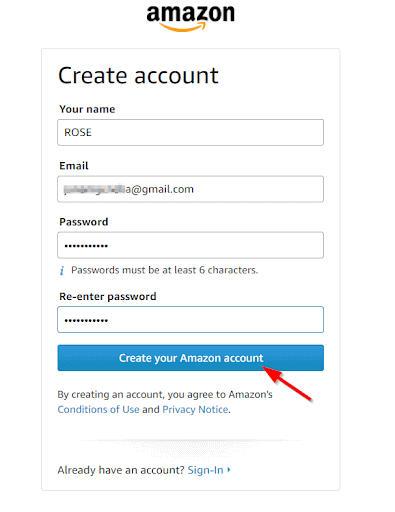
After that, click “Create your Amazon Account” and complete the required fields with your name, email address, password, and other details. Select “Create Your Amazon Account” from the menu.
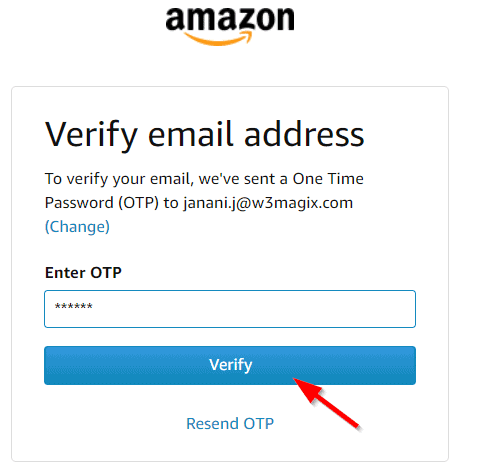
A one-time password(OTP) will be sent to your email address as part of Amazon’s identity verification process. To finish your registration, you simply need to get the OTP from your email and verify it.
That’s it! You’ve created your first Amazon Seller account! If you want to create multiple Amazon seller accounts, just repeat the steps above to sign up!
As it already been stated above, in order to create Amazon multiple seller accounts, you should be aware of the following.
- Each seller account must have a separate bank account. Multiple seller accounts using the same bank account in the exact location are prohibited by Amazon, which may lead to seller account association and cause you losses.
- Each seller account must have a separate email address.
- Your performance metrics and account health must be good.
The problems of having multiple Amazon seller accounts
While there are so many advantages of creating Amazon multiple seller accounts, you will also encounter significant problems, which are listed below:
- Manual updates – The idea of updating each listing individually is really unsettling on all accounts.
- User errors – Human action is prone to mistakes, ranging from minor oversights to major gaffes.
- Lack of time – When you manage each of your numerous accounts from the beginning to the end, your time spent on it can be for nothing.
- No synchronization – It is not easy when the inventory and orders are not continuously synced. The lack of synchronization among all of your selling accounts is another problem you frequently experience.
Simplify your workflow by learning how to export Amazon orders from each account for consolidated record keeping.
How to manage multiple Amazon seller accounts
After creating multiple Amazon accounts, if you’re concerned about how to be more effective, the following advice can help you manage several Amazon seller accounts.
You can use apps like Multiorders and Putler.
The best apps to manage multiple Amazon accounts
We have already mentioned the following apps you can use to manage multiple Amazon accounts effortlessly and avoid the above problems.
Multiorders
It is an all-in-one eCommerce business management solution that connects all the different parts of your online business.
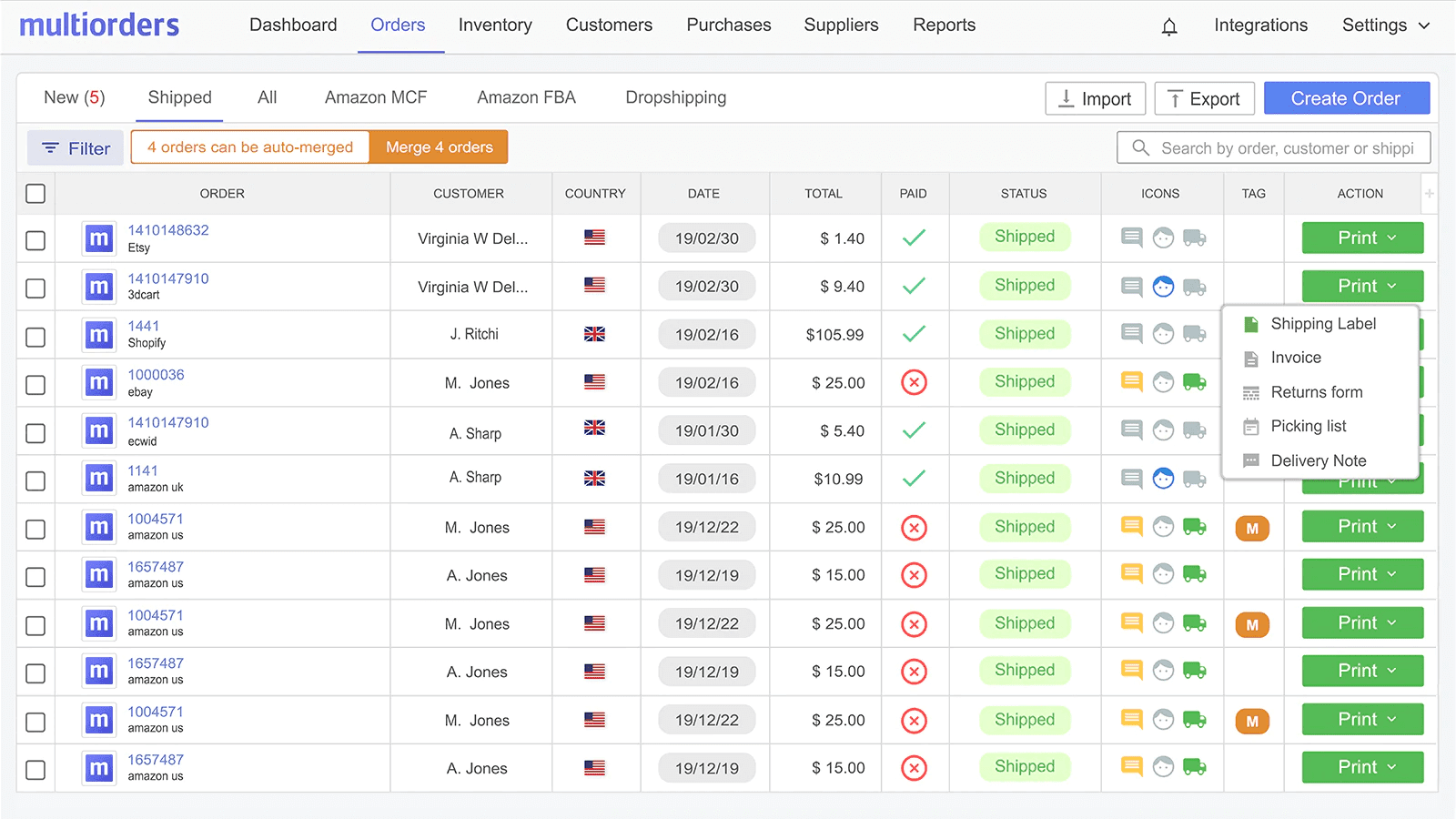
- Keeps track of your inventory
- Allows you to connect different sales channels
- Automatically updates your online stores
- Allows you to merge or bundle products
- Integrates with all of the most popular shipping carriers
- Prepares order documentation
- Syncs shipping details
- Lets you print shipping labels in seconds
- Gives you USPS Commercial Plus pricing
- Allows you to manage Amazon FBA/MCF
Pricing:
- PRO 500: $49/month – Up to 500 orders
- PRO 1K: $99/month – Up to 1,000 orders
- PRO 2K: $149/month – Up to 2,000 orders
- PRO 5K: $249/month – Up to 5,000 orders
Putler
Putler is a unique, revolutionary multi-channel analytics reporting tool that lets you link multiple Amazon seller accounts.
How to connect your Amazon seller account to Putler?
All you have to do is log in to your Amazon Seller account. Under “Select an Account,” choose the appropriate account to link to Putler and click on the “Select Account” button, where you can see the permissions page.
Just accept and approve the required permission for Putler and hit the “Confirm” button. That’s it, your Amazon Seller account will be added successfully to Putler. From then, you’ll be able to get actionable reports in real-time from a single dashboard, such as:
What do you get in Putler?
- Aggregated reports: where you can gather data from multiple places of your Amazon store and get a big picture of it.
- Independent reports: If you wish to get reports about specific business verticals like Products, orders, customers, subscriptions, or transactions, this software helps you.
- Detailed reporting: where you can get detailed insights about specific metrics that help you take data-driven decisions. For example, let’s take a key metric called product. By using Putler, you can find out which products are sold, in what quantities, and which products move quickly and slowly.
- Multicurrency: It helps you get other valuable insights, such as Segmentation, Product insights, forecasting, etc.
You can also generate comprehensive Amazon order history reports to track performance trends over time.
As we discussed above, Putler is a must-have tool to grow your Amazon business. You may add one or more Amazon accounts to Putler, and it will analyze, clean, and enrich the data, and provide detailed reports on goods, orders, clients, sales, transactions, and even your website visitors.
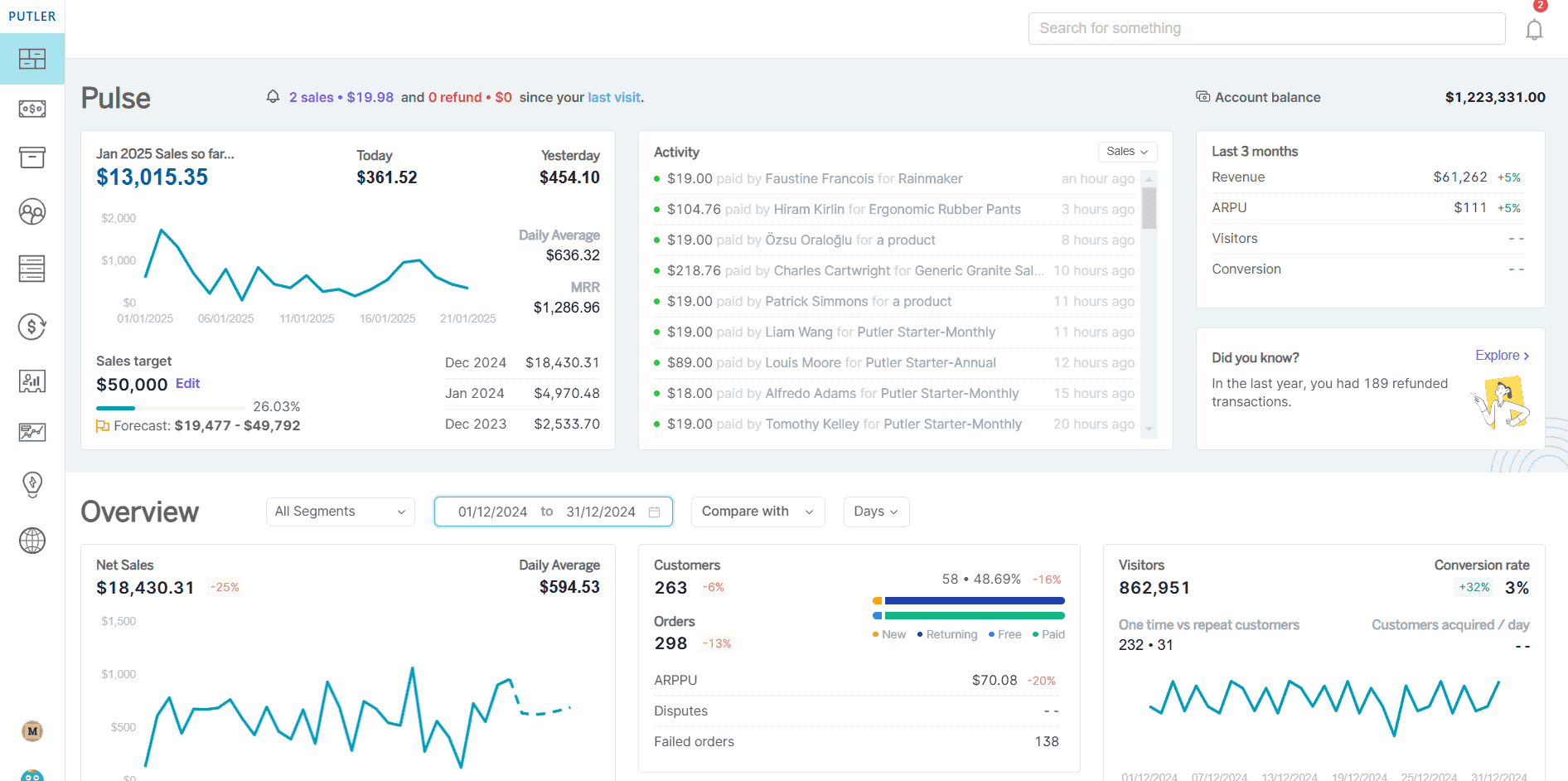
What makes Putler a must-have for every Amazon Seller?
No switch over to multiple accounts – Unlike Amazon, where you need to switch between multiple Amazon accounts to see individual data, Putler provides data of all stores in one place, combined, which saves your time.
- Consolidation – In Amazon, you can only see an in-depth view of transactions and orders placed for the selected period individually, but with Putler, you can accurately combine multiple Amazon accounts and view an in-depth order invoice, advanced order metrics, intuitive order search, order status, and transaction status.
- Automatic debugging – Combining multiple Amazon accounts can sometimes lead to duplication of data that yields an error in results. But Putler removes duplicates and shows you enriched reports.
- Multiple currency support – When you run multiple Amazon accounts in different countries, with Putler, you can automatically convert all the major currencies globally in a single currency dashboard. You need to change the currency manually for every account.
- Ready to use filters and segments – Putler provides some key filters like Location, Order status, Customer type, Revenue contribution, and much more at your fingertips. With those filters, you can instantly drill down into data and gather interesting insights. Whereas, in Amazon, only sales and traffic reports are filtered on a date range.
Metrics – Putler provides reporting with 200+ practical metrics, trends, overviews, and drill-downs, whereas with Amazon analytics, you can view only 20+ ecommerce metrics.
Conclusion
From the above discussion, it is not illegal to have multiple Amazon seller accounts. Having multiple accounts can be beneficial, but managing them can be daunting. To manage multiple Amazon seller accounts, you can use eCommerce management systems such as Putler.
Putler’s Amazon Seller Analytics helps in increasing your profits. You can forecast trends, performance comparison, straightforward data filtering, real-time order updates, product insights, customer analytics, and much more.
FAQs
Is it illegal to have multiple Amazon accounts?
No, it is not illegal to have multiple accounts, but you should have a legitimate business need.
Can I have multiple Amazon accounts?
Yes, you can have multiple Amazon seller accounts for a legitimate business reason.
Can I manage multiple Amazon seller accounts?
Yes, you can manage multiple Amazon seller accounts by using any of the top eCommerce management and analytics platforms like Putler.
How do I have multiple Amazon seller accounts?
Here’s the correct way to open multiple Amazon seller accounts:
- You must have a separate bank account for each Seller Central account.
- Each seller account must have a separate email address.
- The products and services sold in each account must be different.
- Your Performance Metrics and your account must be in good standing.
Can you have 2 Amazon Seller Central accounts?
Around April 2020, Amazon revised its policy on multiple accounts and now permits merchants to open several accounts without Amazon’s approval if they have valid business justifications.
How does Amazon track multiple accounts?
Amazon tracks multiple accounts through the following factors.
- Device ID.
- IP Address.
- Credit Card.
- Bank Account.
- Company name (and/or DBA).
- Billing and/or Shipping Address.
- Phone number.
That’s how Amazon multiple accounts work.