


Stripe reporting starts with the question you need to answer. Use Balance to review a month of account activity, Payout reconciliation to match an automatic bank deposit to its transactions, and Fees to see what you were charged.
| What you need to do | Which Stripe report to use |
|---|---|
| Review changes to your Stripe balance over a date range | Balance |
| Match an automatic bank payout to payments, refunds, and fees | Payout reconciliation |
| See which fees were charged and what they were for | Fees |
| Check MRR, churn, or subscription changes | Billing analytics |
| Find a specific payment or export a filtered list | Transactions export |
Types of Stripe reports
Financial reports
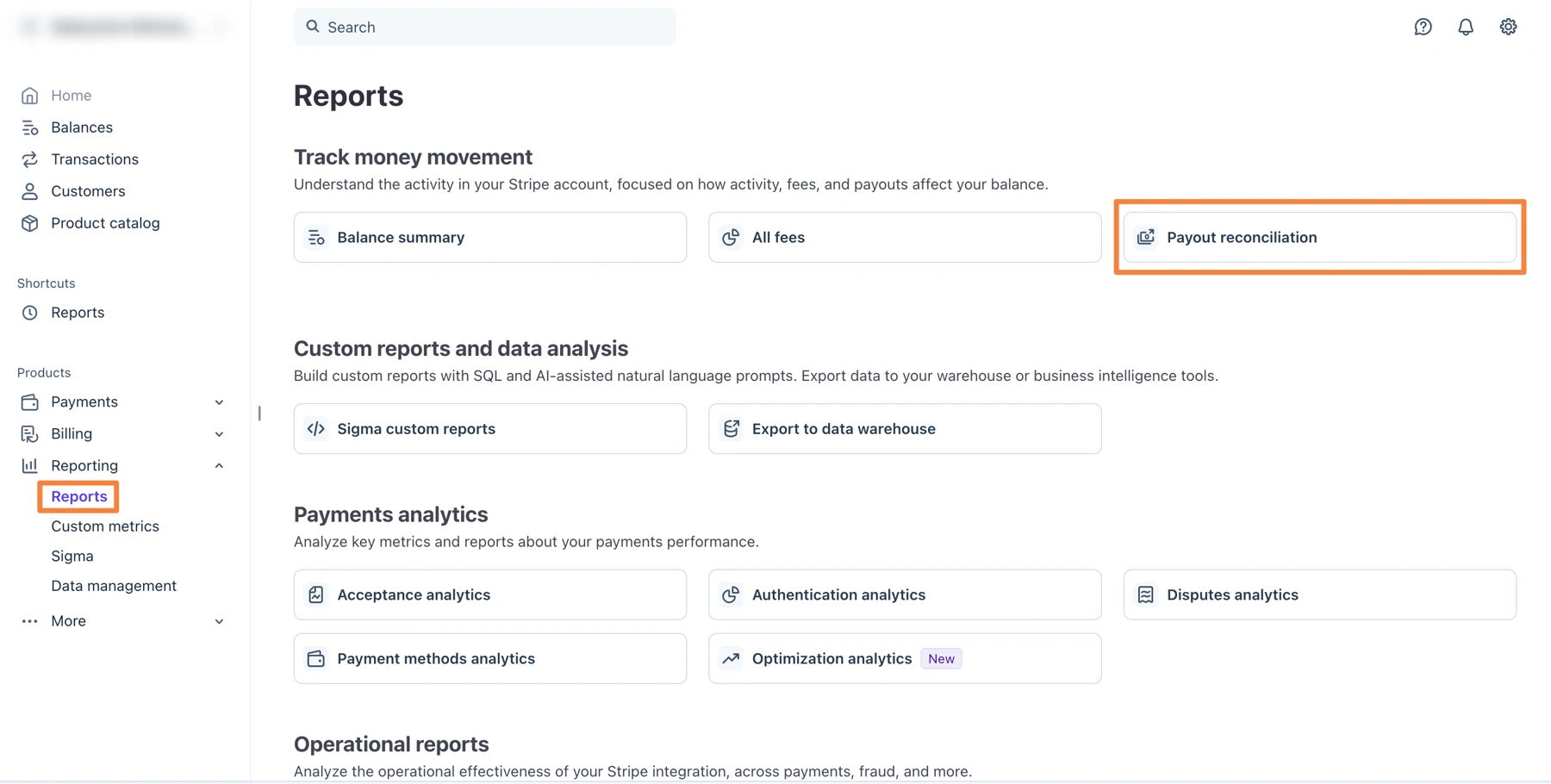
Open Reporting in the Stripe Dashboard for financial reports. Balance organizes activity by when it affected your Stripe balance. Payout reconciliation groups the transactions by the automatic payout that settled them. A payment can appear in the Balance report for one month and in a payout that arrives the next month. See how Stripe selects dates for each report.
Send Stripe transactions to QuickBooks
If you use QuickBooks Online, Intuit’s Stripe Connector by QuickBooks syncs Stripe transactions for bookkeeping. For a standalone transaction record, export a CSV from Stripe’s Reporting section.
Custom reports
Stripe Sigma supports SQL queries, prebuilt templates, and AI-powered prompts for building custom reports.
How to export Stripe reports
- Open Reporting in the Stripe Dashboard and select the report.
- Set the date range, settlement currency, and time zone where available. Stripe financial reports let you choose UTC or your account time zone.
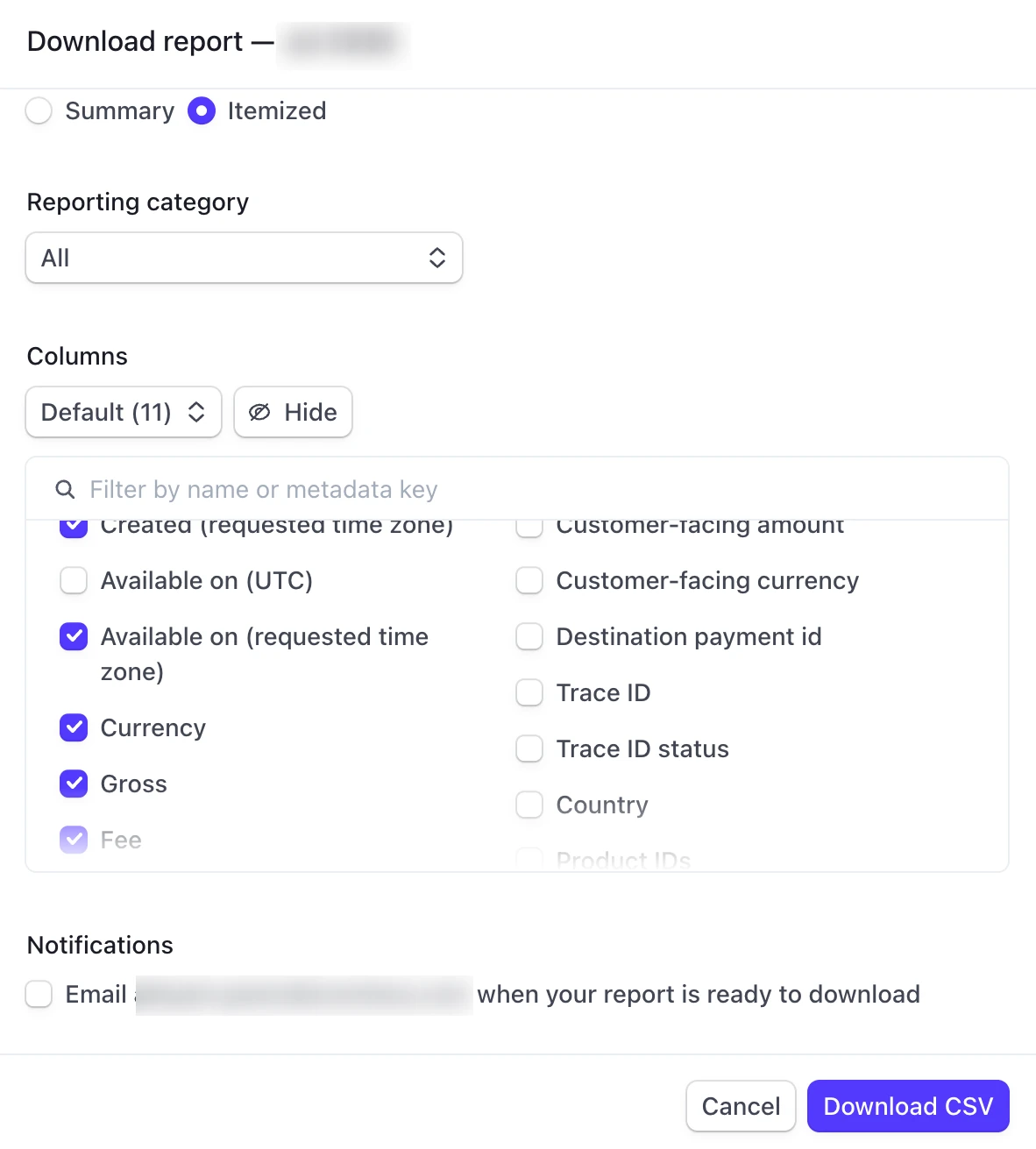
- Select Export or Download in the report section. Choose Summary for totals or Itemized for transaction rows when both are offered.
Choose CSV for sorting, filtering, or importing transactions. Stripe offers PDF for Balance Summary and Payout Reconciliation when the format is available in your export dialog. Itemized PDFs are limited to 5,000 rows. Stripe’s PDF export guide.
For recurring reports, open a report and select Schedule. Choose the frequency, columns, and currency. Stripe emails you when the report is ready to download. Stripe’s scheduling instructions.
How to reconcile a Stripe payout
Say your bank statement shows a $1,064 Stripe deposit. In this illustrative batch, $1,200 in payments, minus $36 in fees and $100 in refunds, leaves $1,064.
- Find the deposit under Balances → Payouts. Note the payout ID, amount, currency, and estimated arrival date shown by Stripe. Your bank may post it on a different day.
- Open Payout reconciliation and choose a date range that includes Stripe’s estimated arrival date. Find the payout in the Payout reconciliation section.
- Export the Itemized CSV. Filter the CSV by the payout ID in the
automatic_payout_idcolumn. Add the matchingnetamounts and compare the total with the deposit. Thegrossandfeecolumns show what contributed to each net amount.
The report is designed for automatic payouts. For manual or instant payouts, use your Balance report and transaction history to reconcile the transfer. If a recent payout is missing, check the report’s processing window. Stripe’s payout reconciliation guide · Report availability.
Key Stripe Billing metrics to track
Use Stripe Billing analytics to review recurring revenue and subscriber activity.
Revenue metrics:
- MRR (Monthly Recurring Revenue): The monthly value of active and past-due subscriptions. Stripe excludes trialing items from MRR and counts eligible paid items on the same subscription.
- ARR (Annual Recurring Revenue): MRR multiplied by 12. Useful for long-term planning and investor reporting.
- MRR growth: Stripe adds new, reactivated, and expansion MRR, subtracts contraction and churn, and accounts for currency changes.
Customer metrics:
- Subscriber churn rate: Divide the subscribers who churned in the last 30 days by the active subscribers at the start plus new subscribers during that period. Stripe counts a subscriber as churned when all their subscriptions are canceled or marked unpaid.
- LTV (Lifetime Value): The total revenue you expect from a customer before they churn. Calculated by dividing ARPU by your churn rate.
- ARPU (Average Revenue Per User): Your MRR divided by total active subscribers. Tracks whether you’re moving customers toward higher-value plans.
Operational metrics:
- Failed payment rate: The percentage of attempted charges that don’t go through. High rates signal issues with card expiration, insufficient funds, or fraud blocks.
- Trial conversion rate: Stripe divides the number of trials that converted to paid in the last 30 days by the number of trials that ended in that period.
In Billing analytics, use Explore on supported charts to see the changes behind a metric. Use Sigma when you need a breakdown beyond the available filters.
Stripe Sigma vs. standard Stripe reports
Use Stripe’s standard dashboard reports for routine exports and reconciliation. Sigma adds custom queries and reports.
Standard dashboard reports work well for:
- Basic balance and payout reconciliation
- Downloading transaction CSVs for your accountant
- Quick revenue snapshots and subscription counts
Stripe Sigma is useful when:
- You need a custom breakdown beyond the product and price filters available in Stripe Billing
- Custom queries like “churned customers by signup month” are required
- Your finance team wants to query across Stripe datasets
- You’re building investor-ready reports with specific breakdowns
The cost consideration: Stripe prices Sigma by charge volume. Its US tier for up to 250 charges per month starts at $15 per month on a monthly subscription or $10 per month on an annual subscription, with overage fees.
Stripe also offers an AI-powered Sigma Assistant that lets you ask questions in plain English instead of writing SQL. You might type “Show monthly recurring revenue by product for the past 6 months” and it generates the query automatically. Useful, but still limited to Stripe-only data.
For businesses that have outgrown Sigma entirely, Stripe Data Pipeline takes things further by syncing your Stripe data directly to a data warehouse like Snowflake, Redshift, or BigQuery. This lets you join Stripe data with the rest of your business data for truly unified reporting. A dedicated reporting tool is another option if it already supports the sources you need.
Where Stripe reporting fits
Stripe can consolidate financial reports across accounts in one Stripe organization. Financial reports use settlement currency, so check the selected currency before comparing totals. If the business also takes payments through another provider, such as PayPal, use a separate PayPal report or combine both sources in a reporting tool.
Common Stripe reporting mistakes
Even experienced finance teams make these errors when pulling Stripe reports. Avoid them to keep your numbers accurate.
Comparing MRR without checking definitions: Stripe Billing excludes trialing items and lets you configure how discounts affect MRR. Check the definitions in both tools before comparing totals.
Grouping downgrades and cancellations together: Stripe records a drop from $99 to $29 as $70 in contraction MRR. Its Customer MRR changes report separates downgrades from churn.
Ignoring failed payment data: Check failed renewals separately so you can identify subscriptions at risk and follow up on recoverable payments.
Mixing time zones: Stripe financial reports can use UTC or your account time zone. Align that setting with your accounting export before comparing daily or monthly totals.
Comparing payment dates with payout dates: A sale at month-end can settle in a payout the following month. Check the report’s date basis and wait until the selected period has been processed.
Alternative Stripe reporting tools
These tools cover different reporting needs, from comparing payment providers to tracking subscription metrics.
Putler
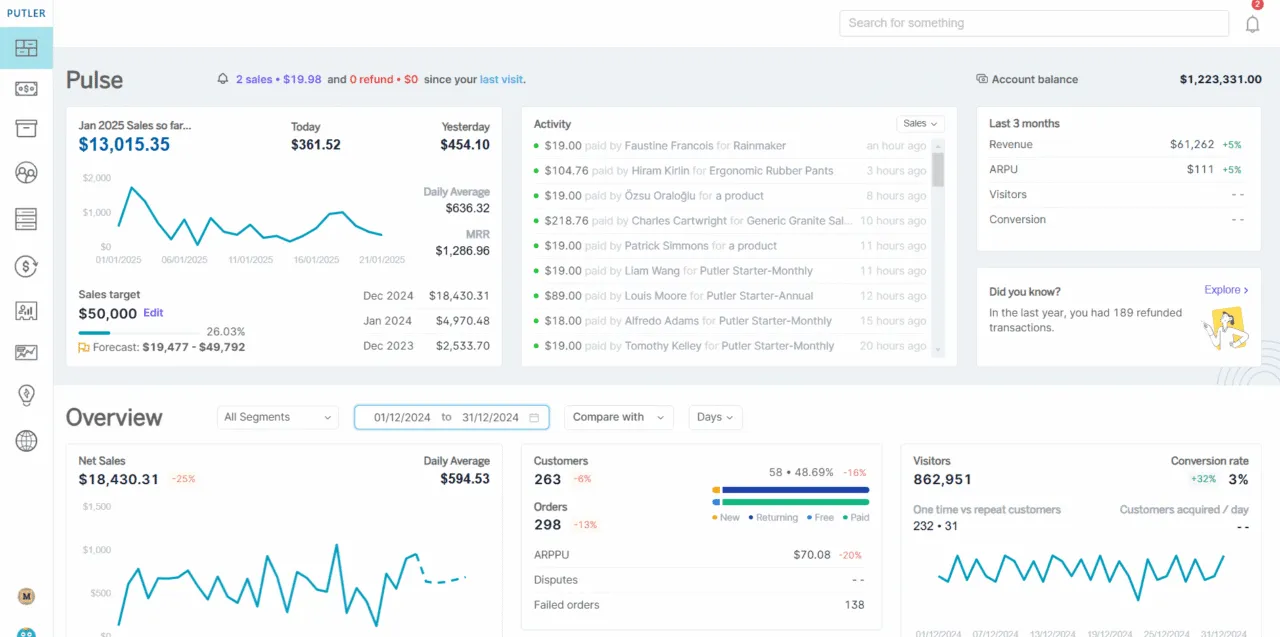
Putler’s Stripe integration brings Stripe data into the same dashboard as other supported providers and storefronts.
Baremetrics
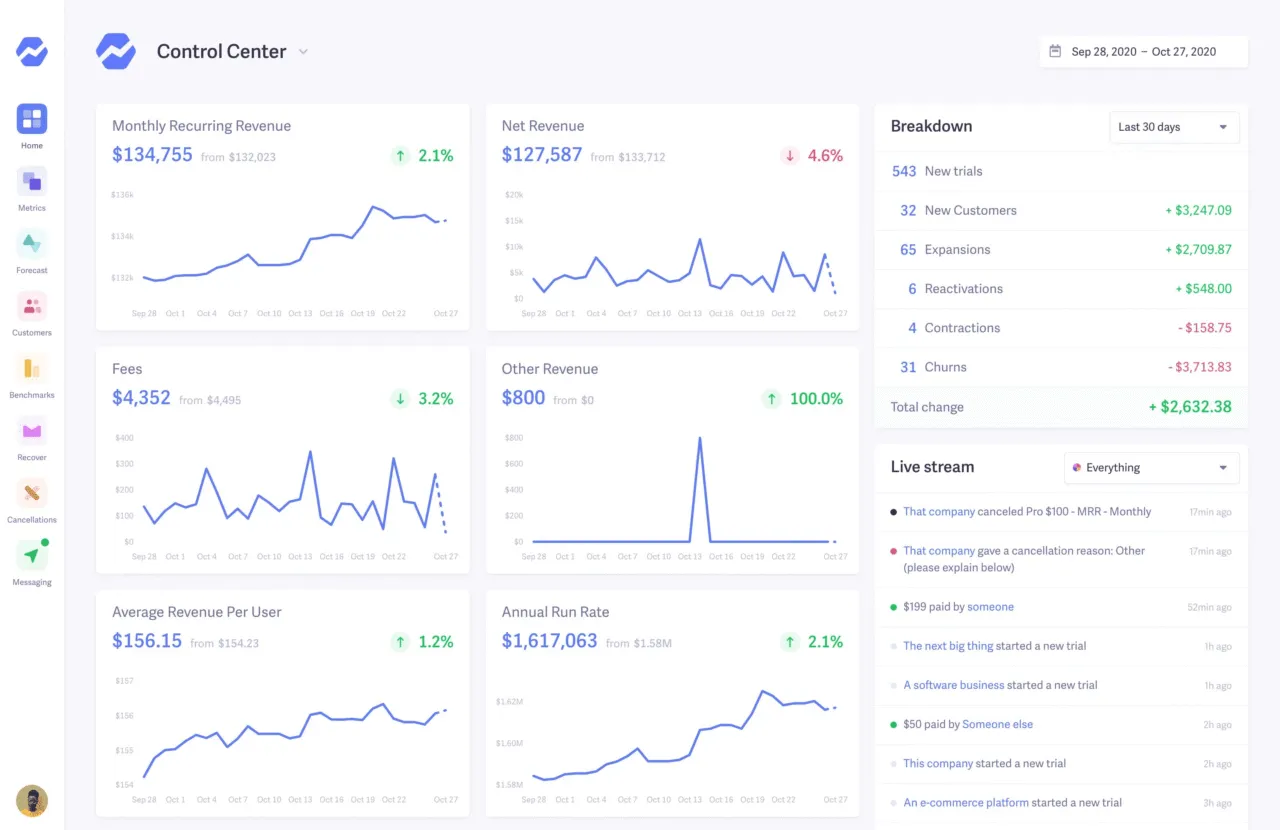
Baremetrics provides insights and analytics for businesses using payment platforms like Stripe, Recurly, and others. To import subscription history, authorize Baremetrics to access your Stripe account.
ChartMogul
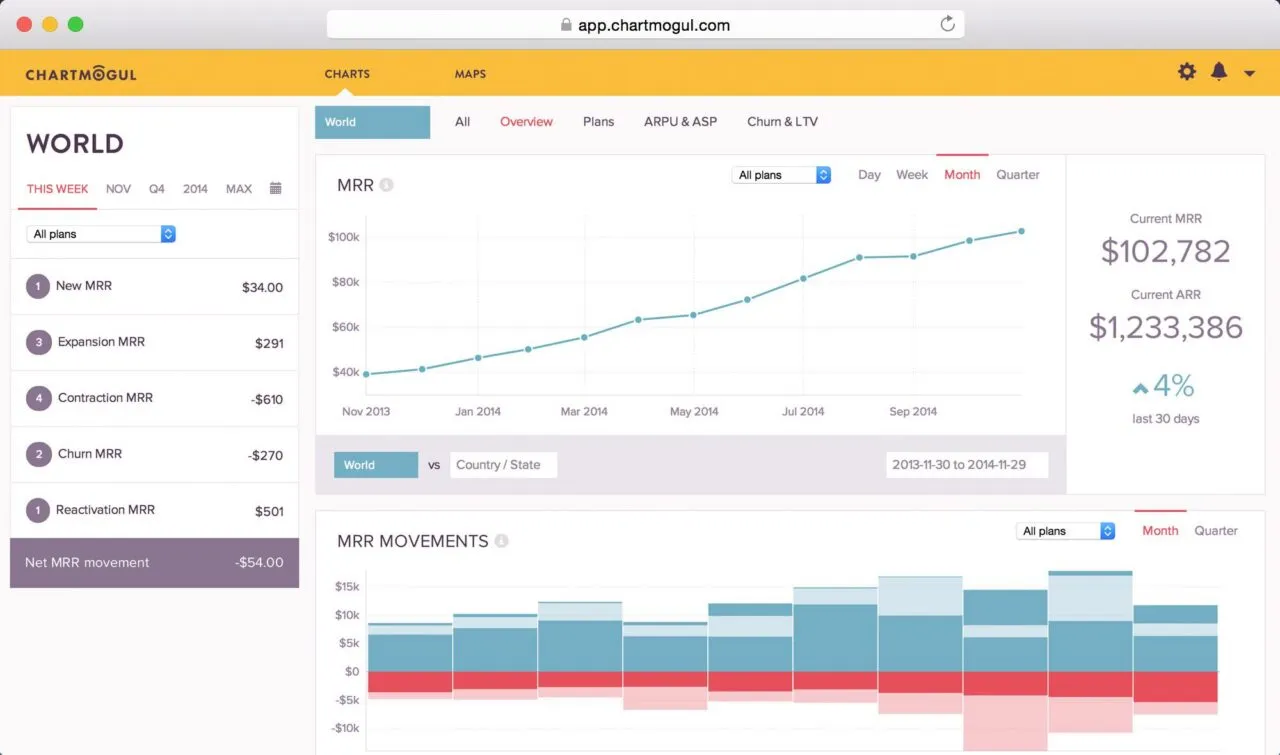
ChartMogul helps subscription businesses analyze MRR, churn, and retention.
MRR.io
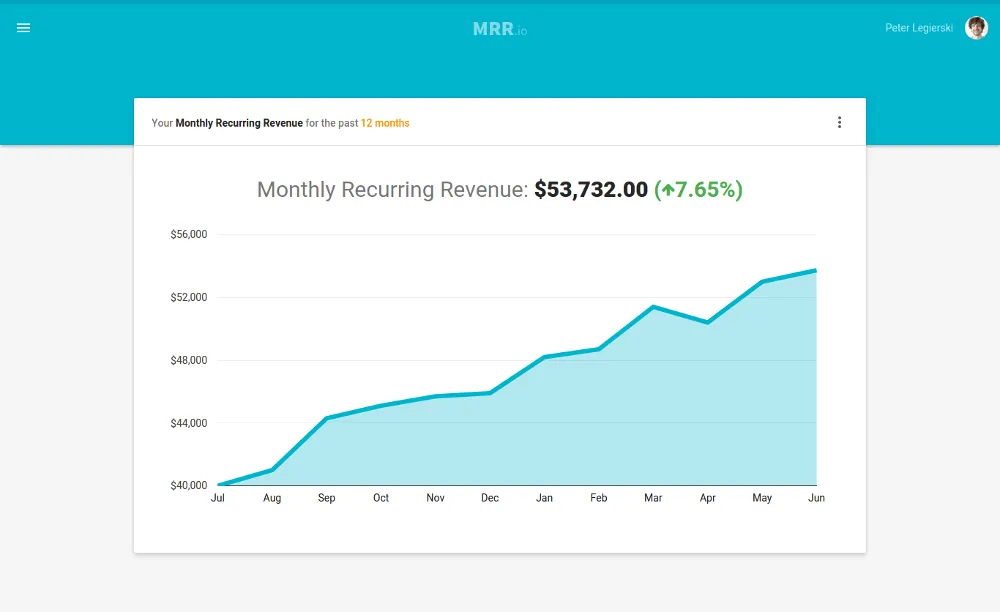
MRR.io is a lightweight reporting tool focused on subscription metrics. It connects to Stripe and provides a clean dashboard for tracking MRR, churn, and customer growth — a practical option for early-stage SaaS businesses that need basic subscription reporting without a heavy setup.
Compare Stripe and PayPal sales in Putler
Use Stripe’s financial reports to match Stripe deposits to the bank. If you also take PayPal payments, connect Stripe and PayPal to Putler to see how sales changed across both providers.
You can also connect other payment gateways and shopping carts, including Braintree, Shopify, and WooCommerce. That brings payments, orders, and product sales into one dashboard, with the option to review each source on its own.
The table uses illustrative sales figures in USD.
| Sales by provider | Month 1 | Month 2 |
|---|---|---|
| Stripe | $8,000 | $7,000 |
| PayPal | $2,000 | $3,000 |
| Combined | $10,000 | $10,000 |
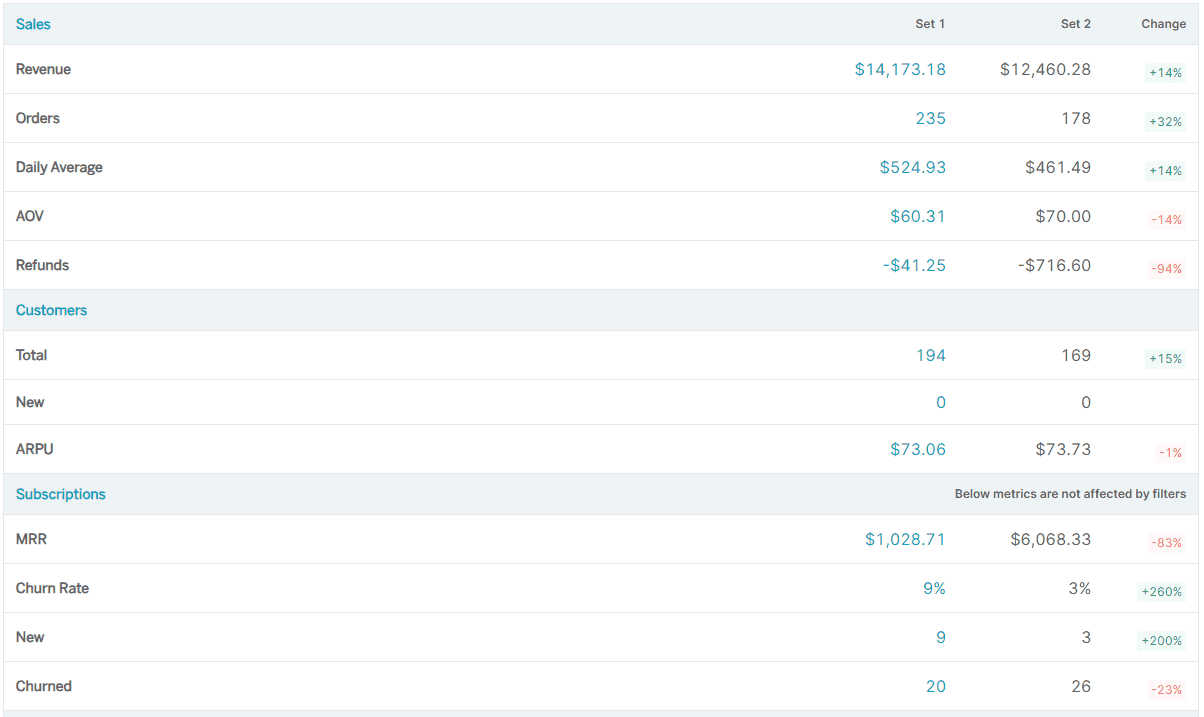
In this example, sales shifted between providers while the combined total stayed flat. In Putler’s Performance Comparison report, create a team for each payment source, select them as Set 1 and Set 2, and use the same dates for both. Check the Orders and Refunds rows alongside revenue. Compare equivalent date ranges when looking at changes month to month.
For further analysis, explore customer segments or revenue forecasting.
FAQs
What metrics are calculated in Stripe?
Stripe’s financial reports show payments, refunds, fees, and balance changes. Stripe Billing analytics adds metrics such as MRR, subscriber churn, and trial conversion.
How do I get my reports from Stripe?
Open Reporting in the Stripe Dashboard, select a report, set your date range and timezone, then click Export.
How do I get a Stripe balance report?
In the Stripe Dashboard, go to Reporting → Balance and select your date range. The summary shows the opening balance, account activity, payouts, and closing balance.
Does Stripe automatically tax?
Set up Stripe Tax, add your tax registrations, then enable automatic tax for the Stripe products you use.
Can I connect Stripe to Google Analytics?
You can send purchase events to Google Analytics with a GA4 ecommerce implementation. Use Stripe reports when you need to reconcile payouts.
What is the difference between Stripe Sigma and standard Stripe reports?
Standard Stripe reports cover balance transactions, payout reconciliation, and basic subscription metrics, available free from your dashboard. Stripe Sigma is a paid SQL-powered analytics environment that lets you write custom queries and build reports tailored to your exact needs.
Does Stripe reporting support multiple currencies?
Stripe can process payments in multiple currencies, but its reporting is organised by settlement currency, meaning you see separate reports for each currency rather than one consolidated view.
What else should you read about Stripe?
Here’s everything we’ve written for businesses that take payments on Stripe. It covers the Stripe dashboard and what it can’t tell you, analytics and reporting tools, multiple Stripe accounts, revenue forecasting, and alternatives if you’re thinking of moving.

The Stripe Dashboard is where you manage every part of your Stripe account. This guide covers every section, what it tracks, what it does not, and how to get more from your data.
Revenue's coming in and Stripe looks fine. But ask for MRR accuracy, churn by segment, or which product is profitable, and Stripe goes quiet. Here's every gap and what to do about it.

Interested in creating multiple Stripe accounts? Here's a complete guide that will answer all your questions.
Stripe's basic analytics fall short for e-commerce growth. Discover the insights you're missing—and how to unlock deeper data to fuel smarter decisions.
Businesses seek alternatives due to their unique needs. From customized plans to broader geographic support, discover tailored solutions beyond Stripe.

Advanced analytics to track your business numbers for multiple Stripe accounts - revenue, refunds, products, customers, transactions, forecast and more.

Discover the top Stripe analytics tools to track revenue, analyze subscriptions, and optimize payments. Compare features, pricing, and benefits to choose the best one for your needs.