

PayPal vs Stripe comes down to the checkout and billing setup your business needs. Choose Stripe for flexible payment flows and subscription tools. Add PayPal when customers want its wallet, or compare PayPal’s card-processing products if you want it to handle cards too.
The fee comparison is less straightforward than it looks. A PayPal wallet payment and an advanced card payment have different prices, even though both carry the PayPal name. Comparing the right products gives you a much better starting point than declaring one provider the winner.
This guide focuses on US online businesses: fees, refunds, payouts, checkout options, recurring payments, and the practical choice between Stripe, PayPal, or both.
PayPal vs Stripe at a glance
Stripe is a payments platform with hosted checkout, payment links, customizable payment forms, and separate billing tools. PayPal combines a consumer wallet with merchant checkout, card processing, invoicing, and recurring payments.
| Your priority | Stripe | PayPal |
|---|---|---|
| Accept online cards | Hosted or embedded checkout and payment links | Standard or advanced card-processing options |
| Offer a PayPal wallet button | Check the supported integration for your business country | Accept PayPal directly through a suitable checkout integration |
| Manage subscription changes | Evaluate Stripe Billing and its separate cost | Evaluate PayPal subscription plans and payment recovery |
| Customize the payment flow | Checkout or Elements with options for custom logic | Expanded Checkout with customizable card fields |
Compare the specific payment product, not just the provider name. Your store platform, payment methods, and recurring-payment needs determine which options you can actually use.
Stripe vs PayPal fees: compare the right products
Stripe’s standard US online card rate is lower than PayPal’s standard Checkout card rate. However, PayPal’s advanced card-processing rate is slightly lower than Stripe’s standard rate. The difference depends on the PayPal product and your eligibility.
These published rates were checked on October 13, 2026. They apply to domestic US online payments in USD; custom agreements, international payments, and platform charges can change your bill.
| Payment product | Published processing rate | Fee on a $100 sale |
|---|---|---|
| Stripe standard online cards | 2.9% + $0.30 | $3.20 |
| PayPal standard credit and debit cards | 2.99% + $0.49 | $3.48 |
| PayPal Advanced Credit and Debit Card Payments | 2.89% + $0.29 | $3.18 |
| PayPal Checkout wallet or Venmo | 3.49% + $0.49 | $3.98 |
Sources: Stripe’s US pricing, PayPal’s product pricing, and the PayPal US merchant fee schedule. PayPal markets its customizable card option as Expanded Checkout; the detailed schedule names Advanced Credit and Debit Card Payments.
PayPal Pay Later and in-person payments have separate rates.
What does a $100 sale cost?
For a hypothetical domestic card sale, Stripe’s fee is $100 × 2.9% + $0.30 = $3.20. PayPal’s advanced card rate gives $100 × 2.89% + $0.29 = $3.18. That two-cent difference is too small to settle the whole checkout decision.
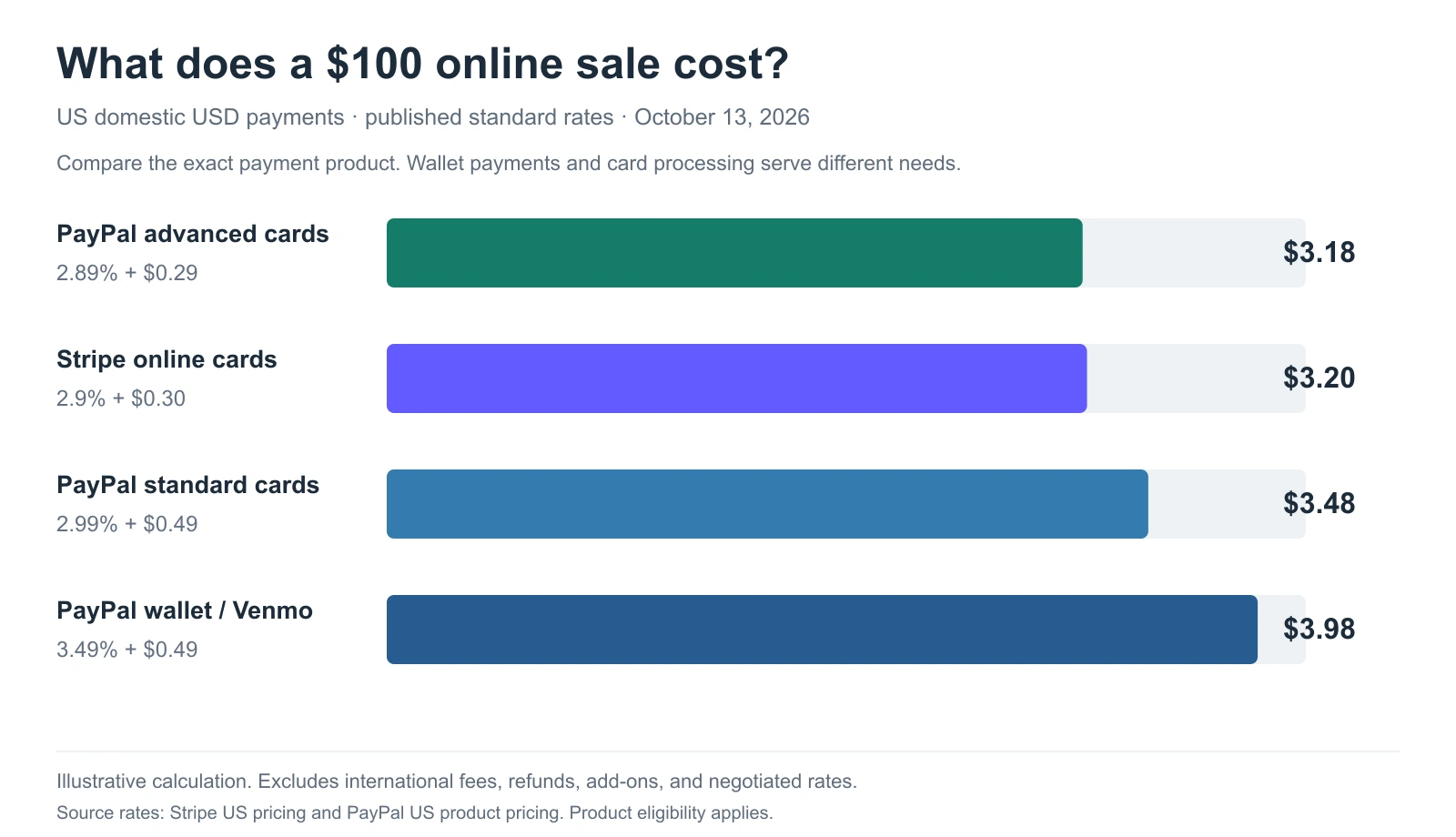
At 1,000 identical $100 payments, the same arithmetic gives $3,200 for Stripe cards and $3,180 for PayPal advanced cards. PayPal wallet payments would total $3,980. These examples exclude refunds, add-ons, international charges, and negotiated rates.
A wallet button offers a different payment choice from a card form. Before removing it to save fees, check whether those customers complete payment another way.
What else changes the monthly bill?
The headline processing rate covers only part of the comparison. Price the services you’ll actually use:
-
International payments and currency conversion. Stripe’s US standard pricing lists separate international-card and conversion charges. PayPal also has cross-border and conversion rules, which vary by transaction type.
-
Billing tools. Subscription management, invoicing, tax tools, and platform services may have separate charges.
-
Refunds and disputes. A refunded sale can still leave you with processing costs; a dispute creates another cost category.
-
Platform and transfer fees. Your ecommerce platform may charge for an external gateway, while optional instant withdrawals can add costs.
Calculate the bill using your average order value, payment-method mix, refund rate, and required add-ons. A single sample transaction won’t capture that mix.
What about nonprofits and small payments?
Nonprofit eligibility and pricing need their own check. PayPal publishes charity pricing, but the rate depends on the payment service and approval. Ask each provider for the rate that applies to your organization instead of assuming a universal nonprofit discount.
For small payments, the fixed charge takes a larger share of the sale. Verify any special pricing program before comparing it with a standard card rate. Commercial sales should use the appropriate business payment product.
Refunds, disputes, and payouts: what reaches your bank?
Customer payments, processing fees, and bank deposits are different numbers. Stripe and PayPal also distinguish refunds, payment disputes, and the movement of available funds to your bank.
Do Stripe and PayPal return processing fees on refunds?
For standard online payment processing, neither provider returns the original processing fee when you refund a sale. PayPal’s refund guidance says there is no fee to issue a goods-and-services refund, but the original receiving fee is retained.
Stripe’s refund policy also retains original processing fees. Additional refund charges can apply to some payment methods or pricing agreements, so check your own schedule.
If you fully refund the hypothetical $100 Stripe card sale, you return $100 to the customer while the $3.20 processing cost remains. Include refund-related fee losses when estimating payment costs.
How do dispute fees differ?
A refund you issue voluntarily is not the same as a buyer disputing a payment. Stripe’s US pricing lists a $15 dispute-received fee and a separate $15 fee when you manually counter a dispute. The countered fee is returned if you win.
PayPal’s merchant schedule distinguishes a $20 card chargeback fee from a $15 standard dispute fee and a $30 high-volume dispute fee. Which rule applies depends on the transaction and the applicable exceptions or protections; don’t add all three to every dispute.
Before choosing, check the evidence deadline, protection eligibility, and who on your team will handle a disputed order. A fee table can’t tell you whether a particular claim will be covered.
How long do payouts take?
Stripe’s payout documentation lists a two-business-day US settlement timing, but settlement is not a promise that every sale reaches your bank two days later. The first payout typically completes within 7 to 14 days, depending on account conditions; payout scheduling and your bank can affect arrival.
PayPal says standard bank withdrawals typically take 1 to 3 business days. Instant transfers usually complete within minutes, subject to eligibility and review. Available balance is different from a payment that’s still held or pending.
For US business accounts, PayPal’s merchant schedule lists eligible standard bank transfers without conversion at no fee. Instant transfers cost 1.5%, with a $0.50 USD minimum. Use the business-account schedule when budgeting, since consumer-account rules differ.
Plan cash flow around your account’s actual payout estimate, especially when starting a new processor. Avoid treating an instant-transfer option as guaranteed access to every incoming payment.
Checkout and payment methods: how much setup do you need?
Both providers offer more than one way to accept payments. Stripe is not limited to developer-built checkout, and PayPal is not limited to sending customers away from your website.
Hosted checkout, embedded forms, and payment links
Stripe Checkout supports hosted and embedded payment experiences. Payment Links provides a no-code starting point, while Elements gives developers more control over the payment form.
PayPal’s Expanded Checkout supports card payments and options such as Apple Pay and Google Pay. Its advanced card integration lets you customize card fields. Approval and supported features vary by account and market.
If you use a store plugin or hosted ecommerce platform, inspect the integration it offers. A provider’s product page may describe a feature that your chosen plugin doesn’t expose.
Match the payment choices to your customers
PayPal gives buyers a recognizable wallet option alongside the card methods available in your checkout setup. Stripe supports cards and multiple wallet or local-payment options, depending on the integration and region.
Test the payment choices on desktop and mobile. Check whether a buyer can pay without creating an unwanted account, whether payment errors are understandable, and whether a successful payment creates the correct order record.
Adding payment methods should make a purchase easier to complete. More buttons alone don’t establish a better checkout.
Subscriptions and invoices: compare the whole billing workflow
Stripe and PayPal both support recurring payments. For a subscription business, the important differences are how you manage plans, recover failed payments, and connect billing records with customer accounts.
Stripe Billing offers subscription tools with separate pricing: its pay-as-you-go plan charges 0.7% of Billing volume, excluding one-off invoices. That charge is distinct from payment processing. Include it when estimating the cost of a subscription collected through Stripe.
PayPal Subscriptions supports recurring plans, trials, upgrades, and payment recovery. A store’s subscription plugin may determine how those capabilities work for customers, so evaluate the full integration rather than only the provider’s feature list.
Compare these tasks before choosing:
-
Changing a customer’s plan or billing amount.
-
Applying trials, discounts, or prorated charges.
-
Handling a failed renewal and letting the customer update payment details.
-
Cancelling a subscription without losing the customer record.
-
Exporting billing history and tracking subscriptions alongside one-time sales.
For an existing subscriber base, confirm what can be migrated before switching providers. Moving reports does not automatically move payment permissions or saved payment details. The PayPal subscriptions guide covers the recurring-payment side in more detail.
International payments: check your business country first
The country where you can open a merchant account is different from the countries where your customers live. A provider’s worldwide reach also doesn’t mean every checkout, subscription, or marketplace feature is available everywhere.
Stripe publishes a supported business-country list. PayPal advertises availability in over 200 markets, but its advanced-card documentation has a narrower product-specific list. Check the product you’ll use in your business’s registered country.
For international selling, separate three questions:
- Can your business use the product? Check legal-entity, account, bank, and business-model eligibility.
- Can customers pay as they expect? Check payment methods and the currencies shown at checkout.
- How will you receive the money? Check supported settlement arrangements, conversion costs, and your linked bank account.
For a US merchant, the cross-border fee and conversion path may matter more than comparing country counts. Neither provider should be treated as the automatic winner for every international business.
Security and support: what are you responsible for?
A payment provider’s PCI compliance does not remove your business’s responsibilities. The way your checkout handles card data affects the requirements you must meet.
Stripe’s security guide describes compliance as a shared responsibility. Using a hosted or properly integrated payment form can reduce how much sensitive data your own systems handle. Confirm the requirements for your chosen Stripe or PayPal integration instead of assuming an on-site form is automatically compliant.
Support deserves a practical check too. Find the merchant support route available to your account, how you submit dispute evidence, and where payout or account-review notices appear. Keep those details somewhere your team can access.
Different review platforms, dates, and reviewer groups don’t establish which processor provides better support. Use recent reviews to identify questions worth asking, rather than as a security or reliability verdict.
PayPal or Stripe: which should you choose?
Choose the setup that handles your required payment and billing tasks with the least unnecessary work. A small difference in card fees shouldn’t outweigh missing renewal features or a payment method your customers use.
Choose Stripe for a configurable payment and billing setup
Shortlist Stripe when you need customizable payment flows, subscription management, or a platform integration that works well with its tools. Its hosted checkout and payment links also make it viable without a custom development project.
Check the cost of Billing and other required services before calling it the cheaper option. For a straightforward online store, your platform’s supported payment configuration may be more important than advanced API capabilities.
Choose PayPal for its wallet, or evaluate its card products
Add PayPal when customers want to pay through their PayPal account and your platform supports a suitable integration. Compare Expanded Checkout separately if you also want PayPal to process cards.
The advanced card rate makes a blanket “Stripe is cheaper” verdict inaccurate. Eligibility, setup work, payment methods, and risk-management responsibilities still matter alongside that rate.
Use both when they serve distinct checkout needs
Stripe for cards and PayPal for wallet payments can be a practical combination. Review completed payments, failed attempts, fees, and the effort needed to reconcile the two systems.
For US merchants, don’t assume PayPal payments can simply be processed through a standard Stripe account. Stripe’s native PayPal payment method is limited to supported European business locations; US setups need an appropriate separate or custom integration.
How to track sales when you use both gateways
Using both providers creates two payment records to reconcile, not two separate businesses. Start by agreeing on what your revenue report should include and how refunds are dated.
Suppose Stripe records $6,000 in payments and PayPal records $4,000 during a period. If total refunds are $500, payments less refunds are $9,500 before processing fees and other adjustments. Bank deposits can differ because fees, payout timing, reserves, and other balance movements are separate.
Use the native reports to investigate payment and payout details. The PayPal reporting guide and Stripe reporting guide explain the reporting options on each side.
Putler can bring connected PayPal and Stripe transaction data into combined sales, customer, product, and subscription reporting. That helps you review the business across gateways while keeping the native processor records available for payment and settlement checks.
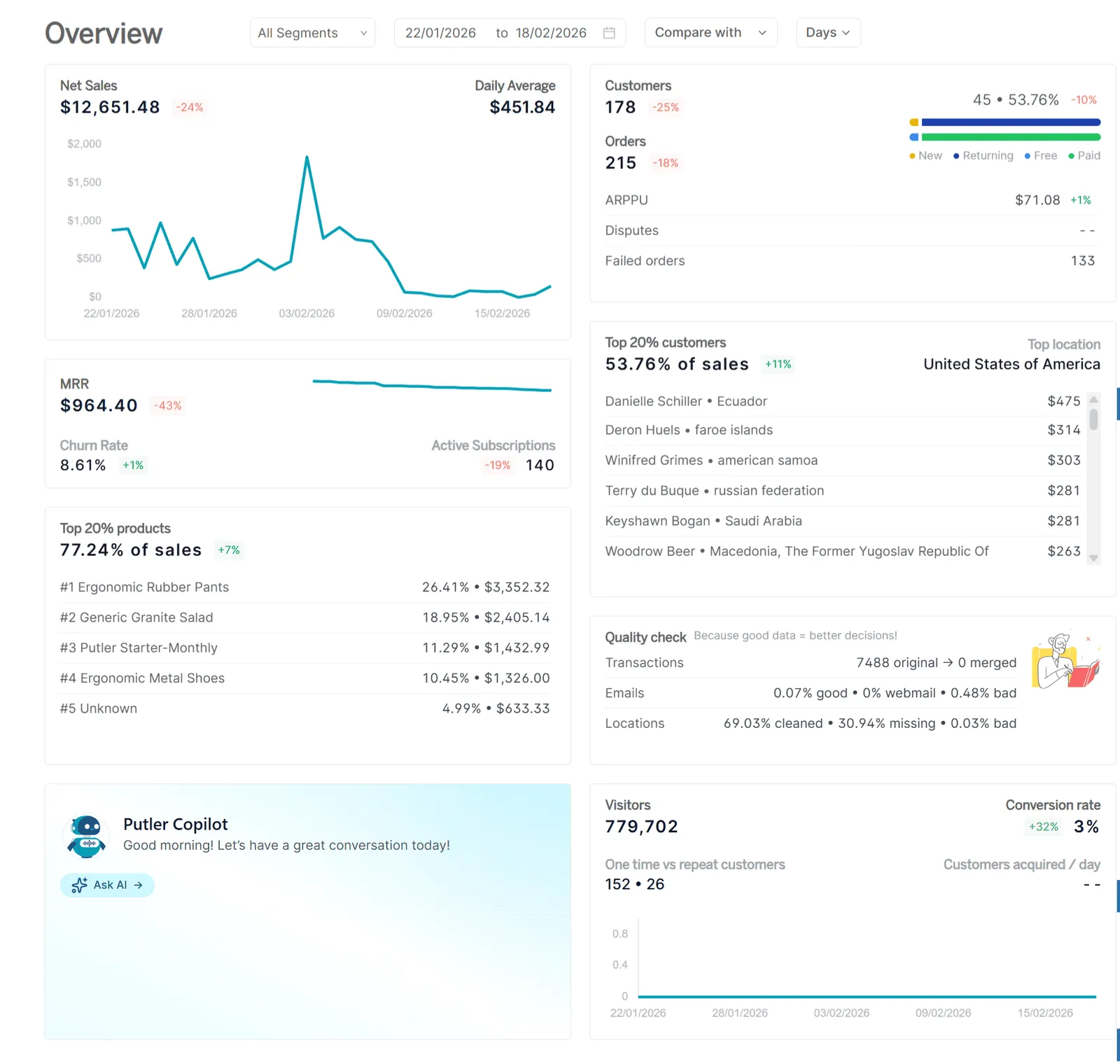
Before relying on a combined dashboard, check source coverage, historical data, currencies, and the treatment of duplicate or refunded transactions. Connected reporting does not itself transfer subscriptions or guarantee that every old account record will remain available after closure.
What to check before changing your checkout
Before choosing Stripe or PayPal, write down the exact product and rate you’ll use. Test the payment and billing tasks your business depends on, including a refund and a failed renewal where relevant. Confirm the first-payout estimate before planning around incoming funds.
Keep exports and subscription records from your existing setup. Agree on a reporting baseline so you can compare the new checkout without mistaking payout timing or a changed fee definition for a change in sales.
Frequently asked questions
Is Stripe cheaper than PayPal?
Stripe’s standard US card rate is lower than PayPal’s standard Checkout card rate, but PayPal’s advanced card rate is slightly lower than Stripe’s. The cheaper setup depends on the product, your eligibility, and additional services. Use the fee table to compare matching payment types.
Can a business use both Stripe and PayPal?
Yes, if its platform supports the required integrations. A common approach is to accept cards through one processor and PayPal wallet payments through PayPal. Check fees and payment records separately before combining reports.
Is Stripe safer than PayPal?
Neither should be selected on an unsupported blanket safety claim. Both provide payment-security tools, but the merchant must use its integration securely and meet applicable compliance requirements. Hosted forms, access controls, and handling of card data affect that responsibility.
Which works better for subscriptions?
Stripe Billing is worth comparing when you need flexible subscription management, with its separate cost included. PayPal Subscriptions also supports recurring plans and payment recovery. Test plan changes, failed renewals, and cancellation through the plugin or platform you’ll use.
Can I switch processors without losing historical data?
Preserve exports and check your future access before switching. Historical reports, saved payment details, and active subscriptions are separate migration tasks. An analytics tool can help combine supported data, but it does not automatically transfer payment authorizations.