

The one thing I learned with years of experience in eCommerce is that having data isn’t a competitive advantage; knowing what to do with it is.
This is where tools like Triple Whale come into play. If you’ve spent even five minutes in a DTC founder forum or a Shopify Slack group, you’ve heard the name.
It promises clarity. It promises intelligence. It promises to be the command center for your business.
In this Triple Whale review, we’re cutting through the hype. No affiliate sugarcoating. No feature-dump fluff. Just one clear question: does it help you make better decisions?
We’ll walk through what Triple Whale does, where it thrives, and where it falls short.
Because in the end, what you need isn’t just a dashboard. You need a decision system.
What is Triple Whale?

Triple Whale is an analytics platform built specifically for Shopify stores.
At its core, it’s a data hub, where you can connect your store, your ads, and your email/SMS tools, and get a centralized view of what’s happening across your business.
It pitches itself as the “operating system for eCommerce,” and it backs that up with features like:
- A real-time dashboard showing your revenue, ROAS, CAC, and ad performance
- A custom tracking pixel (called the Triple Pixel) that improves attribution accuracy
- AI-powered insights via a tool called Moby (think of it as a chatbot with business smarts)
- Cohort tracking to understand repeat customer behavior and lifetime value (LTV)
- Creative analytics to analyze which ad images, videos, or copy are converting
But there’s a caveat baked into the architecture: Triple Whale is a Shopify-first ecosystem.
That means if you’re selling on WooCommerce, Etsy, eBay, Amazon, or even just using PayPal or Stripe without Shopify, you’re out of luck.
It’s powerful. But as we’ll see in the next sections of this Triple Whale review – power doesn’t always equal flexibility.
Triple Whale review: Exploring the dashboard
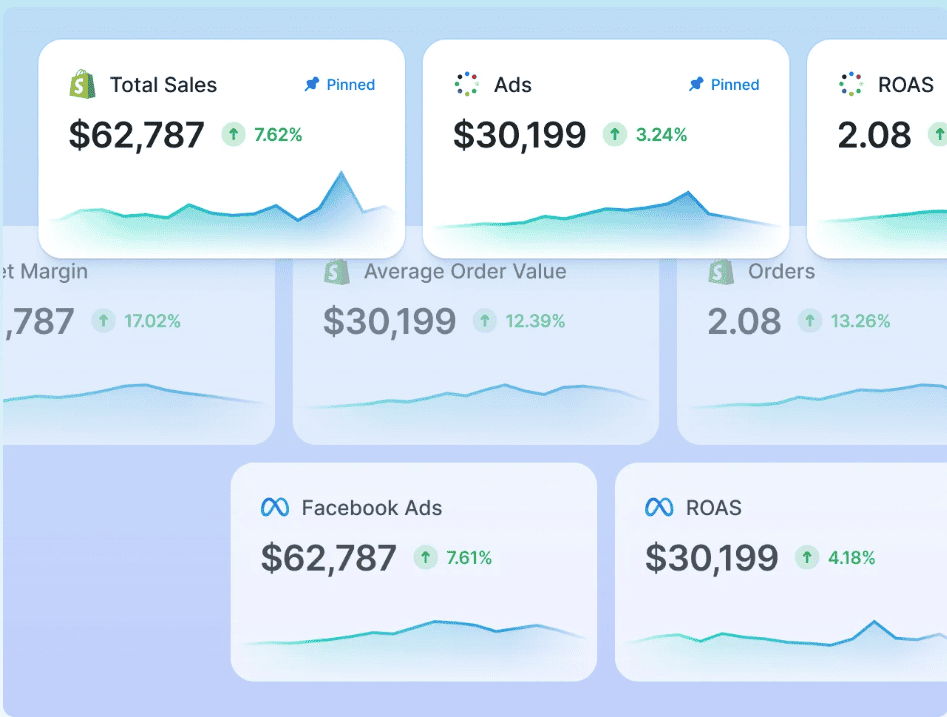
If Triple Whale gets one thing undeniably right, it’s the visuals which are instantly captivating.
The Triple Whale dashboard is polished, dynamic, and undeniably useful at first glance.
It’s designed to be your “mission control,” especially for Shopify brands navigating paid traffic. Think of it as Google Analytics, Meta Ads Manager, Klaviyo, and your Shopify backend rolled into a single screen.
What you see
Let’s unpack the core dashboard elements, as visible in Triple Whale’s official product pages and demo videos:
The dashboard prominently displays:
- Blended ROAS (Return on Ad Spend across all platforms)
- Revenue (total, by day/week/month)
- Ad Spend (Google, Meta, TikTok broken out)
- New vs Returning Customers
- AOV (Average Order Value)
- LTV (Customer Lifetime Value)
Each of these tiles updates in real-time, and you can filter by attribution model (first-click, last-click, Triple Pixel), campaign, or cohort. It’s clean, color-coded, and fast to scan.
Strengths for marketers and founders
What stands out is how focused the experience is on performance marketing. For example:
- You can immediately see which channel is driving the most efficient customer acquisition.
- The Creative Cockpit gives you ROI insights at the ad creative level, image, copy, and video.
- Dashboards can be configured by role—e.g., a founder gets the “high-level view,” while a performance marketer drills down into CAC vs revenue by ad set.
This makes Triple Whale appealing for DTC brands that are highly ad-dependent and need speed over granularity.
The missing layer: Breadth
Here’s where a seasoned analyst pauses.
While the dashboard is tight for Shopify and paid ads, it lacks native visibility for:
- Non-Shopify revenue (Etsy, WooCommerce, Amazon, etc.)
- Email/SMS revenue not tied to Shopify checkouts.
- PayPal/Stripe sales are happening outside the Shopify gateway.
It’s not that the dashboard is flawed; it’s focused. But the trade-off is that you lose multi-platform context.
Triple Whale features and functionalities
Triple Whale markets itself not just as a dashboard, but as an analytics engine, a platform that helps you understand your business, not just monitor it.
But when we dissect its analytics layer through the lens of decision-making, we find strengths… and some gaps.
Let’s walk through the most talked-about features in the Triple Whale analytics suite.
1. Triple Pixel: Attribution engine
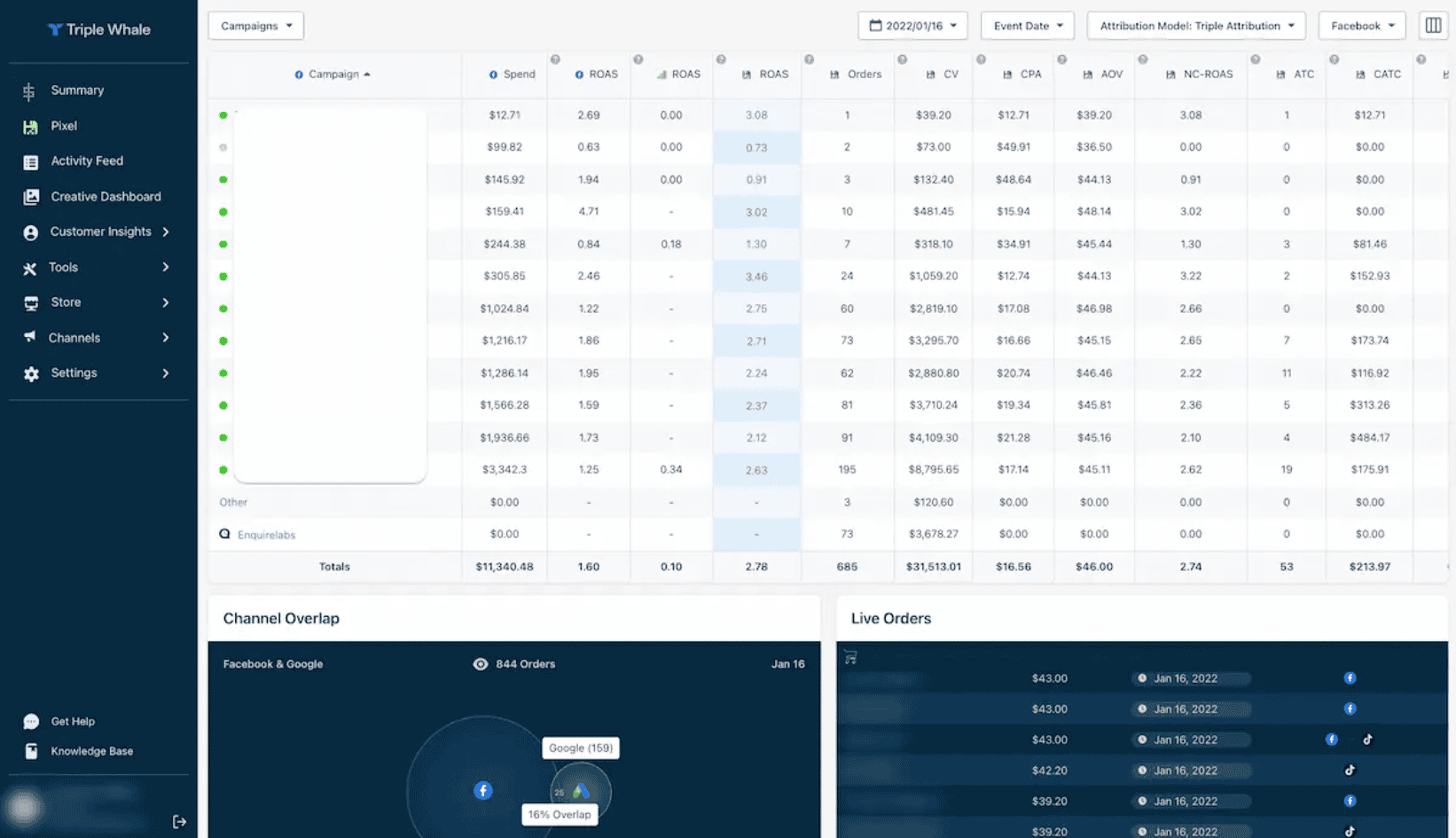
The Triple Pixel is a first-party tracking script that connects ad impressions, clicks, and onsite behavior across devices.
Unlike Meta or Google tracking (which breaks after iOS 14.5), Triple Pixel creates a persistent identity layer to stitch together the customer journey.
What it does well:
- Improves attribution accuracy significantly
- Allows you to compare first-click, last-click, and Triple Whale’s multi-touch models
- Feeds your ad platforms more accurate event data
Limitations:
- Only works fully inside Shopify environments
- Doesn’t capture off-platform conversion events (e.g., PayPal buttons, WooCommerce checkouts)
2. Moby agents: AI-driven insights
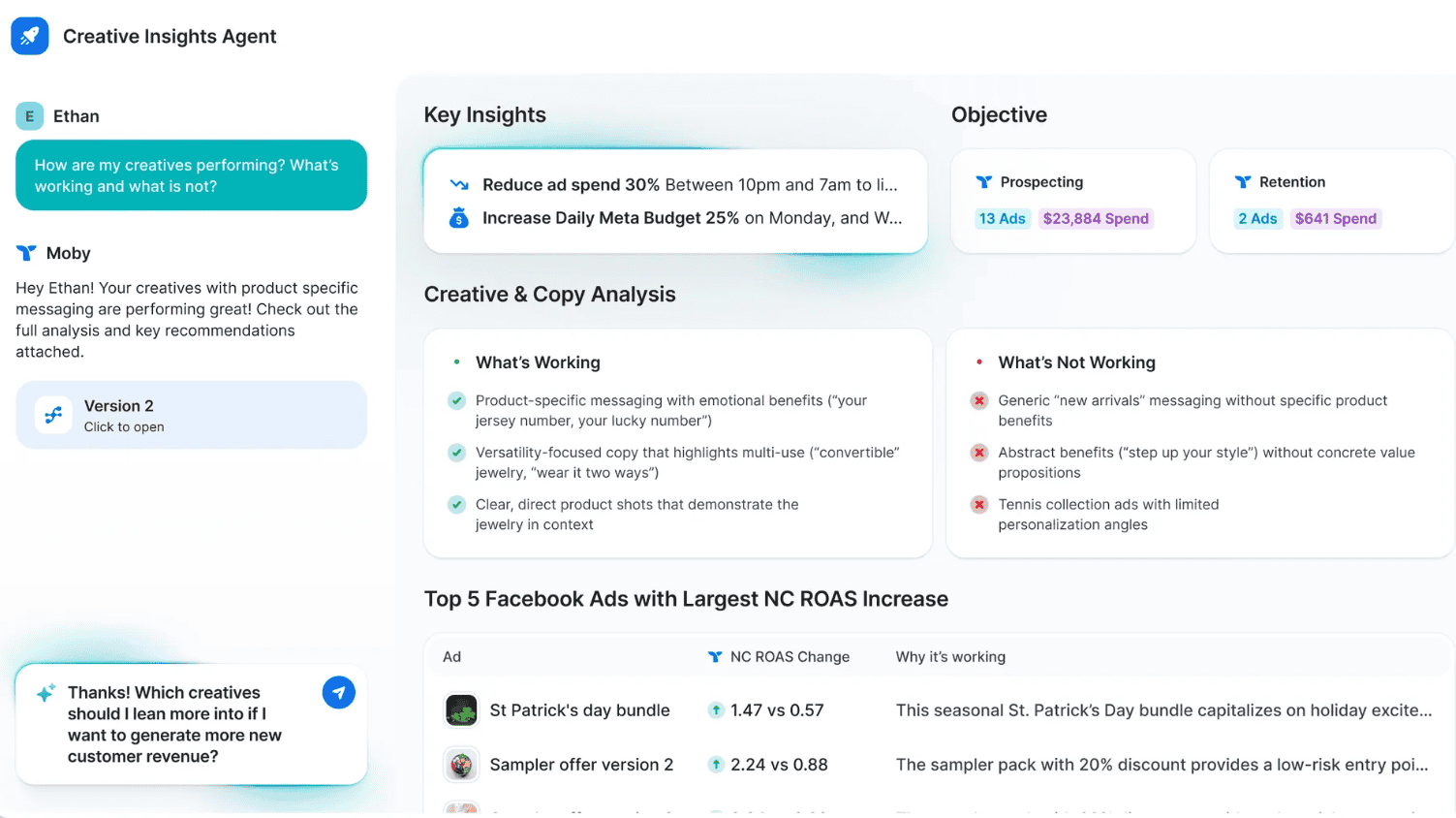
Triple Whale’s AI assistant, Moby, acts like a data analyst-in-a-box. You can ask it questions like:
- “What was our most profitable creative last month?”
- “Which campaign is underperforming this week?”
It also has agents focused on:
- Creative analysis (image/video/copy scoring)
- Retention patterns
- Budget reallocation suggestions
- Klaviyo flows and lifecycle gaps
Pros:
- Beginner-friendly way to surface insights without writing SQL or opening spreadsheets
- Fast recommendations for marketers on the fly
Caution:
Outputs are only as good as the inputs if you don’t run your entire business inside Triple Whale’s ecosystem. Moby can’t see the whole picture.
3. Cohort analysis and LTV tracking
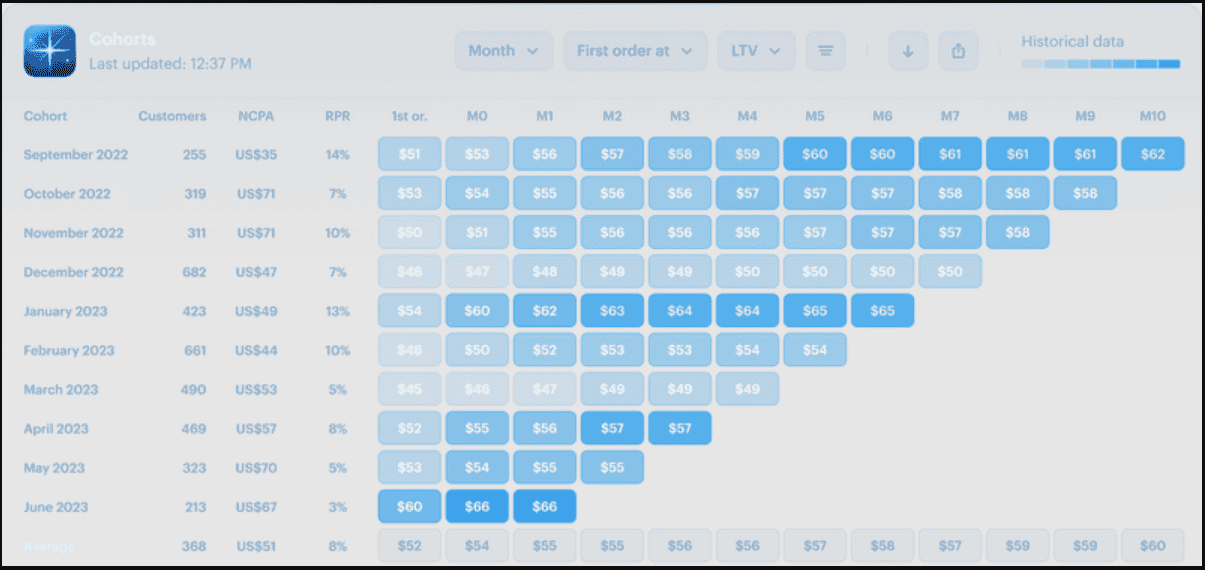
Triple Whale offers cohort charts that group customers by first order date and show how much revenue they generate over time.
This helps answer:
- What is the LTV of customers acquired in November?
- How long does it take to recover CAC?
- Are we improving retention over time?
It’s visual, clean, and founder-friendly. You don’t need a data team to spot if your month-over-month LTV is trending up.
But again: it’s Shopify-only. If some customers buy through Amazon or PayPal directly, those cohorts are invisible.
4. Creative analytics

For ad-driven brands, this is gold. Triple Whale analyzes your ad creatives (copy, visuals, video) and shows performance at the asset level—not just by campaign.
You can sort by:
- ROI per creative
- CTR, conversion rate, and LTV per visual variant
- Top-performing copy patterns
It’s like having a creative strategist running AI-based audits 24/7.
Who uses this? Performance marketers, media buyers, and growth teams optimizing ad budgets.
What’s missing? Attribution outside Meta/Google/TikTok is sparse. Organic creative, influencer UGC, or offline campaigns aren’t included.
Putler doesn’t offer creative analytics—it’s not trying to. Its strength lies in operational data and customer behavior, not ad design.
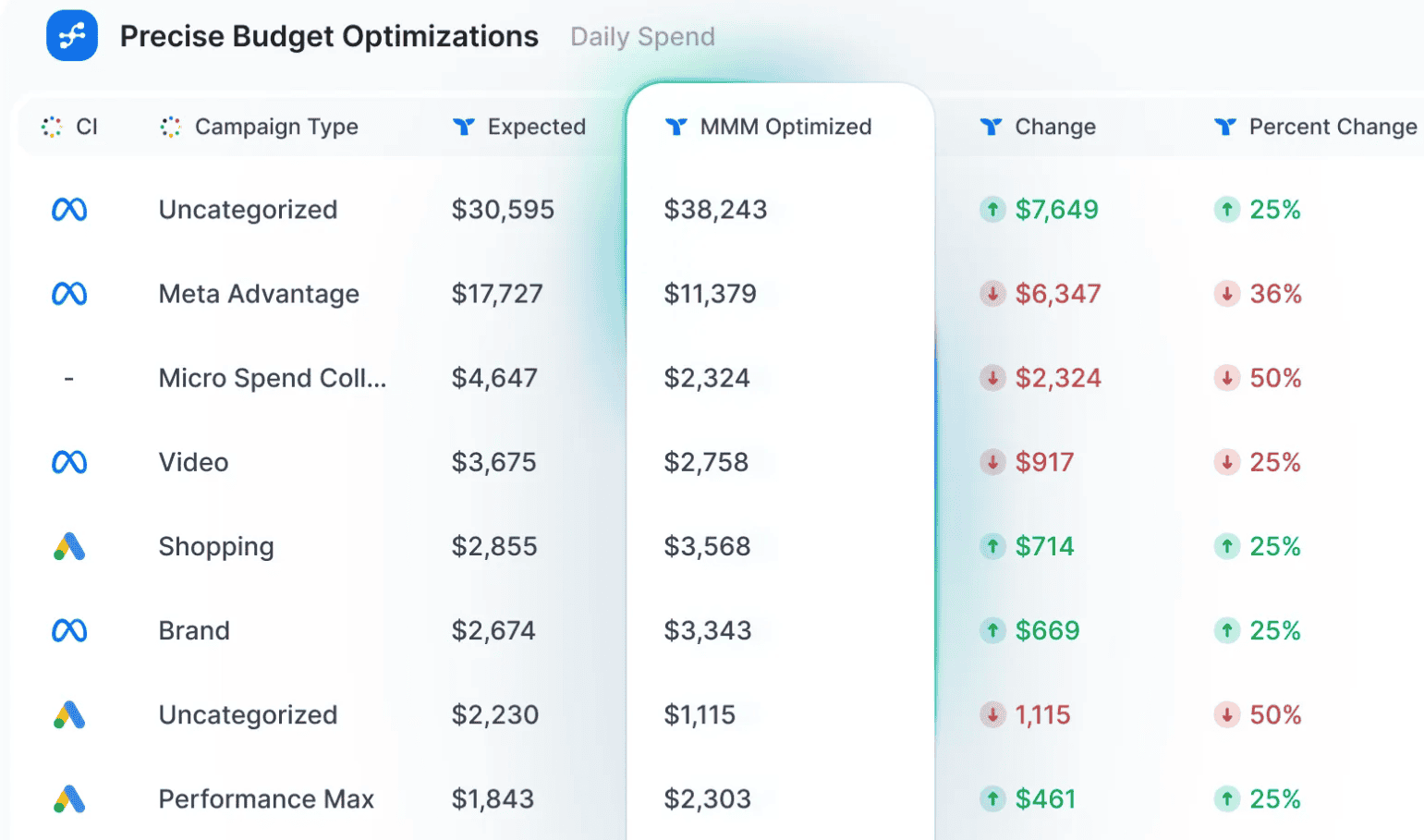
Triple Whale offers MMM as a way to simulate budget shifts. You input channel spend and goals, and the tool suggests optimal allocations based on past performance.
Great for: brands with $1M+ monthly ad spend who need modeling
Not great for: smaller brands without enough data to train models
Triple Whale’s analytics stack is impressive if your business lives inside its walls. If your operations span Shopify, Etsy, Amazon, WooCommerce, or if you sell both via Stripe and PayPal, many of its strongest insights simply don’t apply to large chunks of your revenue.
It’s like having a brilliant strategist who only sees half the battlefield.
Putler, by contrast, doesn’t try to be futuristic—it tries to be complete.
Its analytics are not about the momentum of ads, but about the real money flowing in from everywhere.
When triple whale doesn’t fit in
Triple Whale is built for a specific archetype: the Shopify-native, ad-heavy DTC brand running six-figure monthly campaigns across Meta, Google, and TikTok.
But what if that’s not you?
What if you’re selling on Shopify and Etsy? Or running WooCommerce alongside Amazon FBA? What if your revenue flows through Stripe, PayPal, Razorpay, and Shopify—not just one?
This is where the architecture reveals itself. Triple Whale wasn’t designed for platform diversity. It was designed for performance marketing depth.
And that’s fine—if your business matches that profile.
But if it doesn’t, you’re left stitching together incomplete dashboards, exporting CSVs, and building your own truth in Google Sheets.
Drawbacks of Triple Whale
- Data blind spots: Misses PayPal and Stripe data unless tied directly to Shopify checkouts
- Expensive entry point: Pricing starts high, scales fast, and penalizes growth with steep jumps
- Add-on fatigue: MMM, AI agents, and integrations are tier-locked or priced separately
- Too focused on ads: Great for marketers, but operational and customer intelligence is thin
Where Putler takes a different path
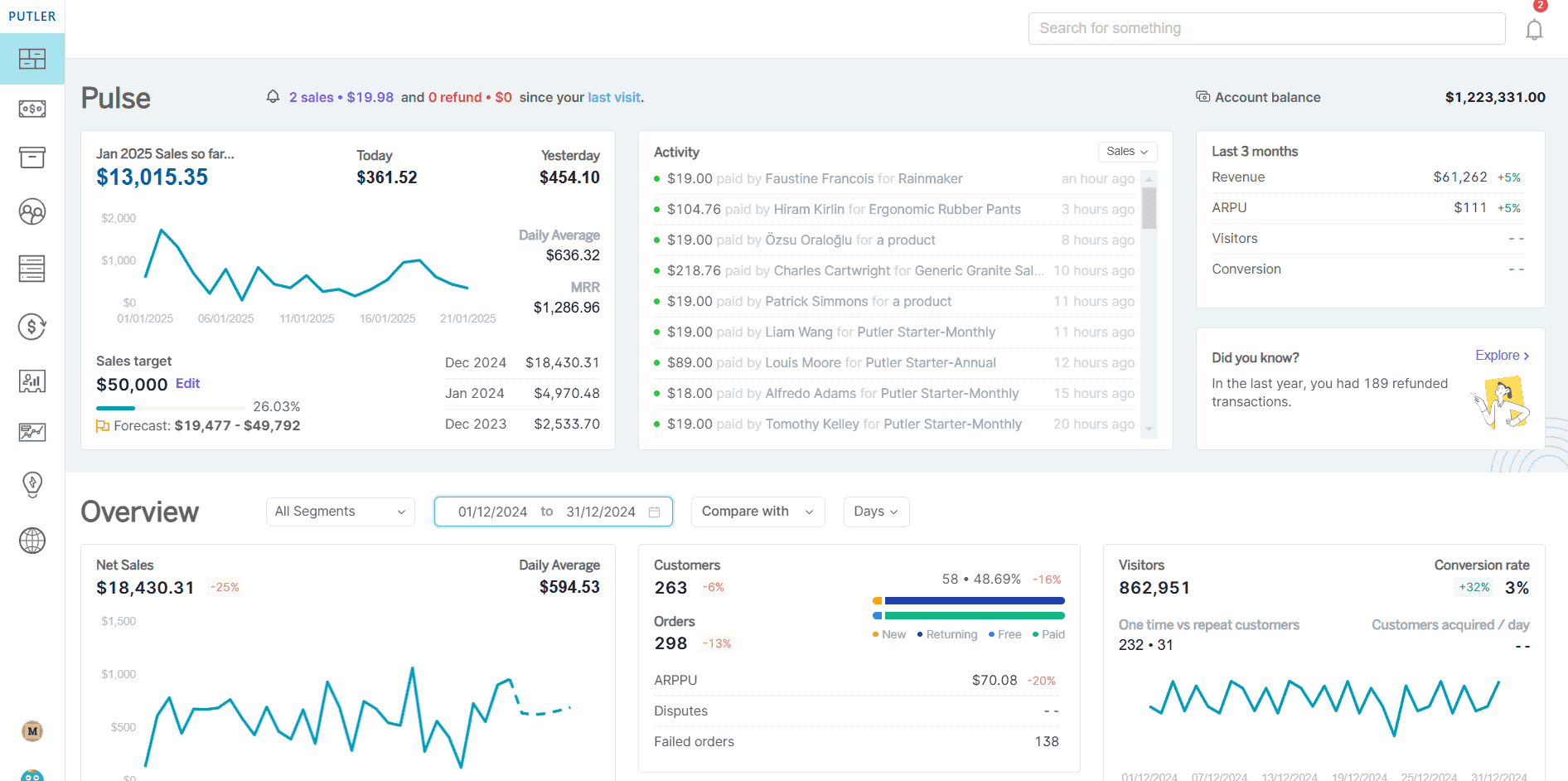
Putler doesn’t position itself as an “operating system.” It positions itself as universal business intelligence—built for merchants who sell everywhere, not just Shopify.
Here’s the fundamental difference in philosophy:
Triple Whale answers: “How can I optimize my ad spend?”
Putler answers: “Where is all my money actually coming from?”
1. Multi-platform, multi-currency, multi-user—by design
This is where the architectural difference becomes impossible to ignore.
Triple Whale = Single platform
Built exclusively for Shopify. One store. One currency (USD-centric). One walled garden.
Putler = Multi-everything
Built for the way modern commerce actually works—messy, global, and distributed.
Multi-platform integration
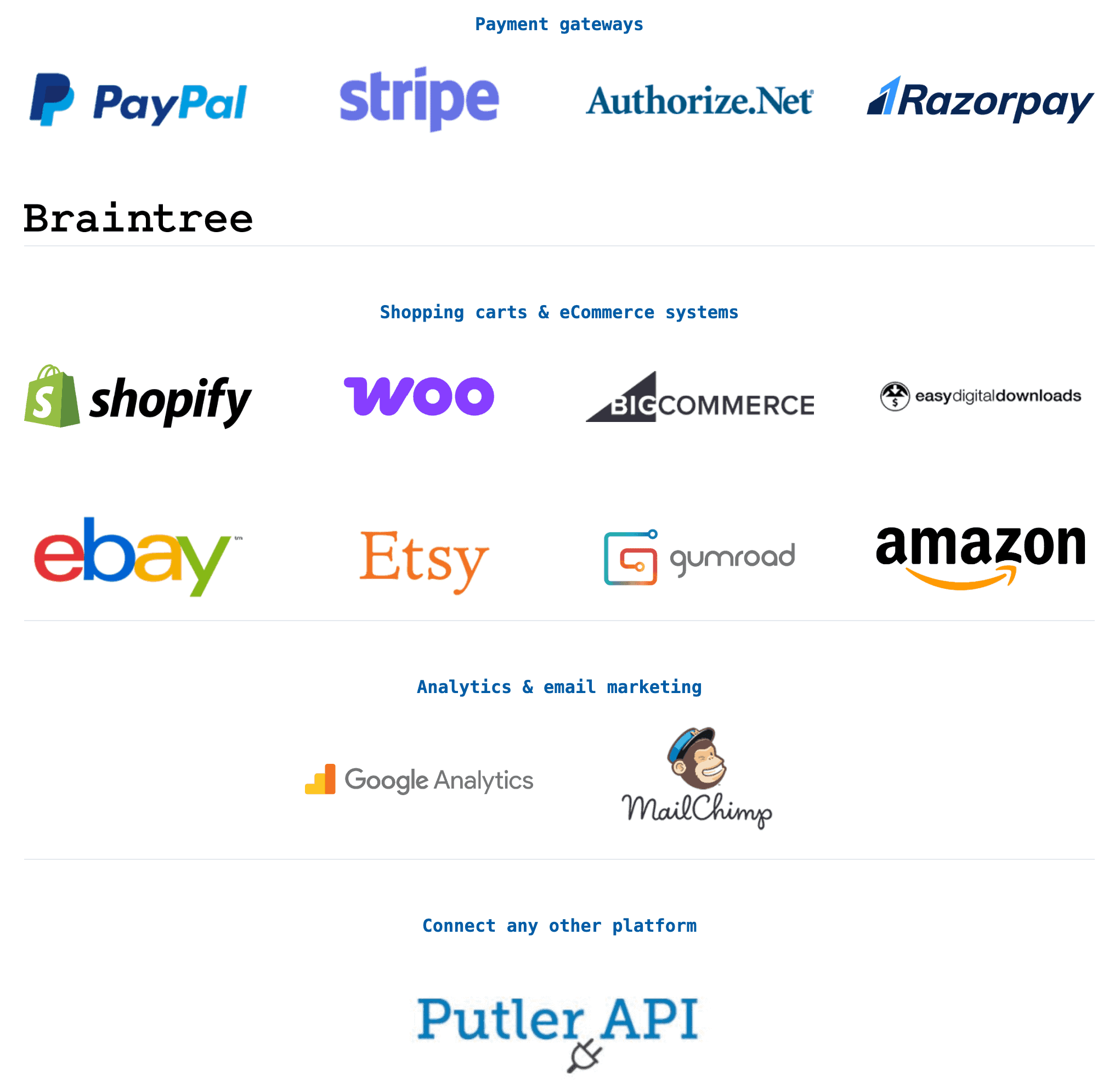
Putler natively connects:
- eCommerce platforms: Shopify, WooCommerce, BigCommerce, etc.
- Payment gateways: Stripe, PayPal, Razorpay, Authorize.Net, Braintree, 2Checkout
- Marketplaces: Amazon, eBay, Etsy
- Analytics: Google Analytics (for traffic and behavior mapping)
You’re not forced to choose one system. You get a unified dashboard that shows all revenue streams, regardless of where the transaction occurred.
Multi-currency support
Selling globally? Triple Whale struggles with multi-currency operations. It’s designed for USD-first businesses.
Putler handles 36+ currencies, natively. Whether you’re invoicing in EUR, processing USD payments via PayPal, or fulfilling orders in GBP—Putler normalizes it all into a single reporting currency of your choice.
This means:
- Accurate revenue tracking across geographies
- No manual conversions or Excel spreadsheets
- Real exchange rate application at transaction time
- Region-specific profitability analysis (e.g., “How profitable is our EU market vs. US?”)
For example:
You sell handmade goods on Etsy (USD), run a Shopify store for India (INR via Razorpay), and accept PayPal payments globally (multiple currencies). Triple Whale can’t even see most of this. Putler consolidates it automatically—and shows you which market is actually driving margin.
Multi-user and role-based access
Triple Whale’s collaboration features are limited and often tier-locked.
Putler includes multi-user access with role-based permissions even on lower-tier plans:
- Admin: Full access to financials, integrations, and settings
- Manager: Can view reports and analytics, limited editing
- Accountant: Access to P&L, tax reports, and transaction logs only
- Marketing: Can see customer data, RFM segments, and campaign performance
The result?
One source of truth. Accessible by the right people. With the right permissions. Across all your channels.
2. Operational intelligence, not just marketing intelligence
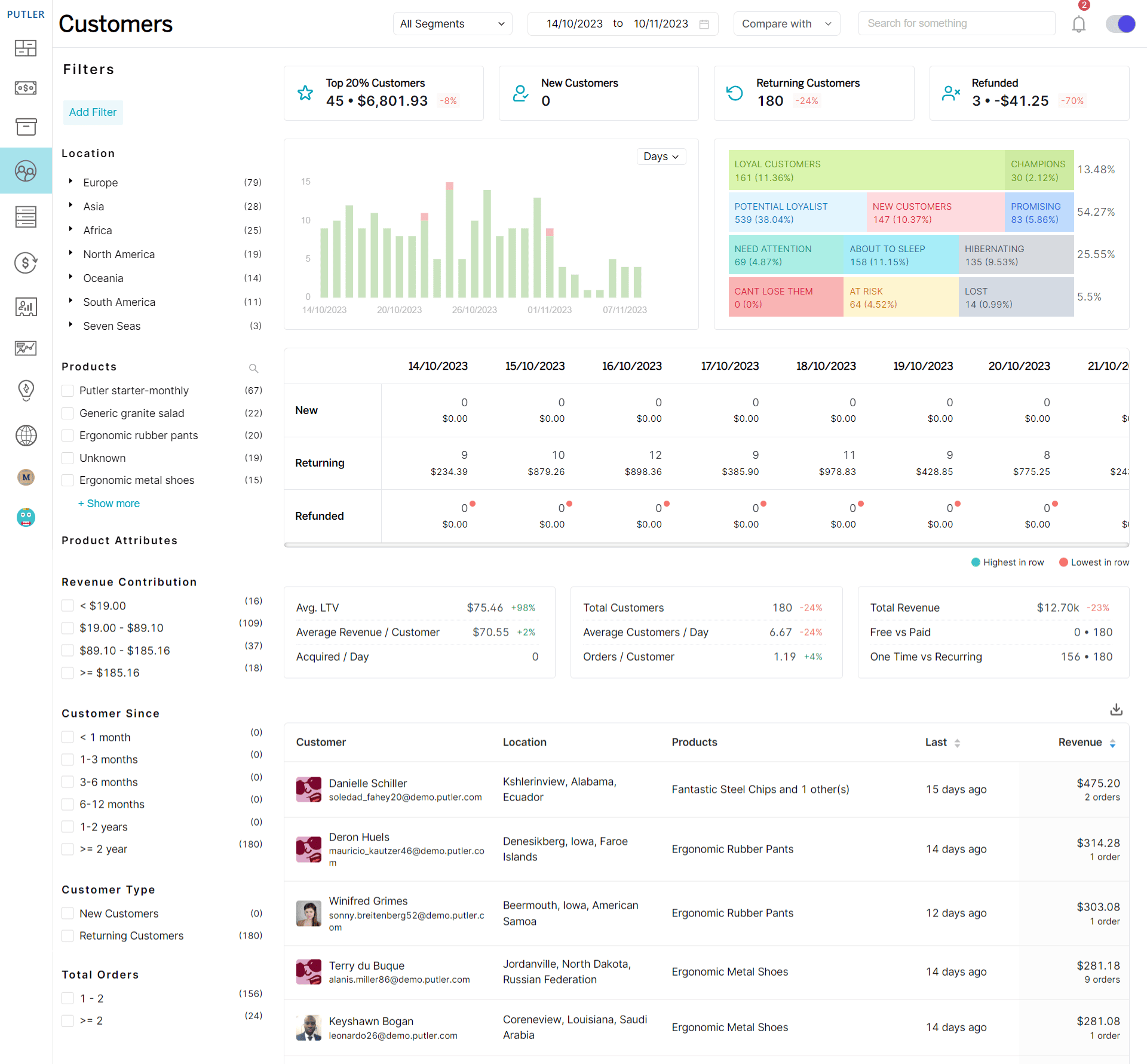
Triple Whale excels at campaign-level data—ROAS, CAC, creative performance.
Putler excels at business-level data—what products are actually profitable, which customers are worth keeping, where refunds are bleeding margin, and whether your inventory matches demand.
It includes:
- RFM segmentation (Recency, Frequency, Monetary) to identify your best customers
- Product performance analytics to see margin, not just revenue
- Refund and chargeback tracking to catch leakage
- Subscription analytics for recurring revenue models
- Geo and currency insights for global sellers
If you’re optimizing ads but losing money on fulfillment, refunds, or low-margin SKUs, you won’t catch it in Triple Whale. You will in Putler.
3. Pricing that doesn’t punish growth
Triple Whale’s pricing model scales with GMV. The better you do, the more you pay—sometimes dramatically.
Putler uses flat-tier pricing starting at $20/month. All core features are included. No revenue-based penalties. No feature gates that unlock only at enterprise spend levels.
For a $500K/year store:
- Triple Whale: ~$179–$299/month (potentially more with add-ons)
- Putler: $20–$99/month depending on transaction volume
That’s not a dig. It’s math.
Here is a more detailed breakdown:
Triple Whale pricing:
- Starting price: $179/month for basic dashboard access
- Advanced features (like Marketing Mix Modeling): Only in higher-tier plans
- Price scales with your store’s GMV – the more you earn, the more you pay
- AI Agents (Moby), cohort tools, and pixel tracking: Included in mid-to-top tiers
- Not cost-effective for small/early-stage stores under $500K/year revenue
- Add-ons can stack up: Tracking, integrations, and advanced modeling often cost extra
- No free plan – entry point assumes serious ad spend and operational maturity
Putler’s pricing:
- Starts at $20/month – revenue-based, not feature-locked
- Flat pricing tiers with no surprise upsells
- All major features included, regardless of plan
- More accessible for solopreneurs, indie brands, and multichannel sellers
4. Financial clarity over ad glamour
Triple Whale gives you dashboards that look like a SaaS demo. Putler gives you dashboards that feel like your accountant and your CMO had a productive meeting.
You get:
- Clear P&L breakdowns by platform, product, and period
- Tax-ready reports (integrates with QuickBooks, Xero)
- Forecasting based on historical trends, not just ad models
- Alerts for anomalies—sudden refund spikes, payment failures etc.
If you’re a founder who needs to run the business, not just run the ads, this is the difference.
So, which one should you choose?
Choose Triple Whale if:
- You’re Shopify-exclusive
- You spend $50K+/month on paid ads
- Your primary bottleneck is creative testing and attribution
- You have a dedicated media buyer or growth team
Choose Putler if:
- You sell on multiple platforms or payment gateways
- You want full financial visibility, not just marketing metrics
- You’re bootstrapped or early-stage and need cost-effective analytics
- You care as much about profit as you do about revenue
Triple Whale review: A note on “best”
There is no universal “best” analytics tool. There are only tools that match or don’t match the structure of your business.
Triple Whale is phenomenal for what it does. But it does one thing deeply, not everything broadly.
Putler is the opposite. It’s not trying to be your creative strategist. It’s trying to be your financial co-pilot, the one who knows where every dollar came from, where it went, and whether it was worth it.
If your business lives entirely in Shopify’s walled garden and you’re scaling with paid ads, Triple Whale makes sense.
If your business sprawls across platforms, payment systems, and marketplaces and you need one source of truth that sees it all, Putler is built for that reality.