

Google Analytics is one of the most widely used analytics tools in the world — but for eCommerce tracking, it has a serious accuracy problem.
15–50% revenue underreporting due to ad blockers, browser restrictions, and sampling issues. For businesses making decisions on this data, that gap is costly.
All these factors leave people wondering:
- Is Google Analytics not accurate?
- Is it wise to bank upon it?
- Should it be used for multiple eCommerce platform analyses?
If Google Analytics eCommerce tracking is a new thing for you, read this post to know the 10 common issues and a viable solution to fix all of them in one go.
Google Analytics eCommerce tracking errors that might bother you
Before we jump to the solution, let’s find out the common errors that can give you a headache while you do eCommerce tracking using Google Analytics.
Error #1 — Data Duplication
It’s very common to see one entry multiple times in Google Analytics. It could be because of Google Analytics’ inability to capture the data in real-time. Data is updated a little later which leads to data duplication.
On top of this, 15.8% of traffic vanishes when users decline cookie consent banners — meaning a meaningful slice of your Google Analytics eCommerce data is invisible before any other error even occurs.
Error #2 — Missing transaction data
For the same reason, missing transaction-related data is another error with Google Analytics eCommerce tracking. This is why the Google Analytics revenue reports created by your team after analyzing various metrics, are not highly reliable.
Error #3 — Reporting Inaccuracies and Inflated Data
While Google Analytics claims to offer insights reporting, it frequently falls short of that promise.
Errors like missing raw data, display of internal traffic in reports, and bot-inflated traffic figures are common. Search result data may fail to appear, and redundant view alerts occur frequently.
There is also a subtler issue: GA4 over-represents Google Ads via skewed session-attribution. This can push businesses to spend more on paid Google products based on distorted data — resulting in misguided marketing decisions and poor ROI.
If you’re a reporting expert, you’ll find it easier to spot these errors. But for rookies, identifying them can be quite tough.
Error #4 — Problems in the management of multiple eCommerce websites
This one is a major Google Analytics issue as it’s nearly impossible to keep track of data from multiple online stores with full accuracy.
There would be so many dashboards that users would get confused and perplexed. Unless you have a stronghold of technical knowledge, you won’t be able to make this work.
Error #5 — Issues with tracking custom campaign
You may have invested a huge sum in generating a custom marketing campaign but Google Analytics can’t track it in real-time. And if Google Analytics stops working, all your efforts will go in vain.
Error #6 — No tracking of offline marketing campaigns
Google Analytics not tracking custom campaigns from various channels is problematic.
In the same way, Google Analytics won’t help you track the utility of the offline marketing program that you’re running for your online store. Tracking offline marketing programs is a tough nut to crack, and Google Analytics is of no use in this direction.
Error #7 — No backup and testing view
This is one of the most common tracking mistakes one can face while using Google Analytics. It’s wise to see all the testing and backup views for insightful data.
Error #8 — Integration compatibility issues
eCommerce businesses today rely on multiple platforms to manage their online operations. However, Google Analytics often struggles to seamlessly integrate with popular platforms like Shopify, WooCommerce, and Etsy.
The integration challenges manifest through persistent webhook delays, frequent API inconsistencies, and complex synchronization issues.
These technical hurdles create significant tracking gaps, leading to incomplete and potentially misleading data interpretations.
Error #9 — Advanced segmentation limitations
Understanding your customer base requires nuanced, multi-dimensional insights. Unfortunately, Google Analytics’ segmentation capabilities fall frustratingly short of modern business needs.
Want to combine purchase history, browsing behavior, product interaction patterns, and conversion path analysis? With Google Analytics eCommerce tracking, these seemingly straightforward segmentation tasks become nearly impossible.
Error #10 — Real-time data lag, sampling issues, and LTV blind spots
For high-traffic websites, Google Analytics’ reporting mechanism becomes a significant liability. The platform frequently resorts to data sampling, which can dramatically skew your understanding of user behavior.
The critical issues include substantial delays between user actions and report updates, inaccurate data representation through sampling, and an inability to support real-time decision-making.
There is also a hard ceiling on customer lifetime value tracking. GA4 caps LTV at 90 days. For subscription businesses or anyone with a longer purchase cycle, this makes GA4’s LTV data essentially meaningless for strategic planning.
These persistent delays and limitations transform what should be a powerful analytics tool into a retrospective reporting system, making proactive business strategies nearly impossible to implement.
What is the way out?
From the above, it’s quite apparent that you’re not going to get reliable Google Analytics eCommerce tracking as it is clunky and can miss out on some major details.
So, should businesses drop the idea of eCommerce tracking?
Of course not! Businesses need to find a way to enjoy enhanced eCommerce tracking.
Putler works great in this regard.
Meant to resolve every eCommerce tracking issue, this high-end tool empowers Google Analytics eCommerce tracking at every front. Without requiring any special technical skills, it gets linked with the existing Google Analytics account and brings every single detail to a centralized place, in the blink of an eye.
Putler – Your multichannel eCommerce analytics ally
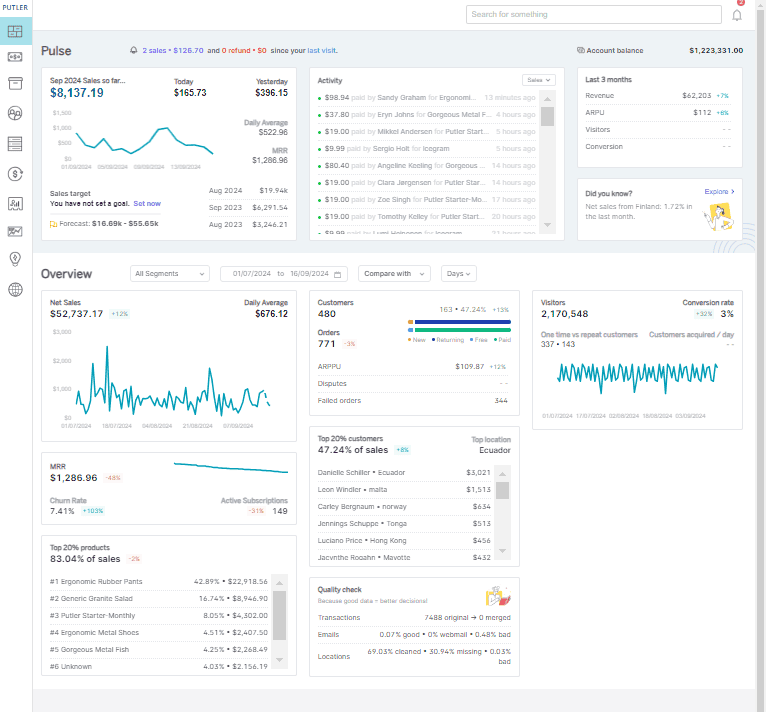
Here are some of the key advantages to experience while you replace traditional Google Analytics eCommerce tracking with Putler-empowered eCommerce tracking.
- Putler shuns the sluggishness of Google Analytics and brings real-time data to users’ disposal in no time. They don’t have to wait till tomorrow to know today’s transaction details.
- As data is generated, Putler collects and presents it to the users in an impressive way.
- There are various kinds of data in an eCommerce business. For instance, customer data, marketing data, revenue data, refund data, expense data, and so on. Regardless of the nature and size of the data, Putler is capable of capturing, assessing, and analyzing it with full accuracy. The cherry on the cake is that it brings all the data together allowing businesses to have deeper insights.
- With Putler, knowing your customer is easy as it brings all the customer details, except the location and time, in a compiled form. It’s a boon for creating customized marketing campaigns.
- Keeping track of metrics like MRR, churn rate, LTV, ARPU, etc. is more than important for a subscription-based business. Sadly, Google Analytics will not lend a helping hand at this front. But, Putler does.
- Putler lets the end-user generate powerful reports with more than 150 metrics.
- Looking for specific data? Putler offers an intuitive search feature that brings everything that you’re looking for over a single click.
- Those who own multiple eCommerce websites will have a tough time making Google Analytics eCommerce tracking work for them as the job is tedious and Google Analytics is not competent. Putler combines all the eCommerce stores and lets the user manage it from a centralized place, which is way easier.
- Putler integrates seamlessly with popular payment gateways, offering dedicated PayPal analytics and Stripe reporting that Google Analytics simply cannot match. This gives you accurate revenue data directly from your payment sources.
These advantages are surely worth exploring — and Putler makes it easy to get started.
How to Get Started with Putler?
Putler offers a free trial and is super easy to use. Just follow the steps below and you’re done.
Step #1: Using a valid email, complete the sign-up process for Putler.
Step #2: Click on the Google Analytics icon and connect your Google Analytics account to Putler.
Step #3: Putler will automatically pull in all the data from your GA account and show you reports.
PS. The best part of using Putler is that it lets you connect multiple Google Analytics accounts and helps you view them from a single place. Also, along with Google Analytics make sure to add other data sources like Razorpay, PayPal, Stripe, and more, so as to get the maximum advantage from this tool.
Still having doubts? Check out this live demo and become a master of Google Analytics eCommerce tracking.
Conclusion
You’re not the only one facing issues with Google Analytics eCommerce tracking. Many businesses share the same frustrations with this powerful but incomplete tool.
Using Putler, you can overcome all the Google Analytics-generated eCommerce tracking issues and make the most of your business data — with accuracy, speed, and far less manual effort.