

An online Etsy shop runs on numbers that a physical store never has to think about: how many visitors land on your listings, where they come from, how many bounce, and how many convert. Tracking those numbers is how you turn a hunch about your shop into a decision backed by data.
Setting up Etsy Google Analytics is one of the most effective free ways to track that performance. This guide covers what Google Analytics does for an Etsy shop, how to connect it correctly in 2026 using Google Analytics 4 (GA4), the metrics worth watching, and where its reporting falls short for sellers who need deeper customer and sales insight.
What is Google Analytics and how does it help your Etsy shop?
Google Analytics is a free web analytics service that tracks how visitors find and interact with your Etsy shop. It shows where your traffic comes from, which listings hold attention, and where shoppers drop off before buying.
For an Etsy seller, that translates into a few concrete advantages:
- Traffic and source data: See visitor numbers and which channels (search, social, direct, referral) send them, so you know where your marketing is actually working.
- Behavior insight: Identify which listings attract interest and where visitors exit, then improve those pages to lower bounce rates and lift conversions.
- Audience demographics: Understand the age, location, and device mix of your shoppers, and tailor products and promotions to the regions sending the most traffic.
- Discovery paths: See how shoppers find your listings and which traffic sources send your best visitors.
Used together, these turn guesswork into data-driven decisions about products, marketing, and shop design. One caveat worth knowing up front: Google Analytics tracks the visitor side well, but it can’t see Etsy sales or revenue, so it works alongside Etsy Stats rather than replacing it.
Why connect Google Analytics to Etsy?
Etsy’s built-in Stats dashboard is a fine starting point, but it’s limited to what Etsy chooses to show. Google Analytics widens the view, with deeper traffic-source data, audience detail, and behavior flow that Etsy analytics alone doesn’t surface.
For a growing shop, that extra layer matters. Knowing that a listing gets heavy traffic but few sales, or that most of your buyers come from one social platform, is the kind of insight that changes how you spend your time and money. A proper Google Analytics integration is what makes that insight available.
How to set up Etsy Google Analytics (GA4, step by step)
Setting up Google Analytics for Etsy takes two parts: create a GA4 property in Google Analytics, then paste its Measurement ID into your Etsy Web Analytics settings. You’ll need a Google account first. If you don’t have one, create one at Google’s account help page.
Part 1: Create your Google Analytics 4 property
Step 1: Open Google Analytics. Go to analytics.google.com and sign in with your Google account. If you don’t have a Google Analytics account yet, click Start measuring to begin.
Step 2: Create a Google Analytics account. Enter an Account name. Use your Etsy shop name, or your business name if you manage multiple Etsy stores. Click Next.
Step 3: Create a GA4 property. Enter a Property name, such as your Etsy shop name. Google automatically creates a Google Analytics 4 (GA4) property, the latest version that replaced Universal Analytics. Click Next.
Step 4: Enter your business information. Fill in the requested details, such as industry category and business size, then click Next.
Step 5: Choose your business objectives. Select the objectives that match your shop, for example generate leads, drive online sales, raise brand awareness, and examine user behavior. Click Create.
Step 6: Accept Google’s terms. Review Google’s Terms of Service and Data Processing Terms for your country, then click I Accept.
Step 7: Create a web data stream. When prompted to choose a platform, select Web. In the Website URL field, enter your Etsy shop URL, for example https://www.etsy.com/shop/YourShopName. Enter your Etsy shop name as the stream name, then click Create stream.
Step 8: Copy your Measurement ID. After the web stream is created, Google Analytics shows a Measurement ID that starts with G-, for example G-XXXXXXXXXX. Copy it. You’ll need it to connect Google Analytics to Etsy.
Part 2: Connect GA4 to your Etsy shop
Step 9: Add the Measurement ID to Etsy. Log in to your Etsy account and go to Shop Manager → Settings → Options → Web Analytics. Paste the Measurement ID (G-XXXXXXXXXX) into the Web Property ID field and click Save.
Step 10: Wait for data to appear. Google Analytics won’t show data instantly. It can take up to 48 hours before visitor data starts appearing in your reports.
That’s it. Your Etsy shop is now connected to Google Analytics 4.
What Google Analytics tracks for your Etsy shop
Once data starts flowing, Google Analytics helps you understand the visitor side of your shop:
- Where your visitors come from: Search, social, referral, or direct, so you know which channels actually send traffic.
- Which countries drive the most traffic: Geographic detail that helps you tailor products and promotions by region.
- Your most-visited Etsy listings: The pages pulling attention, and the ones being skipped.
- Traffic trends and unusual spikes or drops: Patterns over time, plus early warning when something changes.
- How shoppers discover your shop: The path visitors take to find your listings.
- Realtime activity: Active users on your shop right now, useful during a launch or promotion.
Where Etsy Google Analytics falls short
Google Analytics is powerful for traffic and behavior, but it wasn’t built for eCommerce reporting, and on Etsy specifically it leaves real gaps:
- It doesn’t give in-depth customer insight like lifetime value or loyalty segments.
- It doesn’t show a complete picture of purchase behavior on Etsy.
- The sales and transaction data it captures from Etsy is incomplete.
- Recurring sales and richer purchase metrics aren’t surfaced.
The reason is structural. GA4 sees the visitor side well, but Etsy controls the checkout, so a lot of the order and customer detail never reaches Google Analytics. For sellers who want the full sales picture, a dedicated reporting tool fills the gap.
A complete reporting alternative: Putler
Putler is a go-to reporting solution for many Etsy shops that want both visitor data and eCommerce data in one dashboard. You can connect your Etsy shop and your Google Analytics account to Putler and read all the reports in one place.
What Putler adds on top of Google Analytics:
- Accurate eCommerce analytics pulled straight from your Etsy orders
- Customer insight that surfaces your most loyal and highest-value buyers
- Deep growth insights across products, sales, and audience
You can connect your Google Analytics account to Putler and generate the reports Etsy and GA4 leave out.
What reports does Putler provide for your Etsy store?
Putler offers a range of reports that go beyond standard traffic analytics:
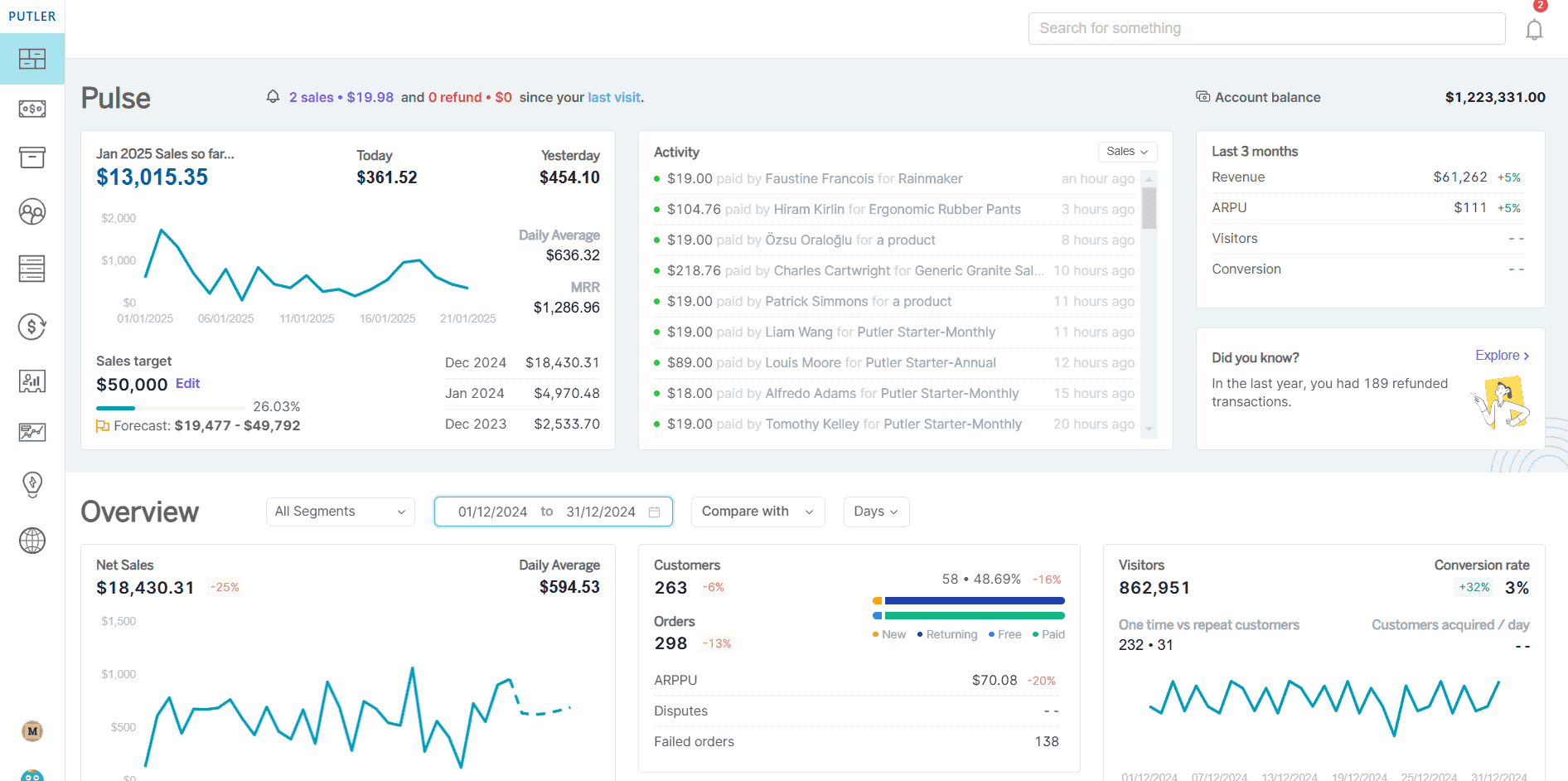
- Product reports: Detailed performance analytics showing which items sell best over a given period.
- Customers: Behavior and demographic insight, including your most loyal customers and their lifetime value.
- Sales: Revenue trends, average order value, and sales growth over time, with patterns and opportunities called out.
- Audience: Visitor demographics, traffic sources, and behavior, showing which channels drive the most traffic and conversions.
- Forecasting: Predicts future sales and revenue from historical data to help you plan products and campaigns.
- Segmentation: RFM (recency, frequency, monetary) segmentation to analyze customer and product groups and sharpen marketing.
- Goal tracking: Set targets and measure progress against them.
- Frequently bought: Product combinations often purchased together, for smarter cross-sells and upsells.
- Trends: Seasonal patterns and emerging product trends to guide inventory and marketing.
These reports turn raw data into decisions, surfacing opportunities that standard analytics leave hidden.
Conclusion
Google Analytics 4 gives Etsy sellers a strong, free view of traffic and visitor behavior, and connecting it is straightforward once you know it runs on GA4 Measurement IDs, not the retired UA system. Where it stops short is complete sales and customer reporting, which is Etsy’s domain, not Google’s.
For sellers who want the full picture in one place, Putler combines visitor data and eCommerce data into a single dashboard, so the numbers that drive growth sit side by side.
FAQs
Does Etsy support Google Analytics 4 (GA4)?
Yes. Etsy supports GA4 and uses the GA4 Measurement ID format G-XXXXXXXXXX in the Web Property ID field. Universal Analytics (UA) IDs no longer work, since Google retired that system in 2023.
How do I get Etsy analytics?
Etsy provides built-in analytics through Shop Manager Stats, covering views, favorites, orders, and revenue. For deeper insight, connect Google Analytics 4 for traffic and behavior, or use a tool like Putler for sales trends, product performance, and customer behavior in one dashboard.
Can Google Analytics track my Etsy sales and revenue?
No. Google Analytics tracks visitor and traffic data, but it does not track Etsy sales, conversions, or revenue, because Etsy doesn’t pass those events to Google Analytics. Use Etsy Stats for sales performance, or a dedicated tool like Putler that reads your Etsy order data directly for full sales and customer reporting.
Where do I find the Web Analytics setting on Etsy?
Log in to Etsy, go to Shop Manager, click Settings, then Options. You’ll see three tabs, one of which is Web Analytics. Paste your GA4 Measurement ID into the Web Property ID field there.
Why is my Etsy Google Analytics not showing data?
Data can take up to 48 hours to appear in your reports, so give it time first. Then confirm your Measurement ID (G-XXXXXXXXXX) is pasted correctly in Shop Manager → Settings → Options → Web Analytics. To test, check the GA4 Realtime report while browsing your shop. If it still fails, remove the Measurement ID from Etsy and re-add it.
- Etsy vs eBay: a deep dive into the best eCommerce marketplace
- Multiple Etsy shops: how to manage and monitor multiple stores from one place
- 10 best Etsy analytics tools that give accurate Etsy reports
- Etsy dashboard: the ultimate guide to mastering your analytics
- How to increase Etsy sales: proven strategies that work