

Etsy orders are the records of every purchase made on Etsy. Buyers use them to track packages, check order status, request refunds, and view order history, while sellers use them to manage fulfillment and monitor sales.
With over 4 million active sellers and 90 million active buyers, Etsy moves a lot of orders every day, and knowing how to track, manage, and grow them is what separates a smooth shop from a stressful one.
This guide covers Etsy orders end to end. Buyers will learn how to find, track, and resolve issues with their purchases. Sellers will learn how to process orders, read the current order statuses, and get more orders on Etsy.
For a broader look at tracking your shop’s performance, check out our guide to Etsy analytics tools.
What are Etsy orders?
Etsy orders are purchases made on Etsy by buyers from individual sellers. Buyers can view order history, track packages, request refunds, cancel eligible orders, and manage custom orders from the Purchases and Reviews section.
Sellers can manage Etsy orders through Shop Manager, update order status, add tracking information, process shipments, and monitor sales performance.
Etsy orders – status, history, refunds…
Let’s first see how buyers can view, track, and manage their Etsy orders. And then, how sellers can get more orders to boost their sales.
Placing an Etsy order
Placing an order on Etsy is straightforward. First, find the item you want to purchase.
Search for items using keywords or browse through the different categories. Once you find an item you like, click it to view details, including the price, shipping options, and the seller’s information.
If you decide to purchase it, click on the “Add to cart” button and proceed to checkout. Enter your shipping address and payment information. You can also add a note to the seller if you have any special requests or questions.
After you complete the checkout, you will receive your order confirmation email. The seller will also receive a notification of your order and will begin processing it.
Recent Etsy orders / Orders history
Your Etsy recent orders all live in one place, the Purchases and reviews page. Sign in to Etsy.com and go to Your account, or open the app and tap You, then Purchases and reviews.
This page lists every order you’ve placed, newest first, with the purchase date, order number, shop name, and current status. Click any order to open the receipt and see full details, including tracking.
If you checked out as a guest, you won’t have a Purchases page. Your order lives entirely in the confirmation email from transaction@etsy.com, so search your inbox (and spam folder) for it.
Order status
Knowing your Etsy order status tells you exactly where your purchase is in the shipping process. Etsy updated its status labels, and here’s what each one means on your Purchases page:
- Not shipped – The seller hasn’t completed the order yet, or hasn’t marked it shipped on Etsy.
- Shipped – The seller has completed the order and it’s on its way.
- Pre-transit – The seller added a tracking number, and it’s waiting for its first scan at the carrier facility.
- In transit – The package has left the facility and is moving toward you.
- Delivered – The package has arrived, and you can now leave a review.
If the estimated delivery date has passed but the order still shows Not shipped, the seller may have forgotten to mark it complete. Open the order and select Help with order to check.
Order tracking
Etsy order tracking depends on how the seller shipped your package. Open the order on your Purchases and reviews page to see where it stands.
If the seller used an Etsy-supported carrier: a Track Package button appears right next to the order. Click it to see detailed carrier updates without leaving Etsy.
If the seller used a different carrier: select View Receipt next to the order to find the tracking number, then paste it into the carrier’s own site.
Carriers don’t track by Etsy order number, so always use the tracking number itself on the carrier page. The same tracking link also appears in your shipping notification email.
Etsy order says delivered but not received
This is one of the most common Etsy order problems, and it usually resolves on its own. A carrier sometimes scans a package as Delivered a day or two before it actually arrives, or a scan gets missed at a sorting hub.
Here’s what to do, in order:
- Wait 48 hours. Late or early delivery scans are common and often correct themselves.
- Check around your property, mailbox, and with neighbors or building reception.
- Message the seller through the order page so the conversation is on record.
- If it’s still missing, open Help with order from your Purchases page to start a case with Etsy.
Order issues
If you have any issues with your order, such as not receiving it or receiving a damaged item, you can contact the seller for assistance.
You can do this by clicking on the “Contact” button on the “Purchases and Reviews” page or through the conversation section of the Etsy app. It’s always a good idea to reach out to the seller first to see if they can help resolve the issue.
Refunds
If you’re not satisfied with a purchase, message the seller through the order page first. Most refund and return requests start there, and the seller will share return instructions and process the refund.
Etsy also backs buyers through its Purchase Protection Program. For qualifying orders, Etsy may cover up to $250 of a refund, including shipping and taxes, even when the order total is higher.
Etsy reviews each case individually, so messaging the seller through the order page is still your fastest first step.
Cancelling Etsy orders
If you need to cancel an Etsy order, you can request a cancellation by contacting the seller through the “Purchases and Reviews” page or the conversation section of the Etsy app.
If the seller approves the cancellation, you will receive a refund.
However, it’s essential to note that not all sellers allow cancellations, especially for custom orders or personalized items. Before placing an order, make sure to read the seller’s cancellation policy.
Custom orders on Etsy
Etsy custom orders are unique items a seller makes to a buyer’s specifications. To request one, message the seller with the details of what you want. The seller then creates a private custom listing for you to purchase.
Clear communication is everything here. Share dimensions, colors, dates, and any reference images up front. Many sellers send a draft or proof before finishing the order so you can confirm it matches what you pictured.
Keep in mind that custom orders often can’t be cancelled once work begins, so read the shop’s policy before you commit.
How long do Etsy orders take?
The time it takes to receive an Etsy order depends on several factors, such as the shipping method, location, and processing time.
The seller’s processing time is the time it takes them to prepare your order before shipping it. You can find the estimated delivery time on the listing page, and you should also receive a shipping confirmation email with the tracking information.
Order reports
If you need to export your order history for record-keeping or accounting purposes, you can download an Etsy Orders report in CSV format.
This file contains all the transaction data for your shop, including the order number, date, buyer’s information, and total sale amount.
You can download the file by going to the “Shop Manager” and clicking on the “Orders” tab.
How sellers process Etsy orders
Your intro promised the seller side, and this is it. Once a buyer checks out, the order lands in your Shop Manager waiting to be completed. Here’s the flow:
- Go to Shop Manager, then Orders. New orders appear under the New tab.
- Select the Complete order icon on the order you’re shipping.
- Choose a ship date. You can set it up to 3 days in the future.
- Add a note to the buyer if you want, then select the shipping carrier and add tracking.
- Select Complete order. Etsy sends the buyer a shipping notification on the ship date.
Adding valid tracking and replying to Help with Order messages within 48 hours are what keep your orders eligible for Etsy’s Purchase Protection if a dispute comes up.
One thing sellers often miss is timing on the money side. Etsy initiates deposits every Monday, and your bank typically adds 1 to 3 business days on top of that. New sellers may also see a reserve hold on a portion of each sale, so plan cash flow around the deposit cycle rather than the sale date.
Getting more orders on Etsy
Learning how to get more orders on Etsy comes down to a few levers that actually move sales, not a hundred small tweaks. Competition is real, but most shops leave easy wins on the table. Here are the strategies that work:
- Optimize your shop – To get more orders on Etsy, have a well-optimized shop that is easy to navigate and visually appealing. Use high-quality images, clear descriptions, and accurate pricing to create a professional and inviting storefront.
- Offer high-quality products – Pay attention to the details, use high-quality materials, and offer unique designs to stand out from the competition.
- Use keywords – Conduct keyword research and use relevant keywords in your titles, tags, and descriptions to increase Sales.
- Utilize social media – Use platforms like Instagram, Facebook, and Pinterest to showcase your products, engage with your audience, and drive traffic to your Etsy shop.
- Offer great customer service – Providing excellent service can help build trust and loyalty with your customers, encourage them to leave positive reviews, and recommend your shop to others. Respond promptly to messages, be friendly and helpful, and go above and beyond to meet customer needs.
- Participate in Etsy promotions – Etsy frequently offers discounts and promotions to shoppers, which can drive traffic to your shop and boost sales. Keep an eye out for these promotions and participate when possible to get more orders.
- Use Putler – it gives you in-depth, real-time analytics for your multiple Etsy shops, helping you identify what is working and what’s not.
New to the platform? Start with these Etsy tips for beginners before diving into advanced strategies.
Better analytics and insights for your Etsy orders
Etsy reports are basic and do not help sellers identify growth spots.
But Putler is a powerful analytics and reporting tool that helps Etsy sellers track and analyze their sales data.
It can help sellers better understand their Etsy orders, improve their sales strategy, and make more informed business decisions.
Putler integrates with Etsy and automatically imports all the sales data, including order history, transaction details, customer information, and more. The data is then presented in a visually appealing dashboard that is easy to read and understand.
Learn how to navigate your data effectively in our Etsy dashboard guide.
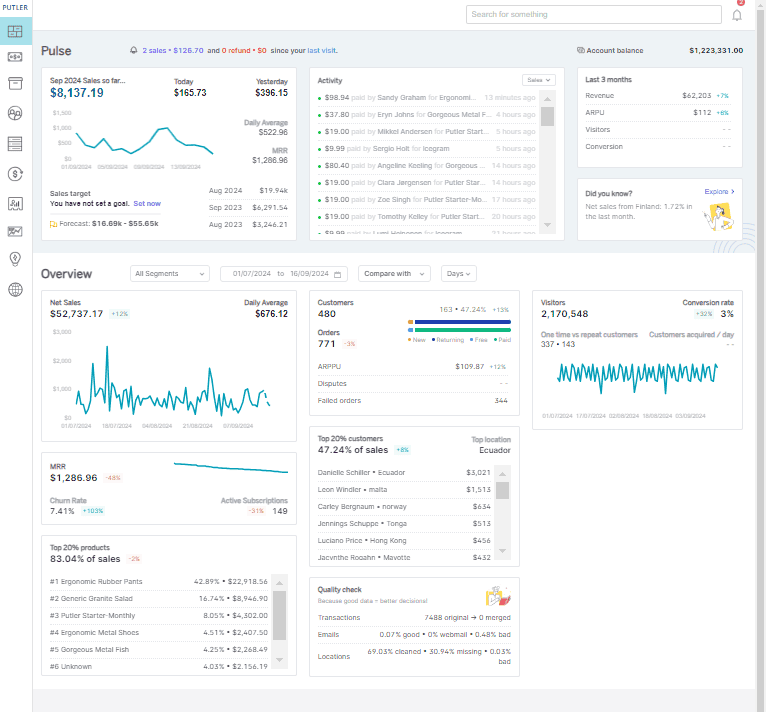
Here are some ways Putler can help with Etsy orders:
- Real-Time order tracking: Putler provides real-time order tracking, allowing sellers to monitor their sales activity and order status. It helps sellers identify any issues that need immediate attention, such as canceled orders or delayed shipments.
- Order reports: Generates detailed order reports that provide sellers with a comprehensive overview of their Etsy orders. The reports include information on sales trends, order volume, order status, customer behavior, and more.
- Product insights: Sellers can easily track which products are sold when, how much, and who purchases them.
- Customer insights: Putler provides valuable insights into customer behavior, including purchase history, spending habits, and more. This information can help sellers create targeted marketing campaigns and improve customer retention.
- Sales forecasting: Putler helps sellers predict future sales by analyzing historical data and identifying trends.
Conclusion
Understanding how Etsy orders work is crucial for both buyers and sellers. When placing an order, buyers should carefully read the item details and communicate clearly with the seller to ensure a smooth transaction.
For sellers, optimizing their shop and listings for search and offering high-quality products are essential for getting more orders. Keeping track of order history and reports can help with record-keeping and accounting.
Overall, Etsy orders are a vital part of the platform, and using Putler is essential for sellers to grow their Etsy business.
FAQs
Where can I see my Etsy orders?
You can view all Etsy orders from the Purchases and Reviews section in your Etsy account. Guest buyers can access order details through their confirmation email.
How do I track an Etsy order?
Open Purchases and Reviews, select the order, and click Track Package if tracking is available.
Why is my Etsy order still showing Not Shipped?
The seller may still be processing the order or may not have marked it as shipped yet.
Can I cancel an Etsy order?
Yes, but cancellation depends on the seller’s policies and whether production or shipping has already started.
How long do Etsy orders take to arrive?
Delivery times depend on processing time, shipping method, seller location, and destination country.
I’m disappointed with Etsy right now. All it shows my is a catalog of things to order. It will not show me my downloads and I have people waiting for me to make these things. Have you changed Etsy? Where are my downloads?
Hey Denise, I understand your frustration and I recommend you to directly connect with Etsy support to gain clarity and resolve this issue.