
Running an eCommerce store is no easy feat. And understanding the numbers behind it? Even harder.
I have seen many store owners struggle to make sense of their WooCommerce data.
This guide covers WooCommerce product filter analytics, their limitations, and how tools can provide the deeper insights you need.
If you want a broader understanding of tracking store performance, this WooCommerce analytics guide is a good starting point.
Now, let’s get started.
WooCommerce product filter analytics: What is it?
WooCommerce recently introduced reporting and data analysis through its Analytics. These reports help users manage their eCommerce store and monitor key sales metrics. Particularly, analytics related to products are spread over a few filters.
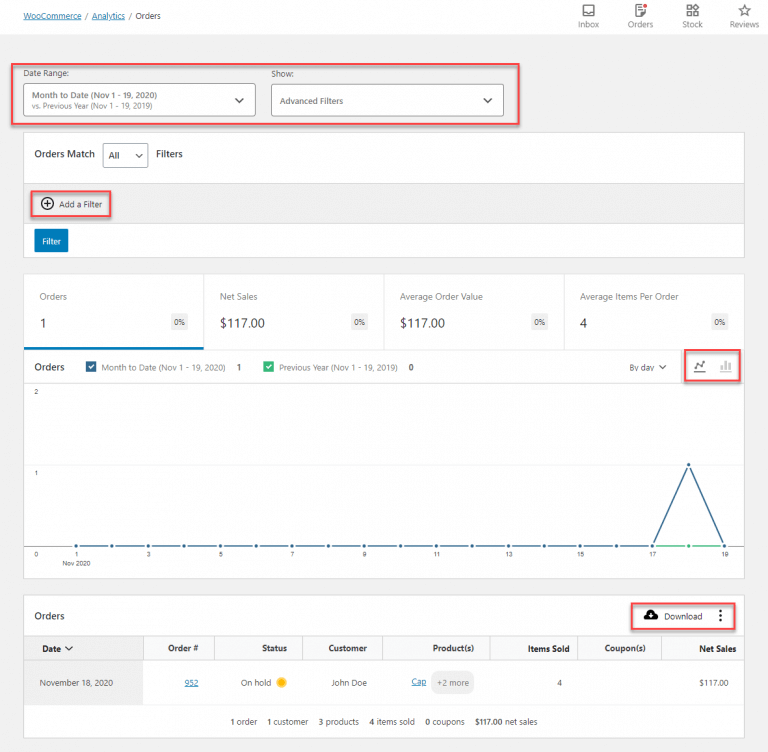
Some of the product filter features included are:
- Items sold
- Net sales
- Orders
- Historical sales data
- Comparison of two different periods of the product’s sales
- Category
- Variations
- Status
- Stock
- Custom filter of specific products, their data, and comparison
Is WooCommerce product filter analytics enough to grow your business?
The simple answer – No.
Even though WooCommerce recently upgraded its analytics, the available product insights are still limited. The product filters display existing information but don’t guide you in applying those insights to your marketing strategies.
Limitations of native WooCommerce product filters
-
No advanced insights
While you have the numbers at hand, you must manually interpret what they mean. There are no advanced insights into why customers purchase a particular product, or, if they’ve done so previously, how many times they’ve bought it.
-
Non-integration of Google Analytics
You cannot integrate Google Analytics into the WooCommerce Analytics ecosystem. As a result, you may miss out on important reports like cart and checkout abandonment, the number of “add to carts” actions for specific products, and product list performance.
-
Lack of custom filters
The custom filters you can create are limited and cover only a few product-related data points. Filters like customers who purchased products, average sale amount, refund percentage of total sales for a product, and more are missing. You also can’t create unlimited custom filters with multiple combinations for in-depth analysis.
-
WooCommerce and WordPress data analysis only
If your product is subscription-based, WooCommerce product filters don’t include key subscription metrics such as MRR, ARR, Churn rate, and more.
-
No subscription metrics
WooCommerce product filters are limited to data generated within the WooCommerce and WordPress ecosystems. External data, such as ad campaign performance or external customer behavior, cannot be integrated or analyzed without additional tools.
-
No advanced customer segmentation
The native product filters do not support detailed customer segmentation. You cannot group customers by behavior, preferences, or purchase history to better target specific marketing or sales segments.
As is evident, the WooCommerce product filter may be useful for first-level analysis. But if you want to understand the “Why” behind your sales, it’s best to choose a more holistic and broader reporting tool.
Troubleshooting common WooCommerce product filter issues
Sometimes WooCommerce product filters do not work as expected. Understanding the common issues can save you hours of frustration.
Analytics loading slowly or not at all
If your WooCommerce analytics are taking a long time to load, the problem often lies with caching or database performance.
Go to WooCommerce > Status > Tools and run the “Clear Analytics Cache” tool. If the data still appears incorrect, try re-importing your historical data from the Analytics settings screen.
For stores with thousands of products, consider upgrading to managed WordPress hosting. Providers like WP Engine, Kinsta, or SiteGround offer server configurations optimised for WooCommerce performance.
Filters showing incorrect data
Incorrect data usually stems from outdated WooCommerce versions or conflicting plugins. Ensure your WooCommerce installation matches the database version by checking WooCommerce > Status.
If there is a mismatch, back up your site and click “Update Database” under WooCommerce > Status > Tools.
You can also temporarily disable other plugins to identify conflicts. Start with caching or security plugins, as they are common culprits.
REST API errors in analytics
Some stores experience 401 or 403 errors when loading the Analytics tab. This often indicates a broken Jetpack connection or firewall rules blocking REST API requests. Verify your Jetpack connection using the debug tool at jptools.wordpress.com. If Jetpack is not the issue, check with your hosting provider about server-side security rules.
Fixing filter issues is only half the battle. Even when WooCommerce analytics loads correctly, many store owners find the built-in reports too limited for serious product analysis.
To truly understand what’s driving revenue, you need deeper, more flexible product filtering.
Putler’s powerful WooCommerce product filters
Consider us biased, but we have to say Putler is the best choice for detailed product filter WooCommerce analytics!
Most other product analytics applications don’t provide extensive reports. Unless your business has in-depth visibility on which products work, you can’t maximize their popularity to grow revenue.
Putler understands this and provides real-time order updates alongside in-depth product insights that can take your online store to the next level.
Once you apply the filters, all of the insights on the Products dashboard will reflect the filtered data. You can use this information to create custom marketing strategies for different products.
How do Putler’s WooCommerce product filters work?
WooCommerce product filter by “customer”
This filter lets you sort by the number of customers who’ve purchased from you for each sales period.
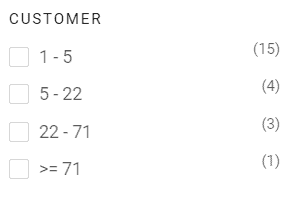
For example, you can use the customer filter to see how many buyers purchased products in March 2025 for 5 to 25 units. You’ll also know which product was the top seller in this category, along with details of the customers who bought it.
Product filter for WooCommerce by “quantity sold”
Next, you can filter your products by the number sold during the selected period.
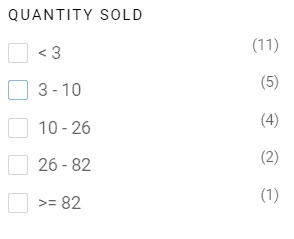
You can use this information to increase sales of products purchased in the lowest quantity. For instance, if you sell organic coffee, you could entice buyers to purchase more from you by offering discounts, such as buying 3 units and getting the 4th for 20% off.
WooCommerce product filter by “average price”
The “Average Price” filter gives you an overview of the price range in which most of your products sell.
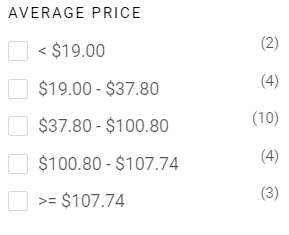
As you can see, the fastest and slowest-moving products are also listed. You can push slow-moving products faster and increase the number of products sold in your highest price range. In that case, you could offer these products as bundles. For example, customers can buy Generic Granite Salad and Smart Coupons for a bundled cost of $100.
WooCommerce product filter by “refund percent”
A unique way to look at product insights is to check your refund percentage. If many products fall within a higher refund percentage range, you can find out which ones aren’t working for the customer.
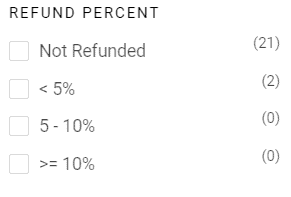
Similarly, you can use Putler’s dashboard to see which of your top 20% products were not refunded. You can then set up promotion strategies or link them to your loyalty program.
For instance, if customers purchase five units of your top 20% products between April 1st and 15th, they get 200 reward points. This also ensures your customers come back and use those reward points to purchase from you again.
Product filter for WooCommerce by “attributes”
Putler also lets you analyze products using attributes such as color, size, package, material, and more. With these insights, you can make critical product decisions.
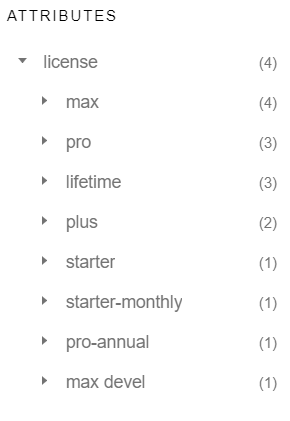
Consider this. You’re selling a black t-shirt in 3 different sizes. Using the “Attributes” filter, you realize that size L sells 35 times, M sells 25 times, S sells 15 times, and XS sells 5 times. Here, you can choose to discontinue selling size XS. Or, if you want to continue selling it, market it differently as a parent-child matching t-shirt bundle.
WooCommerce product filter by “categories”
This filter provides insights into products by way of their categories. For example, your business sells subscriptions to a lunch service for working professionals. You offer three packages in three different food categories – Veg, Non-veg, and Vegan.
With the “Categories” product filter, you can understand which food category sells the most and least. Once you figure that out, you can plan to add more dishes to the best-selling category.
Create custom filter
If all of the above doesn’t get you the insights you’re looking for, Putler also has the option of creating custom filter segments.
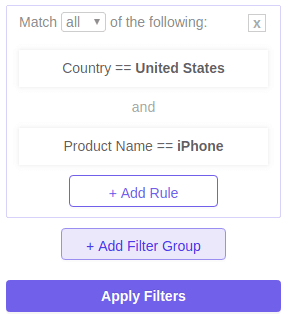
There’s no limit on the number of segments you can create, which allows you to customize reports for all your business needs.
And it’s not just product filters!
Putler has a lot more to offer such as:
- Sales filters, customer filters, and transaction filters.
- Multiple stores connected to one dashboard.
- Sales heat map to identify the best-selling days and times.
- RFM analysis for customer segmentation.
- SaaS KPIs such as LTV, MRR, ARR, ARPU, and more.
- Multi-currency and multi-team setup.
The bottom line
eCommerce is an ever-growing industry today, with many competitors going head-to-head. If you want to stand out, you need to understand your customers and market your products in ways that help solve their problems.
WooCommerce product filter analytics is a good starting point for analyzing your sales. But if you want to grow your revenue, Putler’s got the answer for you.
Get in touch with our team, and we’ll help scale your business through rich, data-backed insights.
- WooCommerce Google Analytics: How to set it up easily and quickly?
- WooCommerce Export Orders – 8 unique ways to export WooCommerce orders from your store
- WooCommerce Export Products – Top 3 Plugins & 5 Real-life Benefits of Exporting Products from Your WooCommerce Store
- How to filter WooCommerce orders by payment method?
- Shopify vs WooCommerce Comparison: Which is the better eCommerce Platform?
- The Definitive Guide To WooCommerce Subscriptions in 2025