


Managing customer billing is one of the more demanding parts of running an online business. Whether you’re dealing with one-time transactions or recurring payments, having the right Stripe analytics software in place makes all the difference between knowing what’s happening in your business and just guessing.
Among the payment processing platforms available today, Stripe stands out for its developer-friendly setup, clean checkout experience, and broad support for subscription billing. Its own reports may already give you what you need. But if you’re combining revenue sources or looking for a report your current setup doesn’t offer, an additional tool can help.
That’s why in this guide we’ll compare the top Stripe analytics software and reporting tools available in 2026, covering features, pricing, and what each tool does well, so you can pick the right one for your business.
If all your revenue comes through Stripe, start by checking its native reports. For subscription analysis, shortlist Baremetrics, ChartMogul, or ProfitWell Metrics. For Stripe alongside PayPal, multiple stores, and a mix of one-time and recurring sales, consider Putler. For custom queries over Stripe data, consider Sigma. The comparison below explains the trade-offs.
We’ve compared each tool’s published features and pricing, checked on 9 October 2026. This guide is published by Putler, which is also included below. The comparison is based on vendor documentation rather than hands-on performance tests.
Advantages and disadvantages of using Stripe
Before diving into third-party tools, let’s briefly examine the advantages and limitations of Stripe’s analytics capabilities.
Stripe Billing already lets you track changes in MRR, churn, customer lifetime value, and retention by cohort. You can adjust how it handles discounts and when it counts a subscriber as active. Standard MRR doesn’t include metered products; usage-based MRR is available as a preview. You can also download reports and look at changes for individual customers. See Stripe’s analytics documentation.
These subscription reports help you understand your recurring business. For balances and payouts, you’ll use Stripe’s financial reports. Before adding another tool, work out which question your existing reports leave unanswered.
Pros:
- Easy setup for recurring payments
- Supports discounts and coupon codes
- Subscription payments management
- Pro-rate charges for mid-cycle customer subscription changes
- Automated billing reminders; check your payment agreement for refund-related fees
- Hosted checkout options alongside subscription billing
Cons:
- Stripe reports don’t automatically include sales made through another payment provider
- Custom reports can take work to build and check
- You’ll need to check how MRR handles discounts, unpaid subscriptions, and usage-based billing
Quick comparison of top Stripe analytics tools
Here’s a quick comparison of what each Stripe analytics tool does, what it costs, and what to check before signing up. Prices and plans were checked on 9 October 2026; discounts and billing terms can change the amount you pay.
| Tool | Best for | Pricing | What to know |
|---|---|---|---|
| Pabbly Subscription Billing | Billing, checkout, and subscriptions | Free up to 50 customers; paid plans vary by customer limit and billing term (plans) | Affiliate management needs Unlimited; check whether its reports cover your analytics needs |
| Putler | Multiple stores or gateways, with one-time sales and subscriptions | $20/month up to $10K monthly revenue; $50/month for $10K-$30K (pricing) | Check how many sources your plan includes and how far back you can see data |
| Baremetrics | Subscription metrics and optional payment recovery | Launch is shown at $75/month; annual discounts and add-ons affect the total (pricing) | Launch includes one integration; check the final price and which features your plan includes |
| ChartMogul | Subscription cohorts and data from billing systems | Free up to $10K MRR; Starter starts at $69/month, or $57/month billed annually (pricing) | Starter includes one billing source; Pro includes five |
| Grow | Dashboards combining Stripe and other business data | Request a quote (vendor) | Check which Stripe data you can use, how often it updates, and the work needed to build reports |
| Stripe Sigma | Custom queries and reports using Stripe data | Pricing depends on charge volume (pricing) | Check when the data last updated and allow time to build and check your queries |
| ProfitWell Metrics by Paddle | Free subscription metrics and benchmarking | Free (product) | Check that it supports your billing sources and calculates metrics the way you need |
| Databox | Stripe reports alongside marketing and other KPIs | Free: one user and three sources; Analyst: $71/month billed annually (pricing) | Check source limits, available metrics, and how often your data updates |
| Treasure Data / Treasure AI | Enterprise customer data and marketing | Request a quote (vendor) | Suits teams that need a CDP and have the resources to set it up |
Now, let’s dig deeper into the features and benefits of these top Stripe reporting tools:
Stripe Analytics Tools
Pabbly Subscription Billing
Pabbly is a SaaS-enabled payment analytics and subscription billing software. Beyond just bill generation, it doubles as a revenue reporting tool that gives you a clear picture of what’s coming in, what’s failing, and what’s been refunded.
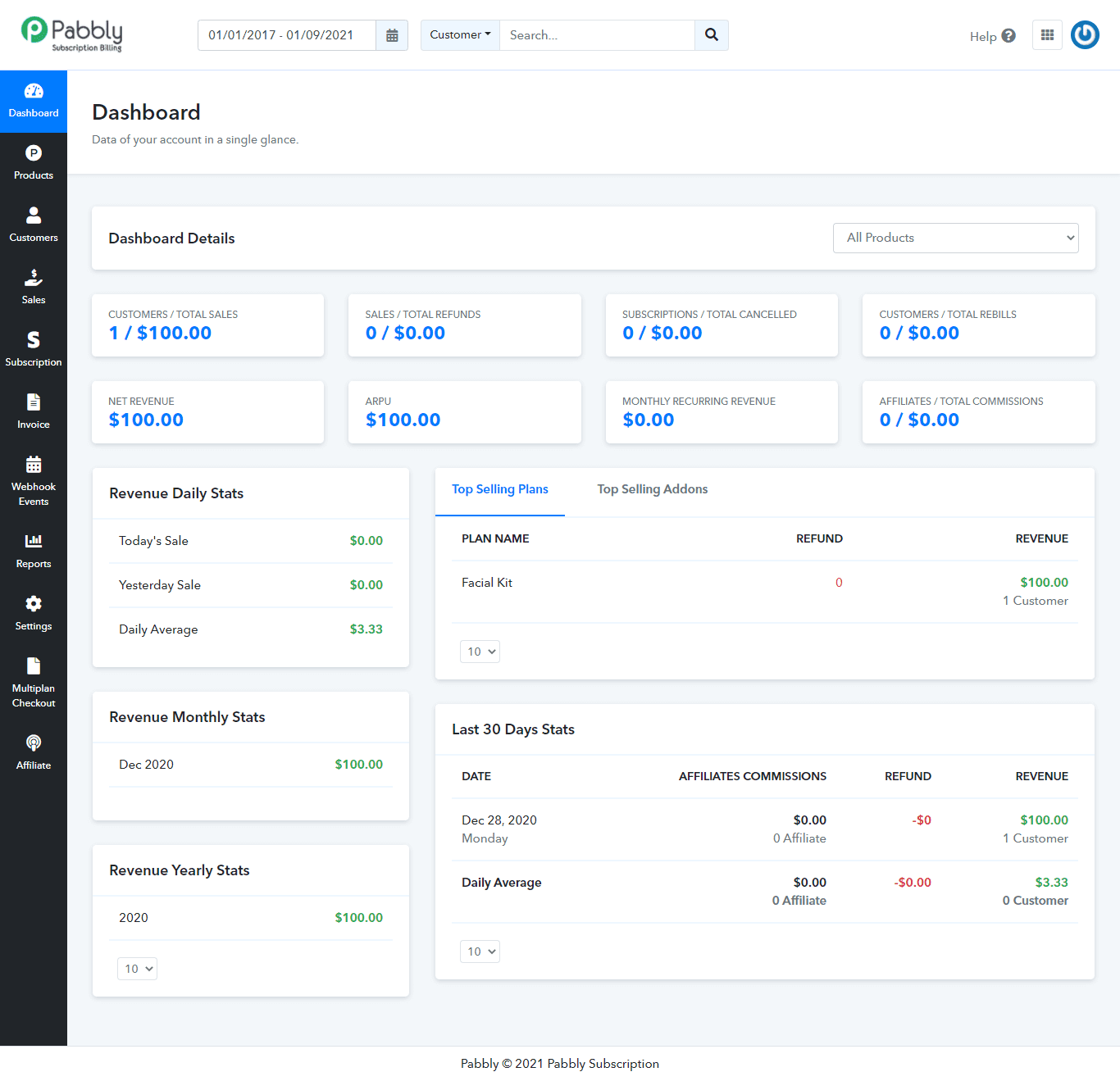
- Payment tracking with invoicing: Records and tracks payment transactions with downloadable invoices.
- Customers and plans: Manages multiple products and subscription plans. Customer limits depend on the plan; Unlimited supports unlimited customers.
- Multi-gateway support: Accepts payments through 35+ gateways including Stripe, PayPal, and Razorpay, with currency support depending on your gateway and account.
- Sales analytics and refund management: Lets you calculate total sales, manage refunds, and track new and canceled subscriptions from one place, without jumping between tools.
- Built-in affiliate management: Includes an affiliate system on the Unlimited plan to create, track, and manage your own affiliate programs.
- Dunning and failed payment recovery: Automatically retries failed payments with smart retry logic and sends follow-up reminders, reducing involuntary churn without manual effort.
Pabbly is worth a look if billing is your main priority. If you’re choosing it for cohort analysis or a specific subscription metric, ask to see that report first. Where it earns its place is as an all-in-one billing engine for small to mid-sized SaaS businesses that want billing, invoicing, and affiliate management under one roof, without adding a separate Stripe analytics tool.
Pricing: Free for up to 50 customers. Standard supports up to 1,000 customers, while Unlimited adds affiliate management. Paid prices depend on your customer limit and billing term. Check the current plans and checkout total, especially when comparing a promotional monthly equivalent with a monthly plan elsewhere.
Putler
If you’re collecting payments through more than one platform or store, Putler brings those reports together. It’s a useful option for SaaS businesses that need sales, product, and customer reporting alongside subscriptions, and for eCommerce businesses with several revenue sources.
Putler’s Stripe reporting dashboard brings sales, customer, product, and subscription reporting together. Beyond Stripe, Putler also offers strong PayPal analytics for businesses using multiple payment gateways.
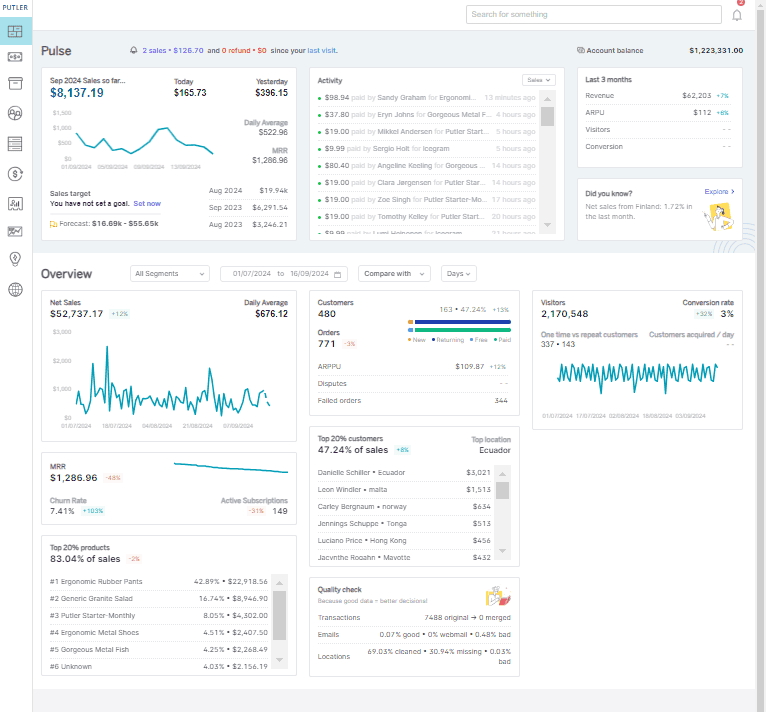
- Single view across all sources: Fetches, merges, cleans, and enriches data from multiple payment gateways and eCommerce shopping carts into one unified Stripe analytics dashboard.
- Google Analytics integration: Offers a unified view of customer analytics by integrating with Google Analytics. It also has its own Web Analytics, offered for free.
- Per-store reporting: Toggle and view Stripe reports of each store individually, or switch to a combined view across all connected stores.
- Multi-store management: Centralized management of multiple stores from a single dashboard.
- Automatic reporting updates: Syncs data from your connected sources, so you can keep track of your business in one place. Check how often each source updates for the reports you use.
- Advanced subscription metrics: Tracks MRR, CLTV, ARPPU, alongside 200+ metrics and insights across sales, customers, products, and subscriptions.
- Customer insights and RFM segmentation: Customer analytics with RFM segmentation to identify your best, at-risk, and lapsed customers.
- Payment analytics and subscription management: Full Stripe payment analytics with subscription lifecycle tracking.
- Goal tracking and forecasting: Set revenue goals and use built-in forecasting to track progress against them.
- Weekly email reports: Automated weekly emails keep your team updated without logging in every day.
- Team sharing: Collaborative team access so multiple stakeholders can work from the same data.
- Performance comparison reports: Compare performance across time periods, stores, and products.
Pricing: Starts at $20/month for up to $10K in monthly revenue, rising to $50/month for $10K-$30K. Higher revenue bands cost more. If you’re connecting several accounts, check how many sources your plan includes; the pricing page doesn’t give an exact limit for each band. See current pricing.
With Putler, you can connect multiple data sources combining WooCommerce stores, payment gateways, and more. If you’re also using PayPal alongside Stripe, Putler makes managing multiple PayPal accounts simple from a single dashboard. Once connected, you can generate unlimited Stripe reports on sales, orders, customers, and transactions, with the option to export them in CSV.
Baremetrics
Baremetrics is a Stripe analytics tool built for SaaS and subscription businesses. It tracks recurring revenue metrics. It offers a free trial. If you want to benchmark your metrics against similar companies or see exactly where churn is hitting hardest, Baremetrics gives you that depth.
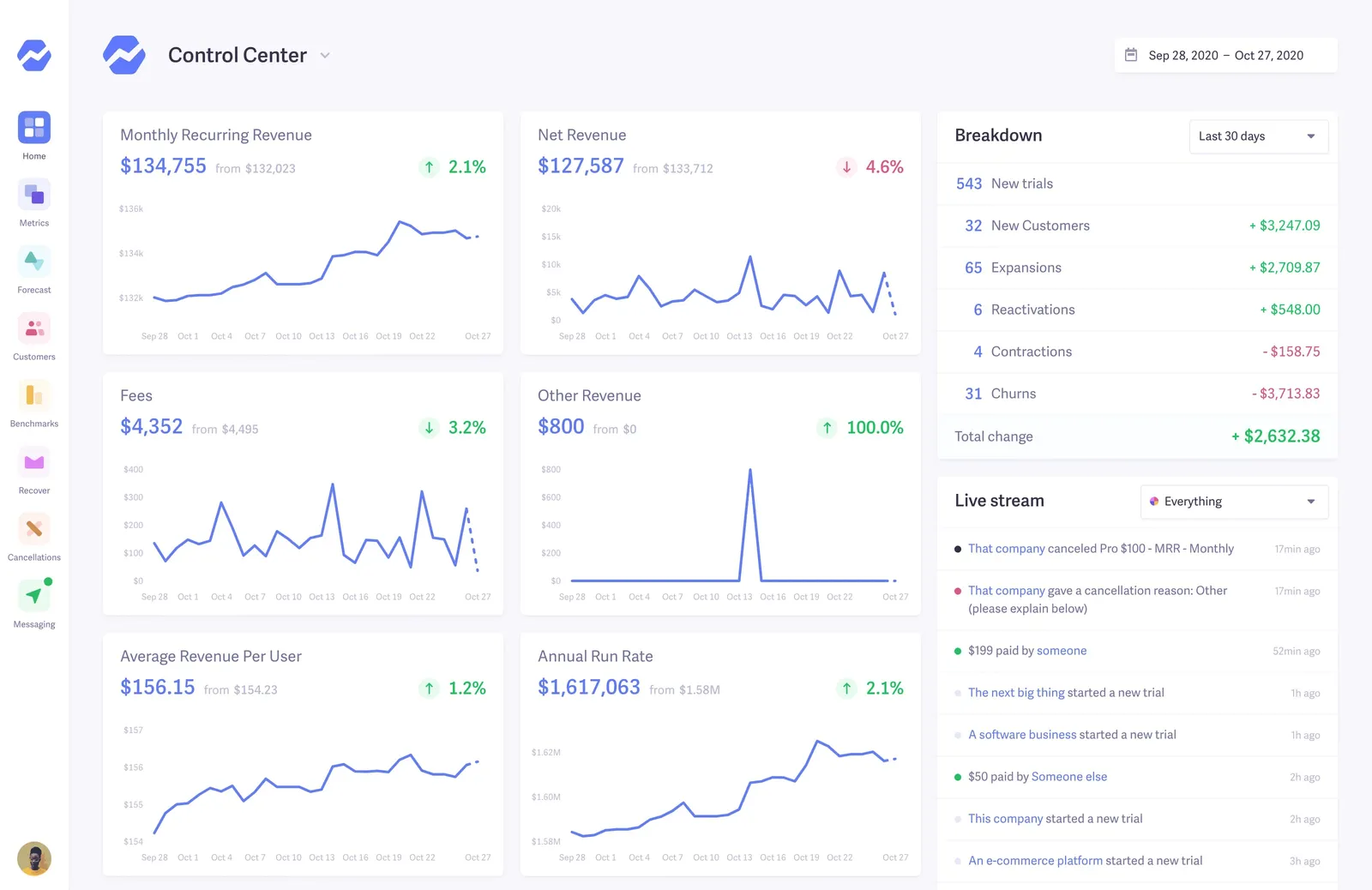
- SaaS metrics: Tracks MRR, ARR, LTV, ARPU, churn rate, and other subscription KPIs. You’ll need Growth or a higher plan for custom dashboards.
- Benchmarking against peers: Lets you compare your metrics with other subscription businesses on Growth and higher plans.
- Recover (dunning management): Automatically retries failed payments and sends customizable email sequences to recover lost revenue. Available as a paid add-on.
- Cancellation Insights: Collects and analyzes cancellation reasons directly from churned customers, giving you the qualitative data to act on, not just the numbers. Available as a paid add-on.
- Financial planning: Helps you explore forecasts and different scenarios. Check which plan or service includes the tools you need.
- Multi-source integration: Connects with Stripe, Braintree, Recurly, Chargebee, Apple App Store Connect, and Google Play, making it useful beyond just Stripe-first businesses.
Baremetrics focuses on subscription businesses, but it also supports usage revenue and other revenue. If you take one-time payments too, ask to see how they’re reported. Keep in mind that its Shopify integration is for Shopify Partners selling apps, rather than individual Shopify stores. See the integration details.
Pricing: Launch is shown at $75/month for one integration, with annual discounts available. Its pricing FAQ gives a different starting price, so check your billing term and final price before signing up. Payment Recovery and Cancellation Insights each add $129/month. Check current pricing.
ChartMogul
ChartMogul has built a strong reputation among subscription businesses for turning raw billing data into clean, trustworthy metrics. It shines in multi-source environments where you’re pulling data from Stripe alongside other billing systems and need everything normalized before you can analyze it.
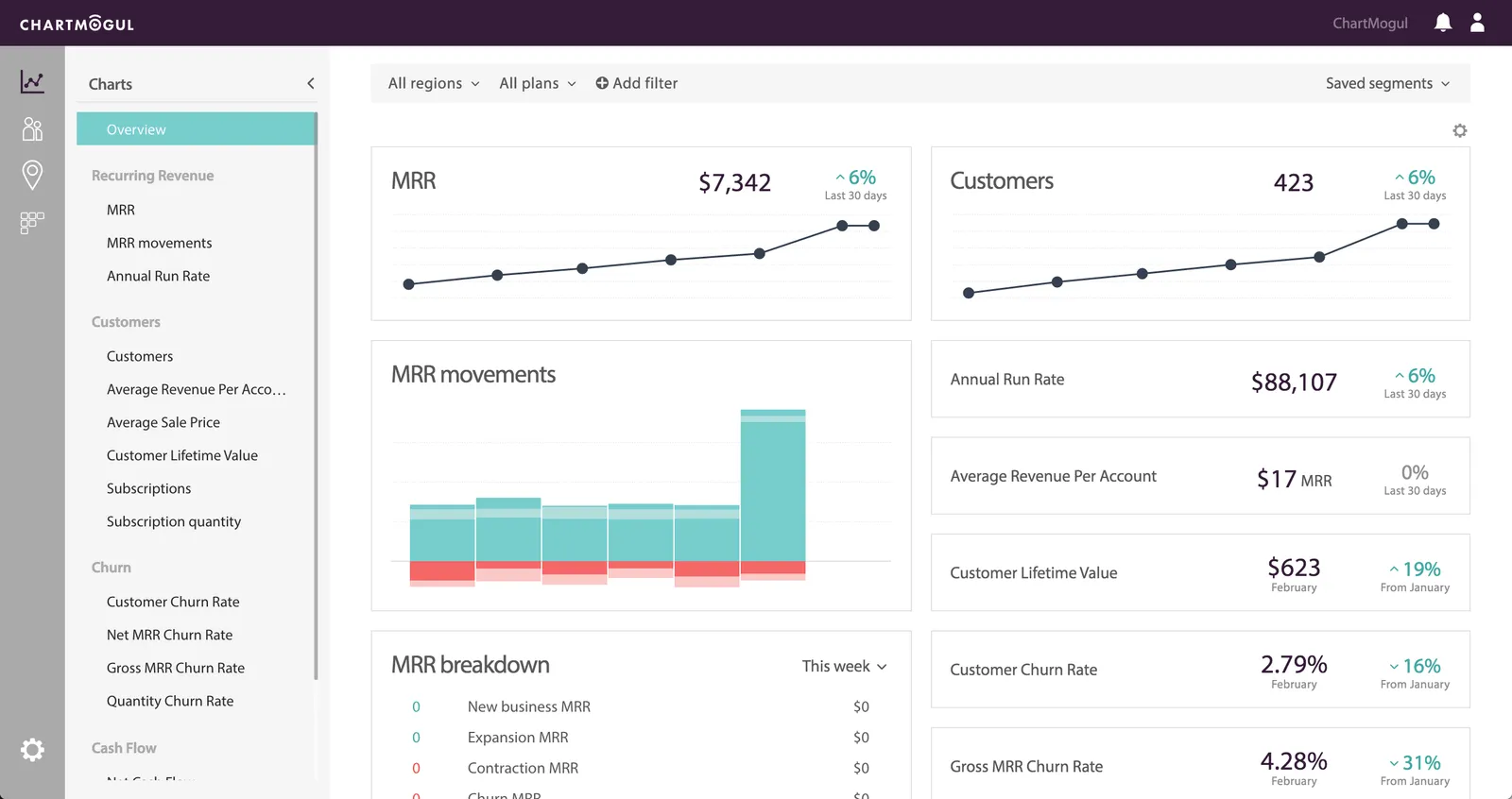
- Multi-source data import: Connects with Stripe, Braintree, Recurly, Chargebee, Paddle, and custom sources via API, with tools to clean up your data. The number of billing sources you can connect depends on your plan.
- Cohort analysis and retention curves: Breaks down retention by customer cohort, plan type, geography, or lead source, letting you investigate when churn happens and which segments it affects.
- Segmentation and custom attributes: Filters and segments your Stripe reports across dozens of dimensions, including MRR by marketing channel, churn by NPS score, and retention by sales rep.
- CRM integration: Connects revenue data with your CRM workflows. Check which destinations your plan supports, how many sources you can connect, and how syncing works.
- Data warehouse connections: Lets Pro and Enterprise users send subscription data to advanced destinations, including a data warehouse.
- CSV import and audit tools: Lets you import historical data via CSV and provides tools to audit, edit, and merge subscriptions when your billing data doesn’t arrive cleanly.
The free plan supports businesses with up to $10K MRR and includes core revenue metrics and segmentation. If you’re early stage and on Stripe, it’s one of the better no-cost Stripe analytics tools available. For teams that need accurate Stripe analytics across multiple billing sources without doing the normalization work themselves, ChartMogul is one of the most reliable options in this list.
Pricing: Free up to $10K MRR. Starter starts at $69/month, or $57/month billed annually, and pricing grows with your tracked ARR. Starter includes one billing source; Pro includes five. If you’re connecting multiple Stripe accounts, each one counts as a separate source. See pricing and Stripe integration limits.
Grow
Grow is a no-code business intelligence platform that pulls data from 150+ sources, including Stripe, into customizable dashboards. Unlike dedicated Stripe analytics tools, it’s a broader BI solution suited to teams that want one dashboard covering marketing, sales, finance, and operations together, rather than a focused view of subscription metrics.
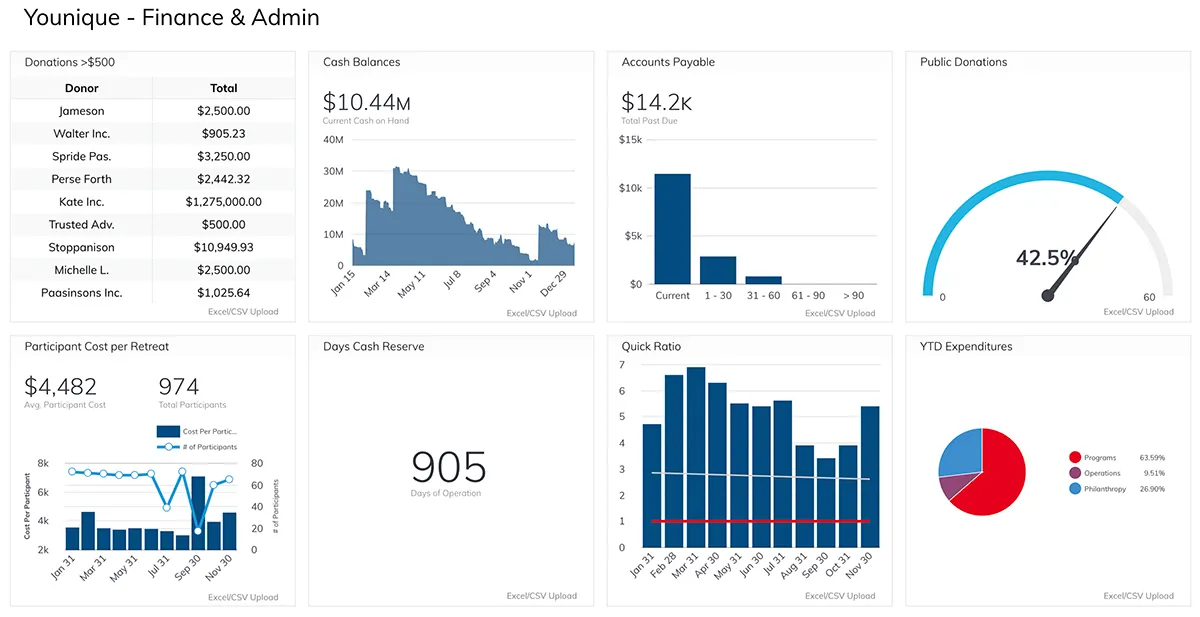
- 150+ data integrations: Connects to Stripe, Salesforce, Google Analytics, Shopify, HubSpot, and 145+ other tools, making it practical for businesses that need one view across all their platforms, not just payments.
- No-code dashboard builder: Builds dashboards using a drag-and-drop interface with no SQL required. For teams that want to go deeper, a SQL editor is also available for custom data transformations.
- Customer segmentation: Uses connected data to group customers and identify which segments drive the most value.
- Scheduled data refresh: Lets you choose when your dashboards refresh. Check how often the Stripe connector can update.
- Data preparation and blending: Brings data from your connected tools together and lets you prepare it for custom reports.
- Team access: Lets your team share dashboards and manage access. Its current site lists unlimited users.
Grow is best suited for teams that need cross-functional dashboards, not deep Stripe analytics. If you’re specifically trying to track MRR, churn, or subscription health, a purpose-built Stripe analytics software will give you more out of the box. Grow’s value is in breadth, not depth.
Pricing: Request a quote from Grow and ask what’s involved in connecting Stripe and setting up your reports. Its Stripe connector guide shows which data you can use.
Stripe Sigma
Stripe Sigma lets you build custom reports using your Stripe payments, customers, subscriptions, and payouts. If you’ve ever needed a report that isn’t in your usual dashboard, it’s worth a look.
- SQL and AI-assisted queries: Write your own query, start with a template, or ask the assistant a question in plain language.
- Custom reports and charts: Look into unpaid invoices, payment fees, or which charges make up a payout.
- Team reporting: Share queries and schedule reports so your team can use the same numbers.
- Data timing: Check how far the data runs, along with the timezone and filters, before comparing it with another dashboard.
Sigma is a useful option if you’re happy to build and check your own reports. It works with Stripe data, so it won’t automatically bring in revenue from another gateway. If you already use a data warehouse, take a look at Stripe Data Pipeline alongside your BI setup.
Pricing: Depends on your Stripe charge volume. Check Sigma pricing for your account. You can test it in a sandbox for free. See how Sigma works.
ProfitWell Metrics by Paddle
ProfitWell Metrics, now owned by Paddle, is a free subscription analytics tool that connects to Stripe and other supported billing systems. It earns its place on this list for a simple reason: it delivers core SaaS metrics at no cost, which makes it one of the easiest ways to move beyond Stripe’s native dashboard without spending anything.
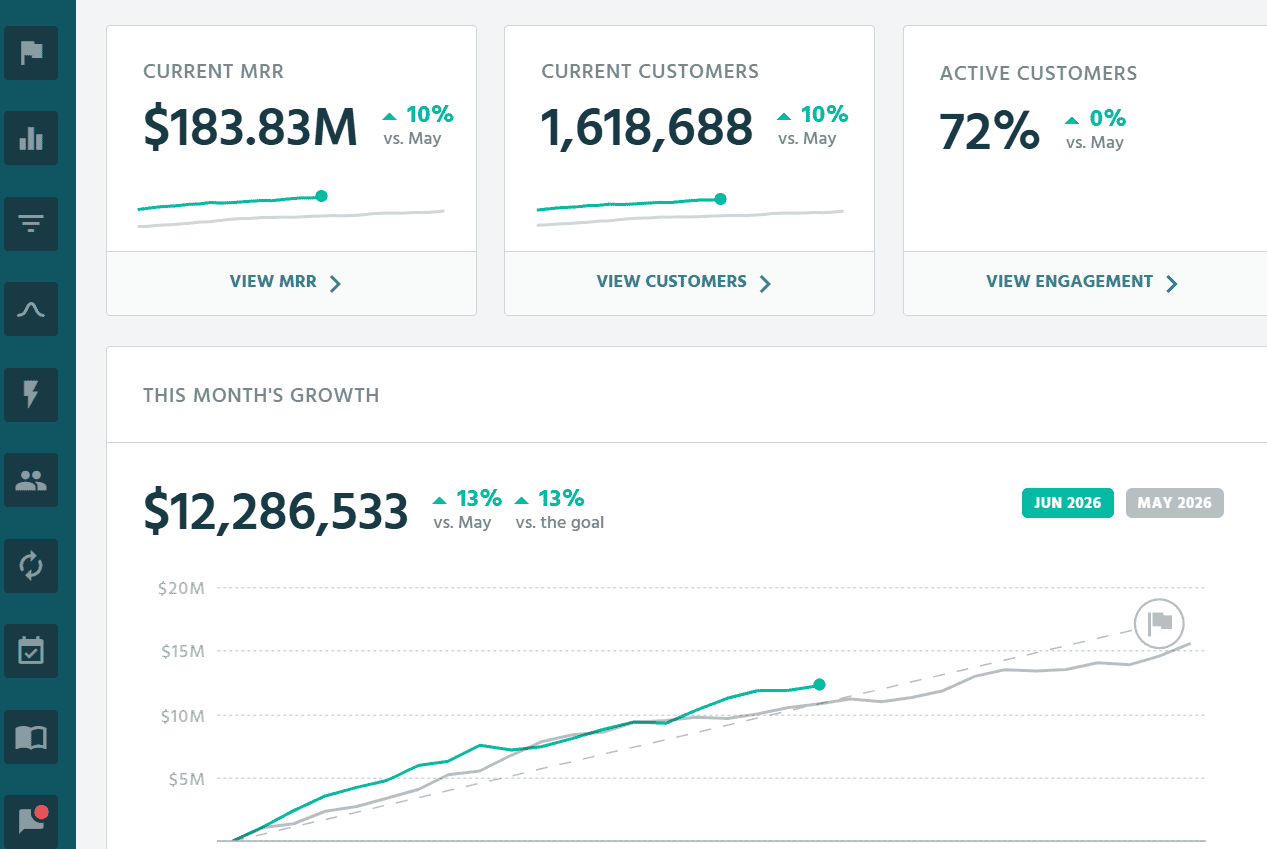
- Free core SaaS metrics: Tracks MRR, churn, LTV, ARPU, and cohort reports out of the box, presented in clean dashboards, with no charge regardless of revenue size.
- Industry benchmarking: Compares your performance against 30,000+ subscription companies, giving you context that most paid tools reserve for higher tiers.
- Segmentation and cohorts: Drills into customer segments, cohorts, and pricing-plan data to surface where growth and churn are actually coming from.
- Customer health signals: Uses activity data to flag customers most at risk of churning, so retention effort goes where it matters.
- Multi-billing support: Integrates with Stripe, Chargebee, Recurly, Zuora, and Paddle, plus CRM and automation integrations for sharing or enriching metrics.
ProfitWell is a strong free option for pure subscription businesses, particularly early-stage SaaS that wants accurate metrics without a bill. Its limits show when you need deep custom analysis or want to combine subscriptions with eCommerce and one-time revenue, where a broader Stripe analytics software serves better. During your trial, check how often your billing data updates.
Pricing: Free, as listed on Paddle’s ProfitWell Metrics page.
Databox
Databox is a business intelligence platform that brings Stripe reports alongside data from 130+ other tools into one unified dashboard. It’s a good fit for teams that track performance across multiple platforms and want payments, marketing, and operations visible in one place.
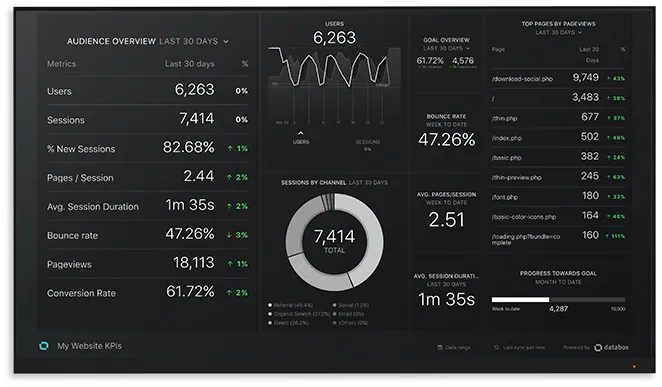
- 130+ integrations in one dashboard: Connects Stripe with Mixpanel, HubSpot, Google Analytics, PayPal, Xero, and 125+ other tools, so you’re not switching between platforms to piece together your Stripe analytics.
- Stripe datasets and metrics: Turns connected Stripe data into datasets and reports. Before choosing it, check that your key metrics are available and calculated the way you expect, especially MRR and lifetime value. See the Stripe integration details.
- Custom metrics and data blending: Lets you create calculated metrics, apply filters, and blend data from different sources using a shared identifier, useful for cross-referencing Stripe reports with marketing spend.
- Goals and forecasting: Set revenue or metric targets, track progress against them, and use forecasting features based on historical data.
- AI-powered insights: Offers an AI analyst and performance summaries, with features and AI credits depending on your plan.
- Refresh frequency: The Free plan lists daily updates and Analyst lists hourly updates, though the timing also depends on your data source.
When comparing Databox plans, look at how many sources and users you need, along with the AI credits you’ll use. For teams tracking only Stripe, it can feel like a lot of overhead. Its real value shows when you’re combining Stripe analytics tools with several other data sources and need one unified view.
Pricing: Free for one user and three data sources. Analyst costs $71/month billed annually and includes one user and five sources. If you need more users or sources, compare the team plans. Check plan details.
Treasure Data
Treasure Data sits in a different category from the Stripe analytics software listed above. It’s an enterprise-grade Customer Data Platform (CDP) built for large organizations that need to unify customer data across dozens of sources at scale. While it integrates with Stripe among 100+ other services, it’s not a dashboarding tool for a SaaS founder checking MRR. It’s infrastructure for enterprise marketing and data teams managing millions of customer profiles.
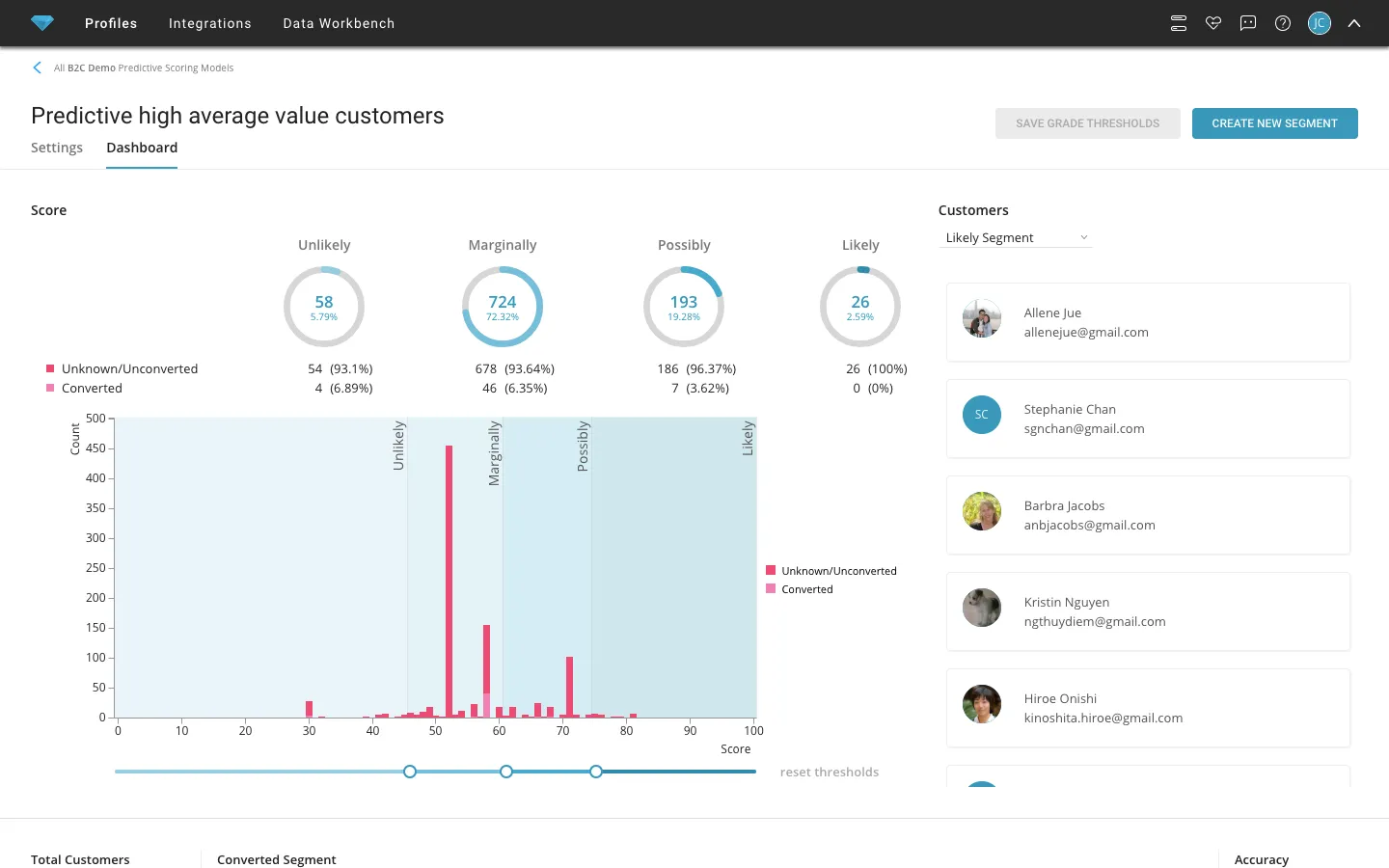
- Unified customer data platform: Consolidates first, second, and third-party customer data from 100+ sources including Stripe, Salesforce, HubSpot, and Marketo into a single deduplicated customer profile.
- Identity resolution: Matches and merges customer records across devices, channels, and brands, so marketing teams work from one accurate view of each customer rather than fragmented Stripe reports.
- Marketing activation: Uses customer data and AI workflows to support audiences, campaigns, and personalization.
- Hybrid CDP architecture: Offers two modes: Complete Mode where Treasure Data acts as the source of truth, and Composable Mode where your cloud data warehouse remains the source of truth while Treasure Data handles real-time activation.
- Enterprise implementation: Talk through the data you need to combine, how customer records will be matched, and where you’ll use that data before comparing costs.
- Flexible and secure data transfer: Moves data securely across systems with encrypted storage, meeting enterprise security and privacy compliance requirements.
Treasure Data is the right tool if you’re a global enterprise managing customer data across multiple brands, regions, and channels. For a growing SaaS or eCommerce business looking specifically for Stripe analytics tools or Stripe reporting tools, the other options in this list will serve you better and cost significantly less.
Pricing: Request a quote for your setup. You can find its Complete CDP, Composable CDP, customer identity, and marketing features on the current Treasure AI site.
Which Stripe analytics software is right for your business?
As the world of online business demands accurate payment information for growth, choosing the right Stripe analytics software becomes one of the more consequential decisions you make early on.
If you need billing automation and basic subscription tracking alongside your Stripe payments, Pabbly covers the fundamentals at a low cost. If you want accurate subscription metrics for free, ProfitWell Metrics is the easiest no-cost starting point. If you’re a SaaS business looking for more detail on subscriptions, Baremetrics and ChartMogul are worth comparing with the reports you already get from Stripe.
If you need cross-platform dashboards that pull Stripe data alongside marketing, sales, and operations data, Grow or Databox are built for that use case.
For custom Stripe reports, take a look at Sigma. If your enterprise needs to bring customer data together across systems and use it for marketing, Treasure Data / Treasure AI is worth considering.
And if you’re juggling multiple payment gateways, stores, and currencies, Putler brings sales, customer, product, and subscription reporting together. It’s worth a look if you need to see those parts of your business in one place.
What to check during a Stripe analytics trial
Before committing, try a few transactions you know well and compare the same reporting period across tools:
- Keep sales and MRR separate. Here’s a simple example: a customer pays $100 for a one-time purchase and $20 for an active monthly subscription, then gets a $25 refund on the one-time purchase. Before taxes and fees, you’ve collected $120, refunded $25, and kept $95 after refunds. MRR is still $20. Your bank payout may differ because of fees, timing, or other balance changes.
- Watch for duplicate sales. Connect a store and the Stripe account that processed its order, then check that the sale appears once. If a customer buys through two stores, look at whether their purchase history comes together as expected.
- Compare subscription numbers. Try an annual plan, a discount, a failed invoice, and a cancellation. Keep the date range, timezone, currency, and rules for counting active subscribers the same.
- Work out your actual cost. Putler prices by monthly revenue, ChartMogul by tracked ARR, Baremetrics by revenue bands and integration limits, and Databox by sources and users. A business taking $20K in one-time sales won’t have the same pricing basis as one with $20K MRR.
- Look at past data and updates. Check how much history the trial shows, how far back a paid plan imports, and when the reports last updated.
Ready to see what your Stripe data can actually tell you? Give Putler a try. You can create a free account and explore all features with a 14-day trial, no strings attached.
FAQs
Does Stripe have analytics?
Yes, Stripe provides built-in analytics for payments, revenue, and customer metrics through its dashboard and Reports section. Stripe Billing also reports MRR, churn, lifetime value, and cohorts. Consider another tool when you need different workflows or data from outside Stripe.
Are there free versions or trials available for the Stripe analytics tools mentioned above?
Several tools offer free options. ProfitWell Metrics is free regardless of revenue. ChartMogul has a free plan up to $10K MRR. Databox offers a free plan for one user and three data sources. Putler provides a 14-day free trial to explore all features before committing.
Why is Stripe analytics important for my business?
Stripe analytics helps you track sales trends, customer retention, subscription health, and business performance using native reports or a separate tool suited to your business. With the right Stripe analytics software, you can make data-driven decisions about pricing, product mix, and retention rather than relying on guesswork.
How do I access Stripe analytics and Stripe reports?
You can use Stripe’s built-in dashboard under the Reports section for basic Stripe reports, or connect a third-party Stripe analytics tool for more advanced and customizable reporting. To connect Putler, you’ll authorize access to your Stripe account. How much past data you can see depends on the tool and plan; Putler’s trial shows the previous 90 days. Follow the connection guide.
Can I combine Stripe data with other sources?
Yes. Tools like Putler integrate Stripe with Google Analytics, PayPal, WooCommerce, Shopify, and other payment processors and eCommerce platforms, giving you a consolidated Stripe analytics dashboard across your entire business rather than one payment source at a time.
Which Stripe analytics software is best for subscription businesses?
For pure subscription businesses on Stripe, Baremetrics and ChartMogul both offer focused SaaS metric tracking, and ProfitWell Metrics covers the basics for free. For subscription businesses that also run eCommerce stores or use multiple payment gateways, consider Putler for sales, customer, product, and subscription reports across connected sources.
What is the best free Stripe analytics tool?
ProfitWell Metrics is fully free and covers core SaaS metrics with Stripe integration. ChartMogul offers a free tier up to $10K MRR. For a broader analytics view beyond subscriptions, Stripe’s own dashboard is free and covers basic Stripe reports without any third-party setup required.
Can I use multiple Stripe reporting tools at the same time?
Yes. Many businesses use Stripe’s native dashboard for day-to-day transaction tracking and a dedicated Stripe analytics software for deeper reporting and strategic analysis. Before connecting another tool, check what it can access and change. Read-only analytics can run alongside your native reports. Tools that handle billing or refunds can change transactions, so review those permissions and agree how your team will use them.