


Tracking down an old purchase in PayPal can turn into a loop of frustration. Many sellers have been there.
PayPal is a convenient payment platform, but accessing transaction details, especially finding one specific order, is a headache.
Multiple steps, a busy interface, and scattered filters make the process difficult and get in the way of efficient transaction management and PayPal tracking order workflows.
This article covers the challenges of PayPal order tracking and the solutions that make the whole process easier.
How to view transaction details in PayPal?
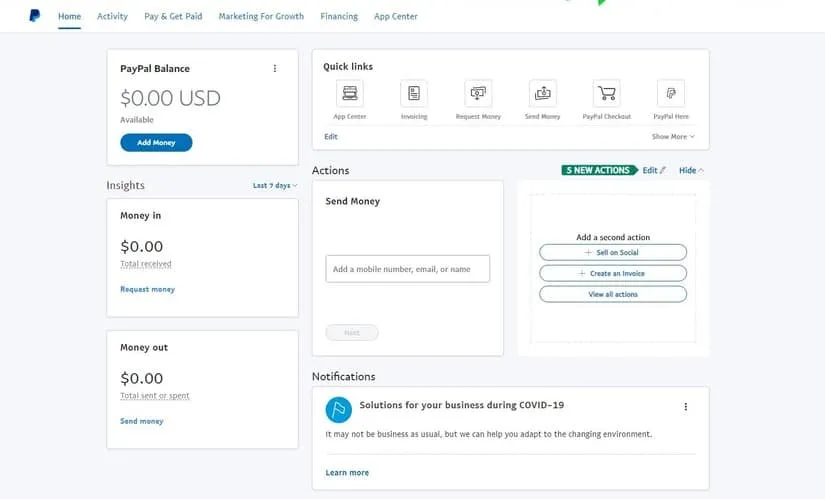
You can view all transaction activity within PayPal using these:
- Email notifications
- Activity table
- Download history logs
- Instant payment notification
Here’s how each one works.
Email notifications
PayPal sends email notifications to the connected email account for every payment, whether it’s a notification about payment received, pending, or canceled.
Activity table
You can also view the buyer’s complete transaction details in the recent activity table on the summary page of your PayPal account.
Once you log in to your PayPal Business account (the same login PayPal uses for all its services), the summary page shows the recent activity table.
This activity table displays your recent account activity, and you can filter it by transaction type and currency to find the specific PayPal orders you’re looking for.
There you’ll also find the status of payments that are completed, cleared, or uncleared.
Downloadable history logs
You can also download the PayPal order tracking details for a specific date range or your complete history. Here are the steps:
- Log in to your PayPal Business account.
- At the top, find Activity.
- On the right side of the page, click Download.
- Enter a custom date range or another option that suits you.
- Filter the data by transaction details or customize the download fields.
- Select the file type to download.
- Click Download.
And there you have your data for PayPal order tracking.
What is the PayPal Orders API?
The PayPal Orders API (currently v2) is a tool that lets developers and business owners create, process, and manage orders through the PayPal platform.
It offers features to handle an order from creation to final payment.
Here’s a breakdown of its functionality.
- Creating orders You can create orders with all the relevant details like items, pricing, and shipping information. You can also decide whether to capture payment immediately or authorize it and capture later.
- Specifying payment methods
The PayPal Orders API supports common payment methods and simplifies checkout for returning customers. There are two main integration paths:
- Direct integration (server-side)
- Save with PayPal (vaulting)
The first is suited to businesses that are PCI compliant for handling card data and prefer a server-side integration.
The second lets customers save their PayPal wallet during checkout for faster future transactions.
Challenges of using PayPal order tracking to view orders
Managing orders through PayPal can be challenging, especially when it comes to logging in or accessing detailed information. Here are the main challenges.
- Time-consuming nature To access detailed transaction or order information, you have to go through multiple steps: logging in, navigating to the dashboard, accessing activity, and applying various filters to find one transaction. This eats up time and becomes a headache for businesses handling large transaction volumes daily.
- Lack of real-time data access The PayPal interface does not always update in real time. This creates a discrepancy between actual account activity and the information available, and those delays make timely decisions harder.
- Limited data view within PayPal PayPal’s interface often limits the amount of data you can view at one time.
For businesses that need comprehensive, in-depth reporting, these limits are a real restriction, which pushes them to rely on external tools to run a thorough review or build a detailed report.
Overall, these challenges carry real costs for businesses: operational inefficiency, slower decisions, inadequate reports, and a poorer customer experience.
Pending orders management
Maintaining a healthy flow of operations matters. Pending orders disrupt that flow and affect both customer satisfaction and financial stability.
Common issues with PayPal order pending
- Payment delays PayPal orders pending often result from delayed payment processing, due to reasons like payment gateway issues, insufficient funds, or a lengthy verification process. This disrupts cash flow and makes it hard to manage expenses or plan investments.
- Order cancellation Frequent cancellations happen when an order stays pending too long. Customers may opt for alternatives or grow impatient. That means a loss of sales and revenue, and damage to your reputation as customers start to see the company as unreliable.
- Inventory management challenge Pending orders complicate inventory. Businesses have to maintain reserve stock, which can lead to overstocking or understocking. It also raises holding costs and creates missed sales opportunities.
- Customer service issue Delays in pending orders spike customer service inquiries and complaints. Handling these pulls your support team’s attention from other critical tasks. And if a customer waits too long, they may never buy from you again.
- Cash flow management Pending orders complicate cash flow management. Businesses can face difficulty tracking payments and planning expenditure, which hinders their ability to pay suppliers, employees, and other operational costs.
A business can address these issues by improving payment processing, communicating more with customers, using an advanced order management system, or implementing inventory management tools.
Integrating PayPal with eCommerce platforms
You can improve the online shopping experience and strengthen PayPal order tracking by integrating PayPal with your eCommerce platform. The integration improves customer satisfaction and enables efficient transaction management.
How to connect PayPal with your eCommerce website?
Connecting PayPal to an eCommerce website expands your payment options and gives customers flexibility at checkout. Here’s how to connect your PayPal account:
- Create a PayPal Business account, then log in to your PayPal account.
- PayPal offers different solutions like PayPal Checkout and payment processing. Select the one you want.
- In your PayPal Business account, navigate to Account Settings, then API access.
- Select Manage API credentials and obtain your credentials.
- Use these to connect with your eCommerce platform like WooCommerce, Amazon, Shopify, and others.
Advantages of integrating PayPal with eCommerce
Integrating PayPal with your eCommerce store gives you these advantages:
- Fast, secure payment processing: PayPal gives customers a quick, secure way to pay. Integrating it helps reduce cart abandonment and lets customers complete transactions using their PayPal balance, credit cards, or linked bank accounts.
- Improved customer trust: PayPal is a well-known, trusted gateway, so integrating it can boost customer confidence in your site’s security and potentially lift sales.
- Global reach: PayPal supports multiple currencies and payment methods, extending your reach to a global customer base and supporting international transactions.
- Simpler refunds and dispute management: PayPal integration lets you handle refunds and disputes directly through the eCommerce dashboard.
Limitations of connecting PayPal with an eCommerce website
There are a few disadvantages to be aware of too:
- PayPal charges transaction fees that add up as sales volume grows.
- Payments are usually quick, but occasional delays can affect cash flow.
- Your business becomes dependent on PayPal’s infrastructure and is affected by any change in PayPal’s service, whether a fee or a policy change.
- Some customers may not prefer PayPal and may abandon a purchase if other options aren’t available, so offering multiple payment gateways is the safer approach.
Integrating PayPal with platforms like WooCommerce and Shopify has clear advantages, but the limitations are real too. Understanding both lets a business make informed decisions and optimize its payment strategy while keeping operations efficient.
How does Putler help in tracking PayPal orders?
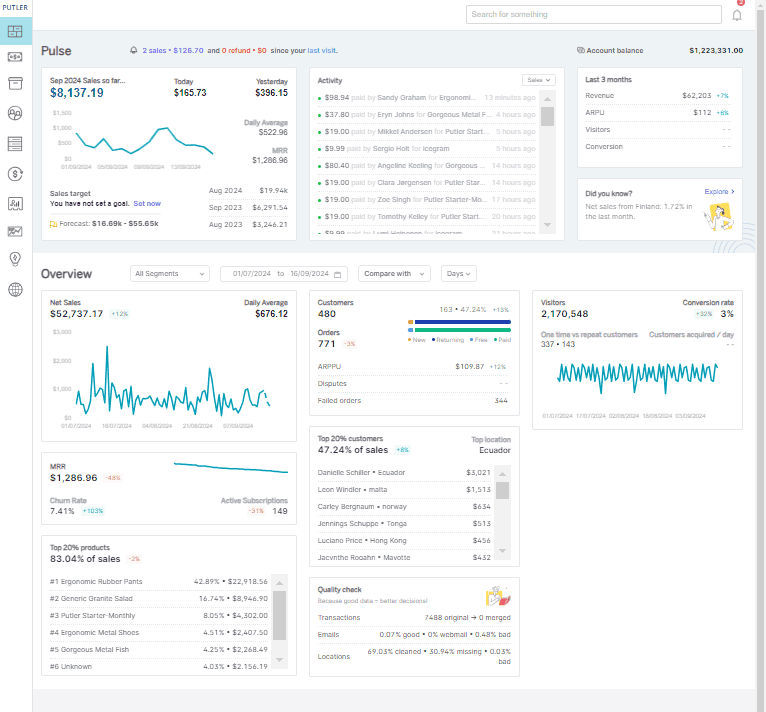
Now for the solution: Putler.
Putler is a powerful analytics and reporting tool that addresses these challenges and improves PayPal orders management.
With strong PayPal analytics, Putler integrates with PayPal alongside your eCommerce websites and provides a comprehensive, real-time view of transactions, simplifies operations, and helps you make data-driven decisions.
How Putler helps business owners view PayPal transactions
Putler simplifies managing PayPal transactions by:
- Centralizing transaction management:
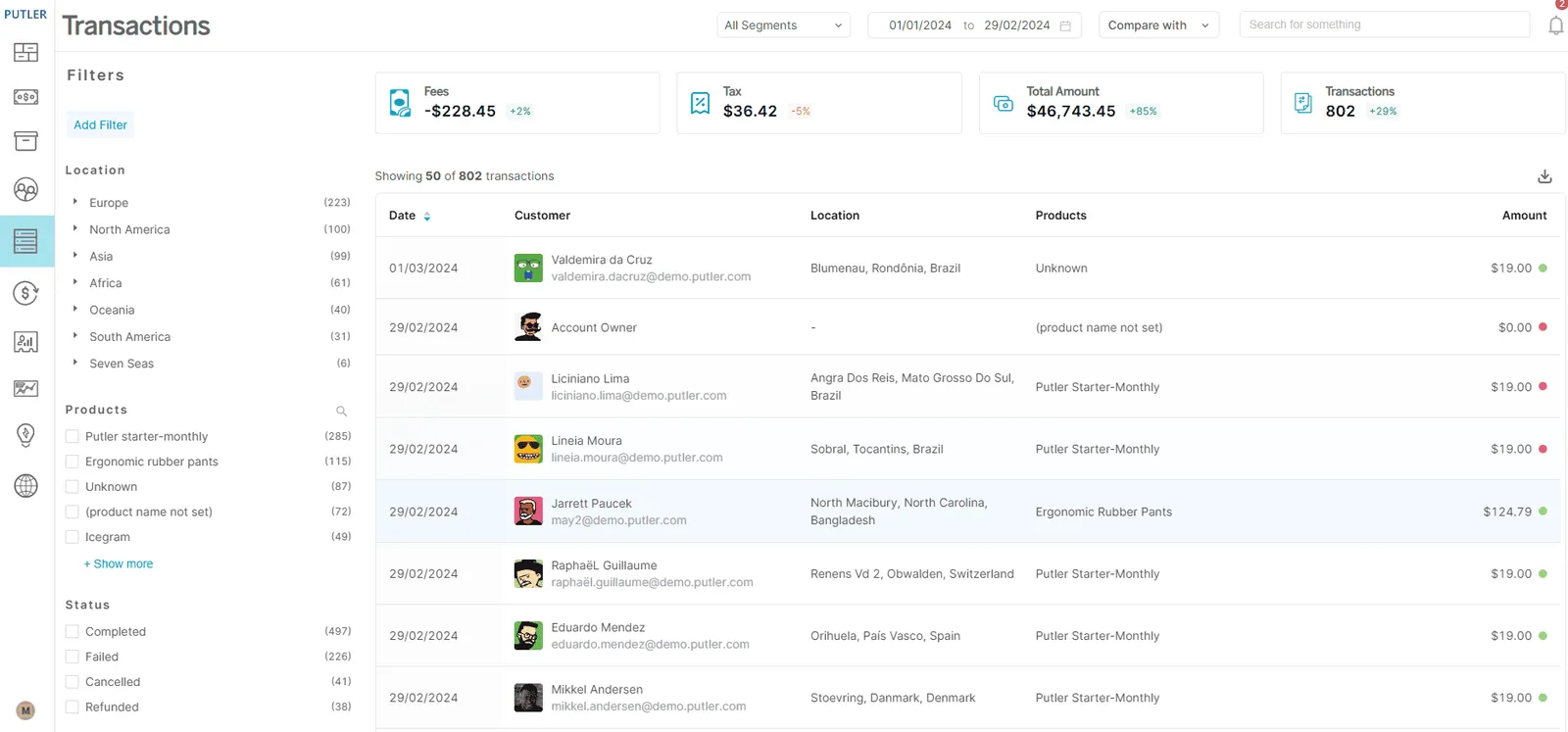
Putler’s Transactions dashboard aggregates all your PayPal transactions in one place and removes the need to navigate multiple pages and filters in PayPal. It comes with advanced filtering by date, type, and status, and it gives you deeper insight into sales and refunds. That saves time and simplifies the whole process.
- Providing real-time data and insights:
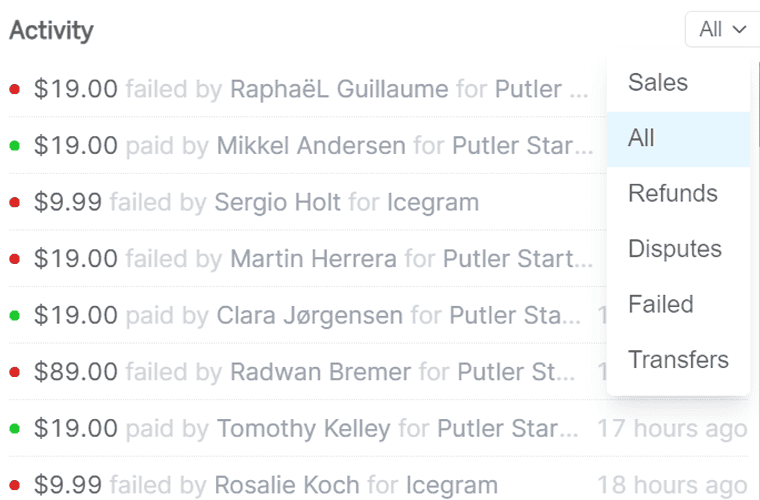
Putler provides real-time updates so you stay informed about your business operations. You get dedicated dashboards for different aspects of your business: sales, products, customers, transactions, audience, and more, each with key performance indicators in real time. Putler also lets you generate custom reports to focus on the KPIs that matter most, and helps you spot hidden patterns and trends.
- Detailed reporting and analysis:
Putler offers detailed reporting and lets you generate reports on:
- Sales reports: On the Sales dashboard, find detailed reports on sales performance, revenue trends, and best-selling products.
- Transaction reports: The Transactions dashboard lets you monitor all your transactions in one place.
- Customer reports: The Customer dashboard gives you detailed information about customers, including their purchasing behavior and purchase history. For a comprehensive guide on tracking your PayPal transactions, check out the detailed PayPal reporting resource. You can also customize and export these reports for analysis.
- Enhanced PayPal order tracking:
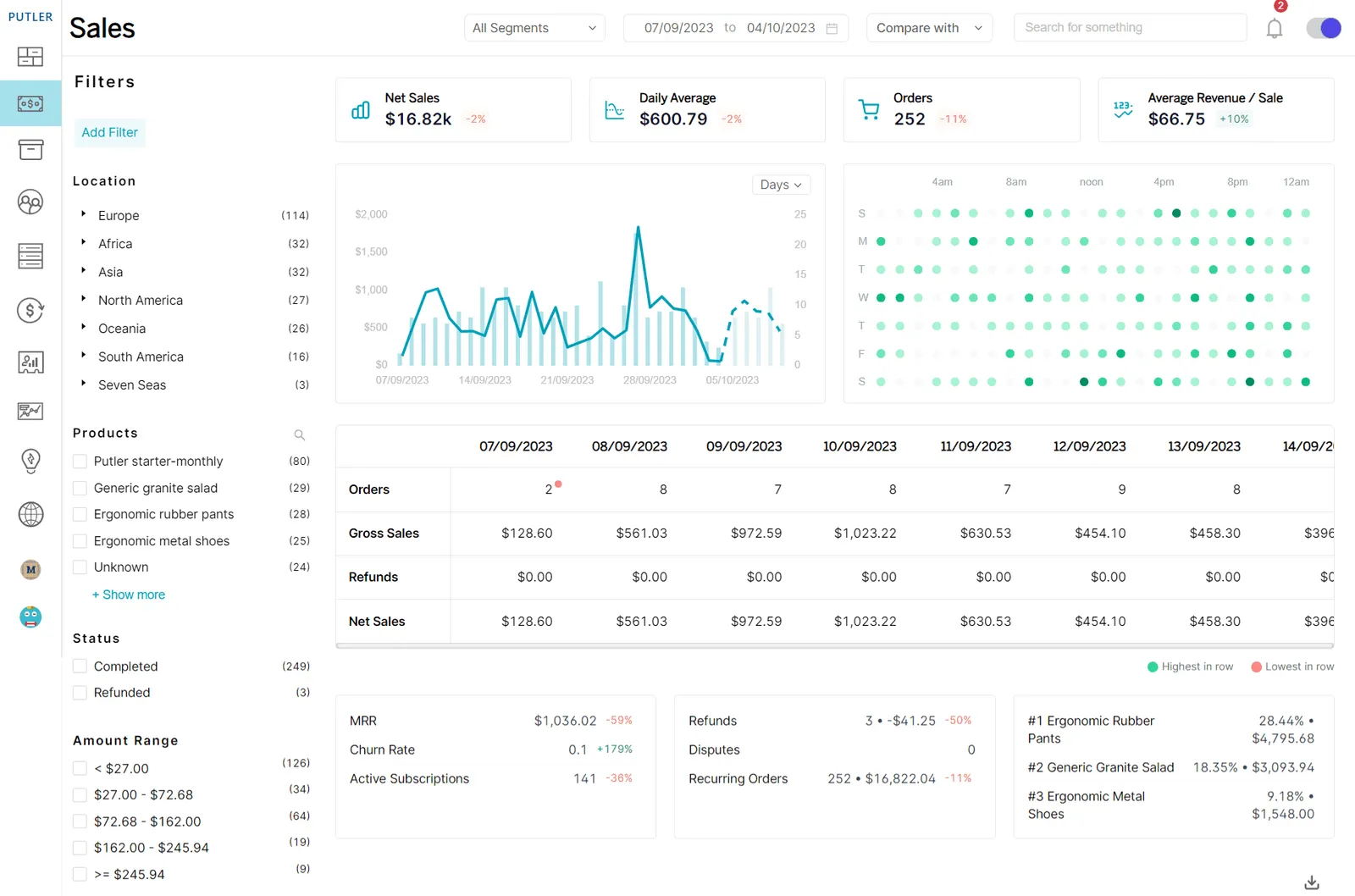
Putler also helps with PayPal order number tracking in several ways. You can check PayPal order data on the Sales dashboard. You can even segment orders by criteria like refunded orders, completed orders, and disputes to stay on top of everything happening in your company.
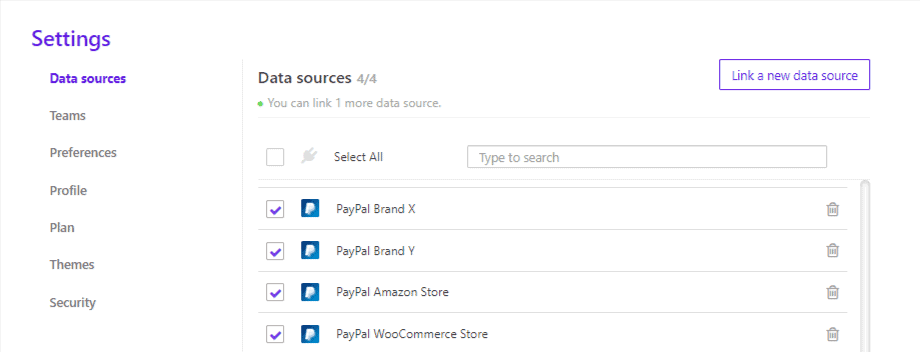
Even if you have multiple PayPal accounts, Putler brings everything crucial into one place for a consolidated view.
- Inventory management:
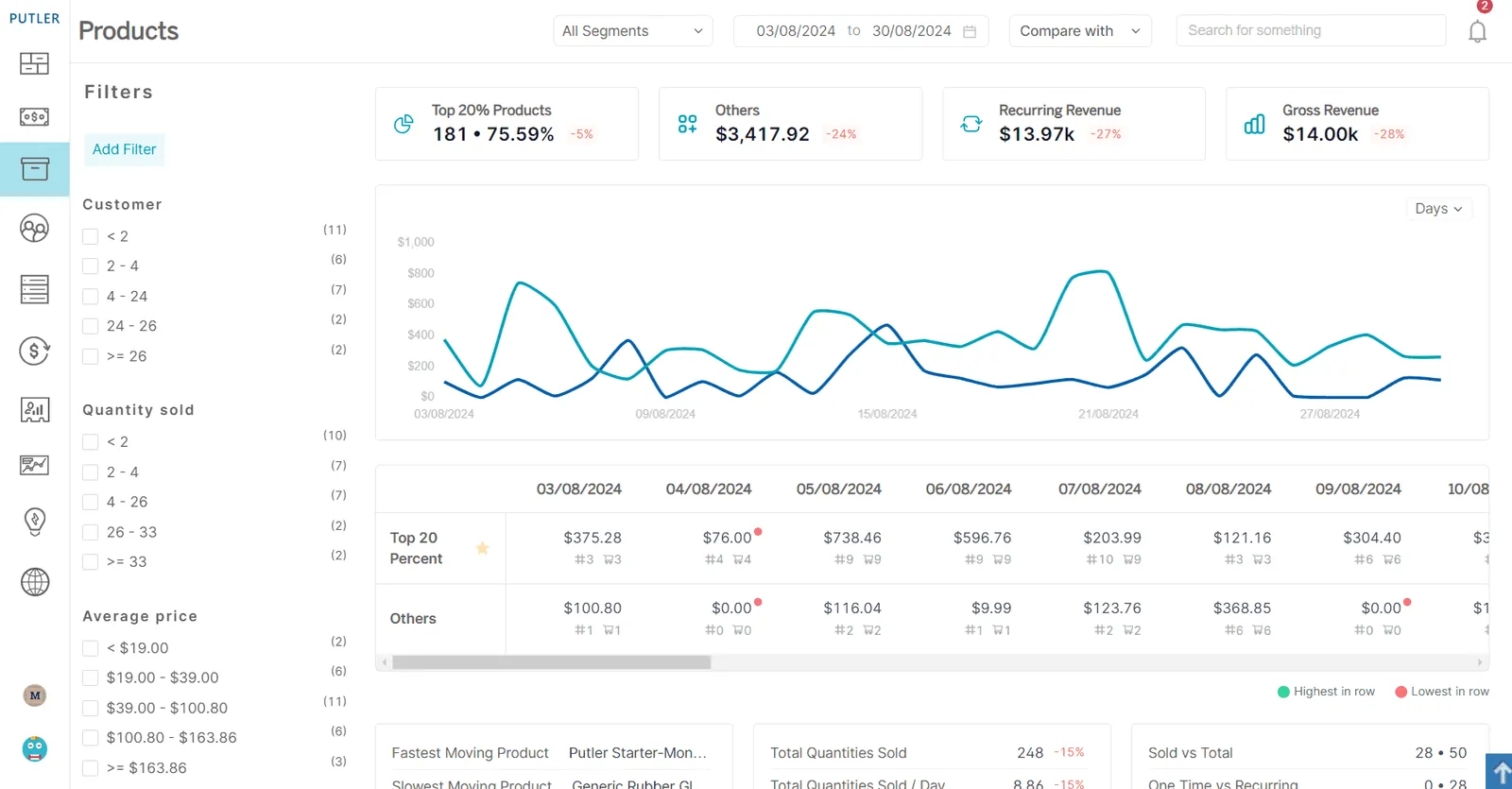
Putler is not an inventory management tool, but it can help you estimate the right inventory level. On the Products dashboard, you can check a product’s sales history and gauge how much stock to hold for the coming months.
Benefits of integrating different solutions and platforms with Putler
Here are some benefits of integrating Putler with other solutions and platforms.
- Unified dashboard: Putler supports integrations with 17+ channels for a unified view of your entire business. That includes top payment gateways like PayPal, Stripe, Braintree, and Authorize.net. If you use Stripe alongside PayPal, Putler also offers comprehensive Stripe reporting to consolidate all your payment data. It also covers top shopping carts and eCommerce platforms like Shopify, WooCommerce, BigCommerce, Easy Digital Downloads, eBay, Etsy, Gumroad, and Amazon. It integrates with Google Analytics and Mailchimp too. And if you have data sources Putler doesn’t directly integrate with, you can use the Putler API to bring that data in. All of this supports better decision-making and comprehensive business management.
- Enhanced analytics: Putler is a powerful analytics tool that helps you spot emerging trends and patterns, discover sales opportunities, and find areas for growth. With real-time KPI monitoring across revenue trends, customer behavior, and product performance, you can manage your operation in real time and visualize data for clearer, better decisions.
- Tighter integration with eCommerce platforms: Putler integrates with multiple eCommerce platforms, so if you sell on more than one, you can manage everything from a single dashboard.
- Simpler operations: Putler provides a centralized platform for your entire operation: sales, products, customers, audience, transactions, and more. That simplifies operations, saves time, and reduces administrative overhead.
- Improved customer satisfaction: Putler helps with order tracking and provides real-time updates and comprehensive reports, which supports better order fulfillment and customer service, and improves overall satisfaction.
- Scalability: Putler grows with your business. Even for a large business, it offers in-depth reporting of every activity, freeing your time and resources from day-to-day tasks. You can customize dashboards to focus on the KPIs that matter most at each growth stage. That said, if your business is enterprise-level, Putler might fall short.
Wrapping it up
Using PayPal to manage eCommerce orders can be a frustrating experience. This article has laid out an easier way to manage your PayPal orders.
Putler is one of the best solutions for simplifying PayPal order management and accessing PayPal order details quickly. Investing in it can save time and give you advanced filtering along with strong analytics and reporting.
Give Putler a try and see for yourself. It only takes 5 minutes to get started.
Rose
Thanks a lot for the article! It was really helpful